
Vandaag of morgen in huis

Kwaliteit gegarandeerd

Welkomstaanbiedingen ontgrendelen: GRATIS bezorging | Tot 80% korting | Gratis 30 dagen JoyPlus-proefperiode
Download de app
An electric height-adjustable desk can be useful for working from home, studying and gaming. With the press of a button, you can switch between sitting and standing. But a smart-looking desktop or a low price doesn’t tell you everything. A desk may not offer enough space for a small room, may wobble at higher settings or may have features you’ll rarely use in practice.
As a Joybuy Product Recommendation Officer, I’ve narrowed down the most important product specifications and compared them with the most common purchasing pitfalls. This will help you choose a sit-stand desk that’s right for your workspace, equipment and everyday use.
A load capacity of 70 kg sounds generous, but check what you’ll be putting on the desk. Think about one or two monitors, a monitor arm, laptop, speakers, books and accessories. How the weight is distributed matters too. A desk that can technically support 70 kg won’t necessarily feel as stable if all the equipment is placed on one side.
So consider the combination of load capacity, frame construction and desktop size. A metal frame and adjustable feet can help you position the desk securely on an uneven floor, but they’re no substitute for correct assembly.
A height-adjustable desk needs to go low enough for comfortable seated work and high enough for standing. For example, the models in this selection have a range of around 72 to 118 or 120 cm. That’s a practical range for many adults, but your own chair, height and arm position are still key factors.
Position your keyboard so that your shoulders stay relaxed. When standing, your screen should be directly in front of you, so you don’t have to look down for long periods. An electric sit-stand desk makes it easier to change posture, but it won’t automatically set up the right working position for you.
A desk with a memory function can be useful if several people use it or if you often switch between two heights. However, two or four memory settings aren’t the same as automatic ergonomic adjustments. Also check that the display is easy to read and the buttons are straightforward to use.
A desk with a USB-C port can help you charge a phone or compatible device. Check the product specifications for its charging capacity, and don’t use the port instead of a full laptop charger unless the product information confirms that you can.
A 120 x 60 cm desk is easier to fit into a bedroom, student room or compact home office. This size will usually accommodate a laptop, one monitor, a keyboard and documents. It’s often enough for a simple work or study setup.
A 160 x 70 cm desk gives you more room for two screens, a larger monitor arm, notebooks or gaming accessories. Measure the available space beforehand and allow for the desktop to move. Don’t place an electric desk right up against the wall if it moves up or down; according to the product information, this could cause scratches or collisions.
Don’t just compare the number of motors. Check the stated height range, maximum static load and instructions for use. The selected models have a stated maximum static load of 70 kg. Some models also note that an overheating protection feature is activated after around two minutes of continuous adjustment. If this happens, the product information says to wait around 18 minutes before adjusting the desk again.
This is particularly relevant for frequent users who adjust the desk several times in a row. Use the desk on a level surface and check that all the connections are secure after assembly.
The product listings for several JoySelect models mention CE marking and certification to European standards. CE marking indicates that the manufacturer declares the product complies with the relevant EU requirements; it isn’t a general quality rating. Also check the manual, manufacturer details and included parts.
Many models use a combination of chipboard and steel. Check the finish on the edges, the thickness of the desktop and the stability of the frame. Keep electrical components away from liquids and only use the desk indoors if this is stated in the product information.
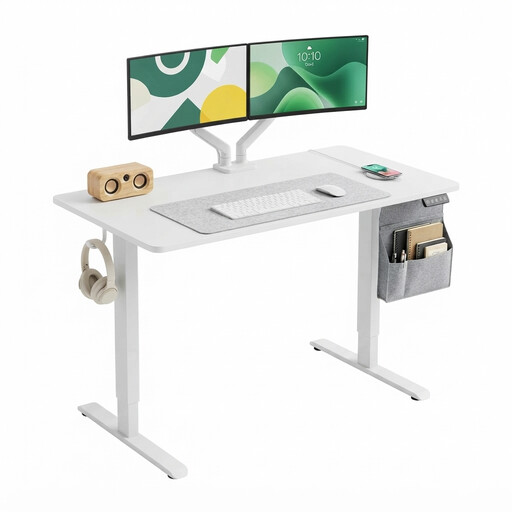
Why it suits this profile: Its compact size makes it a good choice for a smaller home workspace, student room or simple gaming setup.
The product listing specifies a height range of 72–118 cm, a load capacity of up to 70 kg and two memory settings, so you don’t have to choose based on looks alone.
Digital display, two memory settings, two hooks and a white desktop with a white frame. CE marking and European certification are mentioned in the product listing.

Why it suits this profile: The wide desktop is a good choice for professionals or people working from home who use several screens and accessories.
The specifications list dimensions of 160 x 70 cm, a height range of 72–120 cm, a load capacity of 70 kg, adjustable feet and lockable controls.
Memory function, USB-C port, two cable grommets, organiser, hook and energy-saving mode, according to the product description.

Why it suits this profile: A handy choice for users who regularly switch between working heights and want a mid-sized desk between 120 and 160 cm wide.
The product information lists a height range of 72–120 cm, four memory settings, an obstacle detection sensor and a maximum static load of 70 kg.
140 x 60 cm desktop, USB-C port, cable management, organiser and three hooks, according to the product listing.
We’ve put together a complete, up-to-date list of products that meet these strict selection criteria and the applicable European safety requirements.
Start with the lowest seated position. Adjust your chair and keyboard so that your shoulders stay relaxed and your elbows are roughly by your sides. Then adjust the standing height without hunching your shoulders. Before moving the desk, check that cables, walls and other objects are clear of its path.
Its lifespan depends on assembly, load, frequency of use and maintenance. Stay within the stated load capacity, keep liquids away from electrical components and carefully tighten connections if needed. Also follow the rest instructions if the overheating protection feature is activated.
The motor uses electricity while the desk is being adjusted, not throughout the working day. Total energy use depends on how often and for how long you adjust the height. According to the product description, a controller with an energy-saving mode can help reduce standby consumption. Check the technical specifications for the specific model for exact figures.
