
Vandaag of morgen in huis

Kwaliteit gegarandeerd

Welkomstaanbiedingen ontgrendelen: GRATIS bezorging | Tot 80% korting | Gratis 30 dagen JoyPlus-proefperiode
Download de app
An electric height-adjustable desk makes it easier to alternate between sitting and standing while you work. But the lowest price or a bold product claim doesn’t tell you everything. If you focus only on how a desk looks, you could end up with one that wobbles, doesn’t offer enough space or has features you’ll hardly ever use.
Look out for these three common pitfalls:
A wide height range without considering stability
A desk may be able to move up and down over a wide range, but feel less stable at its highest setting. Check the frame, the number of leg sections and the maximum static load.
Memory settings that don’t suit your daily routine
Two or four memory settings are useful if several people share the desk or you use set sitting and standing heights. If you’re the only user, though, simple controls may be all you need.
A desktop that looks spacious on paper but feels cramped in practice
A 120 x 60 cm desk has room for a laptop, monitor, keyboard and documents, but cables, speakers and accessories take up space too. For two screens or a wide gaming setup, 140 x 60 cm or 160 x 70 cm may make more sense.
For a sit-stand desk, the adjustment range matters more than simply calling it an “ergonomic desk”. Check the minimum and maximum heights, then compare them with your sitting position, chair and height.
A digital control panel shows the height at a glance. A desk with a memory function can save your preferred settings, so you don’t have to keep searching for the right height. Check whether the desk has two or four memory settings, too. Extra settings are most useful in a shared workspace.
Check the difference between the weight of the desk itself and its maximum static load. A load capacity of 70 kg should be enough for a monitor, laptop, lamp, books and accessories, as long as their combined weight stays within the limit.
The floor surface matters too. Place the desk on a level floor, and watch out for walls, cables and cupboards when adjusting it. If you have an electric model with a safety sensor, follow the instructions provided. Some models have thermal protection if you adjust them repeatedly over a long period.
A cable management system stops cables hanging down the legs or getting trapped. A desk with a USB-C port can be useful for charging compatible devices, but check in advance which charging features and power output are actually listed.
Choose the size to suit your equipment:
Also check whether assembly is required, which parts are included and whether the electrical components need to be protected from moisture. A CE mark or reference to European standards can provide useful information, but it doesn’t replace checking the product’s specific details.
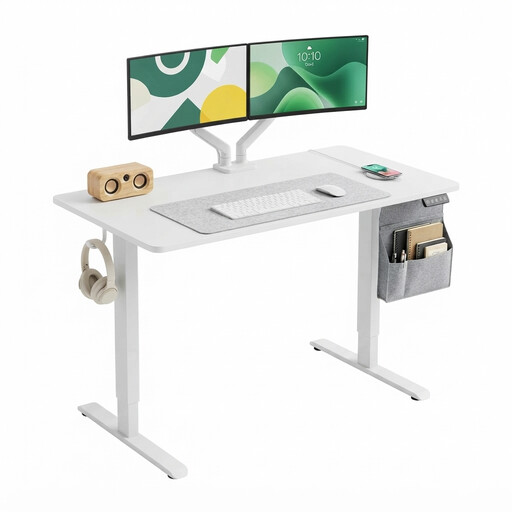
Why it suits this user: This compact model is a good choice for a first home office, study or bedroom. The digital display and two memory settings keep the controls simple.
The specifications clearly state the size, height range of 72–118 cm and 70 kg load capacity. This makes it easier to judge in advance whether the desk will suit your equipment.
120 x 60 cm desktop, two memory settings, digital display and two hooks. According to the product information, the model is CE-certified and certified to European standards.

Why it suits this user: The spacious desktop is ideal for people working from home with several screens, documents or peripherals. The USB-C port, memory function and cable management features help keep your workspace organised.
The size and maximum static load of 70 kg are listed. The product description also specifies cable management, a USB-C port, hooks and an organiser.
160 x 70 cm desktop, memory function, USB-C port and cable management. The height adjusts from 72 to 120 cm.

Why it suits this user: This model combines a compact size with features for everyday work, study or gaming at home. It’s a good fit if space is limited but you still want to save your preferred sitting and standing heights.
The product information lists not only the memory function but also cable management, a USB-C port, three hooks and a maximum load capacity of 70 kg.
120 x 60 cm, height range of 72–120 cm, memory function, USB-C port, plus a storage bag and hooks included.

Why it suits this user: Four memory settings are useful when housemates, partners or family members share a desk. Its mid-sized desktop offers more room than a compact computer desk.
The four memory settings make it easy for several users to share the desk. The product also lists cable management, a USB-C port and a maximum static load of 70 kg.
140 x 60 cm desktop, four memory settings, height range of 72–120 cm, USB-C port and hooks included.
We’ve put together a complete, up-to-date list of products that meet these strict selection criteria and the applicable European safety requirements.
Position the desk so the desktop won’t hit a wall, windowsill or cupboard when you adjust it. Check all cables and fixings before use. An ergonomic office chair is still important when you’re sitting: adjust the seat height so your feet rest flat on the floor and your arms can rest comfortably on the desktop.
A gaming desk or computer desk doesn’t automatically need to be bigger. Measure your monitor, keyboard and accessories first. A gaming chair with a footrest can offer extra reclining comfort, but takes up more space than a standard office chair. A 6-tier bookcase beside your desk can help keep the desktop clear of documents and accessories.
Power consumption depends on the type of motor, how often you adjust the desk and how long you use it. The motor mainly uses electricity while raising or lowering the desk. Check the technical details of the specific model if energy use is a deciding factor for you.
Its lifespan depends on factors such as assembly, load, floor surface and how often it’s used. Don’t exceed the stated load capacity, make sure the desk is level and check the screws and electrical connections regularly. Follow the recommended break instructions if the thermal protection is activated.
There’s no one height that works for everyone. When sitting, adjust the desk so you’re comfortable and your forearms are roughly horizontal. Then raise the desktop until you can stand upright without hunching your shoulders. Use the memory function to save both positions, and remember to alternate regularly.
