
Vandaag of morgen in huis

Kwaliteit gegarandeerd

Welkomstaanbiedingen ontgrendelen: GRATIS bezorging | Tot 80% korting | Gratis 30 dagen JoyPlus-proefperiode
Download de app
An electric height-adjustable desk can be useful for home workers, students, gamers and office workers who want a flexible workspace. With the press of a button, you can switch between sitting and standing. However, an attractive product photo tells you little about whether a desk is right for your space, equipment and daily routine.
The most common buying mistakes are:
Below, we explain which specifications to check before ordering a height-adjustable desk, sit-stand desk or electrically adjustable desk.
First, check the minimum and maximum height settings. The right height depends on your height, chair and work equipment. For example, a desk that adjusts from 72 to 118 cm offers different settings from one that adjusts from 72 to 120 cm.
Measure your space at home or in the office, too. A 120 x 60 cm desktop is suitable for a laptop, one monitor and basic accessories. For two monitors, speakers or a large gaming keyboard, a deeper or wider desktop is more practical, such as 160 x 70 cm.
Also check:
The stated load capacity usually refers to the maximum static load: the combined weight of your monitors, computer, books, lamp and other items on the desktop. The desks featured here have a stated capacity of 70 kg.
A high load capacity doesn’t automatically mean the desk will feel equally stable at every height. So also check:
For an office desk or home-working desk with a single laptop, 70 kg is usually well above the weight you’ll have on it day to day. A heavy desktop computer, several monitors and accessories do require careful calculation.
A desk with a memory function can store two to four of your preferred heights. This is especially handy if several people use the same desk or you often switch between sitting and standing. A digital display makes it easy to see the selected height.
A desk with a USB-C port can be useful for charging compatible devices, but always check the output specifications and whether your own adapter is compatible. The USB-C connection doesn’t automatically replace a full charging station.
Also worth considering:
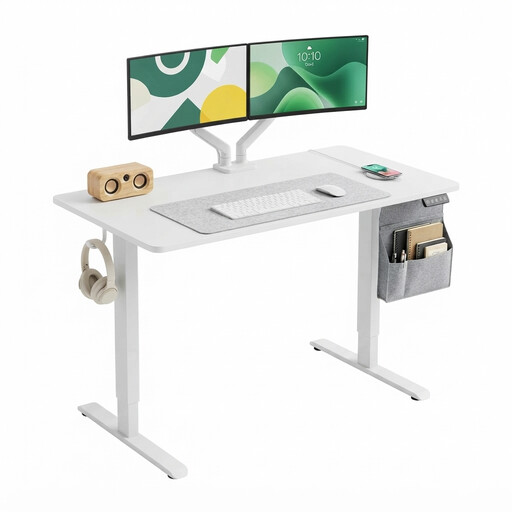
Why it suits this profile: This compact model has a 120 x 60 cm desktop and is suitable for a laptop, monitor and documents in a small home workspace, student room or bedroom.
The specifications state a height range of 72 to 118 cm and a maximum static load of 70 kg. This makes it easier to assess the available space and weight requirements in advance.
Digital control panel, two memory settings, two hooks and a 120 x 60 cm desktop. The product listing mentions CE and European standards certification.

Why it suits this profile: The wide desktop offers more room for several screens, paperwork or a full office setup. The USB-C port, cable management and storage details are designed to help keep your workspace organised.
The desktop measures 160 x 70 cm, so you won’t have to make do with a small surface when using several devices. The maximum static load is listed as 70 kg.
Four memory settings, USB-C port, cable management, three hooks and height adjustment from 72 to 120 cm.

Why it suits this profile: This model is ideal for intensive home working, studying or gaming if you need a mid-sized desktop, several preferred height settings and straightforward cable management.
The product information lists a height range of 72 to 120 cm, four memory settings and a load capacity of 70 kg. This lets you check in advance whether the settings suit the way you’ll use it.
Four memory settings, USB-C port, cable management, three hooks and a 140 x 60 cm desktop.
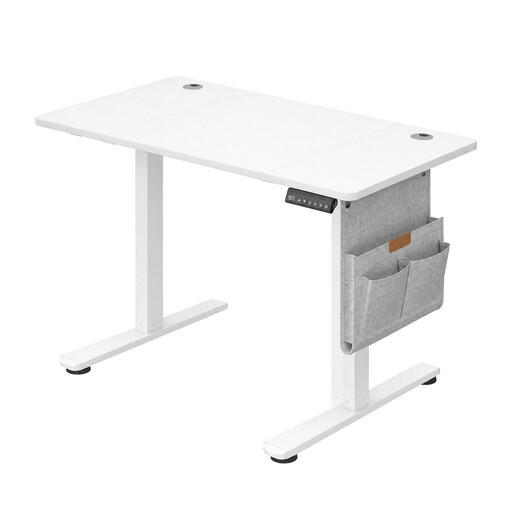
Why it suits this profile: Its compact size is ideal for a student room, home office or bedroom where every centimetre counts. The memory function makes it easier to switch between saved heights.
The dimensions, weight of 21,8 kg and maximum static load of 70 kg are clearly stated. The product information also mentions an obstacle detection sensor.
Four memory settings, storage bag, hook, cable holes and height adjustment from 72 to 120 cm.
We’ve put together a complete, up-to-date list of products that meet these strict selection criteria and the applicable European safety regulations.
Start by placing the desk on a level floor, with some space between it and the wall. Adjust the sitting height so your arms rest comfortably on the keyboard. Then choose a standing height that puts the screen directly in front of you while allowing your shoulders to stay relaxed. Only save height settings you’ve checked and know are right for you.
Its lifespan depends on the motor, frame, load, assembly and frequency of use. Don’t exceed the stated load capacity, and bear any thermal protection in mind. Also check the screws, cables and electrical connections regularly. Always follow the manufacturer’s maintenance instructions.
This depends on the motor’s power, how often you adjust the desk and your local electricity rate. The motor mainly uses energy when raising or lowering the desk; check the product specifications or manual for exact consumption. Using the USB-C port to charge devices can increase electricity use.
