
Vandaag of morgen in huis

Kwaliteit gegarandeerd

Welkomstaanbiedingen ontgrendelen: GRATIS bezorging | Tot 80% korting | Gratis 30 dagen JoyPlus-proefperiode
Download de app
An electric height-adjustable desk might seem straightforward at first: press a button and switch between sitting and standing. But models vary considerably in size, stability, controls and practical features. And a low price doesn’t always mean it will be easy to use in the long term.
For home workers, students and professionals, there are three pitfalls to watch out for:
An 120 cm wide height-adjustable desk is often a good fit for a bedroom, student room or compact home office. A 140 cm desktop gives you more room for a monitor and laptop. If you work with two screens or want space for documents beside your keyboard, it’s worth considering an 160 cm wide height-adjustable desk.
As well as the width, pay attention to the depth:
An adjustable desk should be practical to use at its lowest setting, not just technically capable of moving. You should be able to rest your forearms comfortably on the desktop, with your feet firmly on the floor.
An electric sit-stand desk usually consists of a steel frame, a motorised column and a desktop made from materials such as chipboard. Don’t just look at the maximum load capacity; consider what you’ll actually put on the desk, too.
The models in this selection state a maximum static load of 70 kg. That’s enough for a typical home office set-up, but the weight should be distributed evenly. A heavy monitor at one end may affect how stable the desk feels.
Also look for:
The models described have a usage limitation: after around two minutes of continuous adjustment, the overheating protection may switch on. According to the product information, you then need to wait 18 minutes before adjusting the height again. Bear this in mind if you plan to move the desk up and down repeatedly.
An adjustable desk with a memory function can save your preferred sitting and standing heights. This saves time during the working day, especially if several people use the same desk. But a memory function isn’t a substitute for setting things up properly: measure your sitting height and check that your screen is at eye level.
A desk with a USB-C port can be handy for charging compatible devices. Check the product details to see what charging power is specified, and whether it’s enough to charge your laptop. A USB-C port doesn’t automatically mean that every device can be fully powered through it.
Cable holes, a fabric organiser and hooks are simple but useful details. They help keep chargers, headphones and small accessories off your desktop.
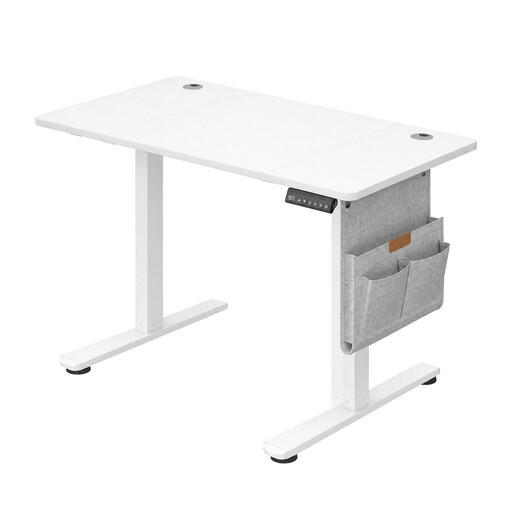
Why it suits this user: A compact choice for a first sit-stand desk in a small home, student room or home office. The product description lists four memory settings and a height range of 72 to 120 cm.
The dimensions and maximum static load of 70 kg are clearly stated. Cable holes, a storage compartment and a hook help keep accessories tidy.
Compact desktop, four memory settings, steel frame and a stated load capacity of 70 kg.

Why it suits this user: The generous desktop is suitable for a permanent monitor set-up, laptop and documents. The product description lists memory settings, USB-C, cable management and hooks.
At 160 × 70 cm, it offers more workspace than a compact desk. The product information also mentions a sensor and a maximum static load of 70 kg.
Spacious desktop, height range of 72–120 cm, memory function and USB-C port, according to the product description.

Why it suits this user: A mid-sized option for anyone who wants more desktop space than 120 cm offers but can’t fit a 160 cm desk. The listing includes four memory settings, USB-C and cable management.
You can check the fixed dimensions, height range and 70 kg load capacity in advance. The memory function makes it easier to switch positions regularly.
140 × 60 cm, four memory settings, USB-C port and steel frame, according to the product description.
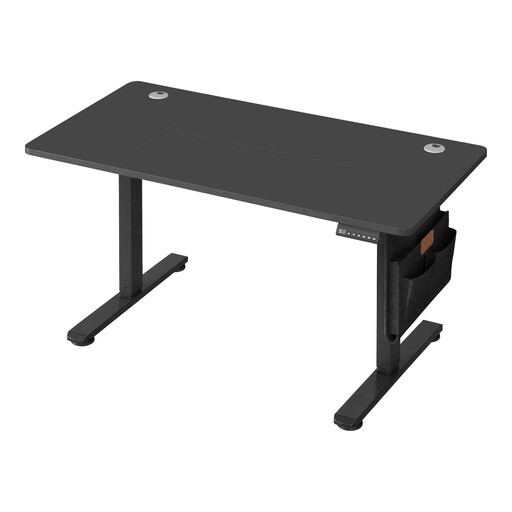
Why it suits this user: This size suits home workers who need room for a monitor and laptop but have limited floor space. The listing includes a memory function and USB-C.
The specifications list adjustable feet, two cable holes, a hook and a maximum static load of 70 kg.
A mid-sized 140 × 60 cm desktop, USB-C, memory function and adjustable feet, according to the product information.
Don’t position the desk right up against the wall when adjusting its height. Check first that cables, windowsills and armrests won’t get in the way as it moves. Keep electrical components away from liquids and use the desk indoors only, as stated in the product information.
Then set two basic positions:
Use the memory buttons as a helpful feature, not as a substitute for good posture. A desk can make it easier to alternate between sitting and standing, but the right chair, monitor height and lighting are still important.
We’ve put together a full, up-to-date list of products that meet these strict selection criteria and the applicable European safety regulations.
Measure not only the space for the desktop, but also the room behind and beside the desk. A 120 cm wide model is suitable for a compact workstation. For two screens or extra accessories, 140 or 160 cm is more practical. Also leave enough room for the desk to move up and down.
The motor only uses electricity while the desk is moving. With normal use, adjusting the height usually takes very little time. The exact energy consumption depends on the motor, how often you adjust the desk and the weight on the desktop. Check the adapter specifications and keep the plug away from liquids.
Its lifespan depends on how it’s assembled, the load it carries and how often it’s used. Don’t exceed the stated load capacity of 70 kg, avoid collisions and bear the overheating protection in mind. Correct assembly and even weight distribution help reduce unnecessary strain on the frame and motor.
