
Vandaag of morgen in huis

Kwaliteit gegarandeerd

Welkomstaanbiedingen ontgrendelen: GRATIS bezorging | Tot 80% korting | Gratis 30 dagen JoyPlus-proefperiode
Download de app
An electric height-adjustable desk can be useful if you want to switch regularly between sitting and standing while working, studying or gaming. However, an electric motor alone says little about how practical a desk will be. A desktop that’s too small, limited stability or unclear information about the weight capacity can all lead to frustration after purchase.
So, look out for these three common pitfalls:
A wide height range without enough attention to stability
A desk may adjust high and low enough, yet still be prone to wobbling at its maximum height. Check the frame, feet and maximum static load capacity.
A memory function that isn’t practical
Some desks have just one saved position or controls that aren’t easy to use. If you switch positions regularly, a digital control panel with several memory settings is more convenient.
A compact desktop that fills up quickly
A 120 x 60 cm desktop often works well in a home office or student bedroom, but offers less room for multiple monitors. A 160 x 70 cm desktop may be more suitable for a full gaming or office setup.
An electric sit-stand desk should suit your height, chair and monitor setup. Don’t just check the lowest and highest settings; consider how you adjust the height too.
For example, the models in this selection have a range of around 72 to 118 or 120 cm. A desk with a memory function lets you save your preferred sitting and standing heights. This saves you having to make manual adjustments every day.
Also check:
The features listed are based on information from the manufacturer or seller. How loud a desk seems in use may vary depending on the room and floor surface.
Check the maximum static load capacity, not just the weight of the desktop. A monitor arm, two screens, computer, speakers and accessories can quickly add up.
The JoySelect models and several JOYFURNOS models list a weight capacity of 70 kg. This is a verifiable product specification, but make sure you distribute heavy equipment evenly across the desktop. Adjustable feet can also help compensate for minor unevenness in the floor.
During assembly, make sure you have:
A 120 x 60 cm height-adjustable desk is a practical choice for a laptop, one monitor, keyboard and documents. A 160 x 70 cm desktop gives you more room to move around when you have a wider setup.
Cable management helps stop wires getting caught behind the desk. Cable holes, a storage compartment or hooks are useful features. A desk with a USB-C port can also be handy for charging compatible devices. Check that the stated charging function works with your adapter and device, though: USB-C doesn’t automatically mean that every device will charge at the same speed.
Some product listings mention CE certification and European standards. If in doubt, check the documentation and instructions supplied with the product. Electrical components should be used indoors and kept away from liquids.

Why it suits this profile: The compact desktop fits well in a home office, student bedroom or bedroom. Its height adjusts electrically from 72 to 118 cm.
The product listing specifies a weight capacity of 70 kg, two memory settings and a digital display. This makes the key control features clearer than on a basic manual model.
120 x 60 cm desktop, two memory settings, two hooks and a version listed as CE-certified and compliant with European standards.
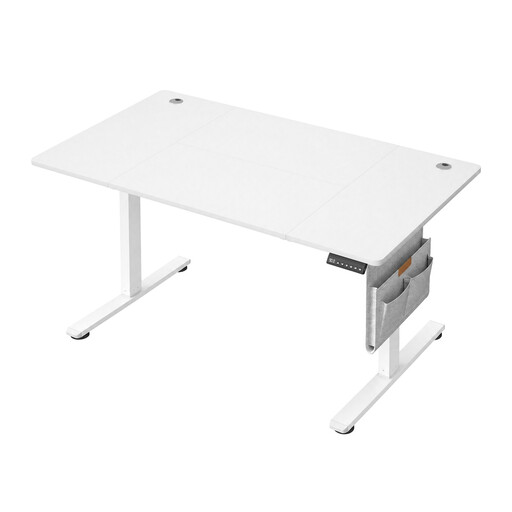
Why it suits this profile: The spacious desktop is ideal for home workers with multiple screens, documents or peripherals.
The 160 x 70 cm desktop helps keep multiple screens and accessories from being crammed together. The product description also mentions adjustable feet for use on a floor that isn’t completely level.
160 x 70 cm of workspace, memory function, two cable holes, a fabric organiser, USB-C port and a stated weight capacity of 70 kg.
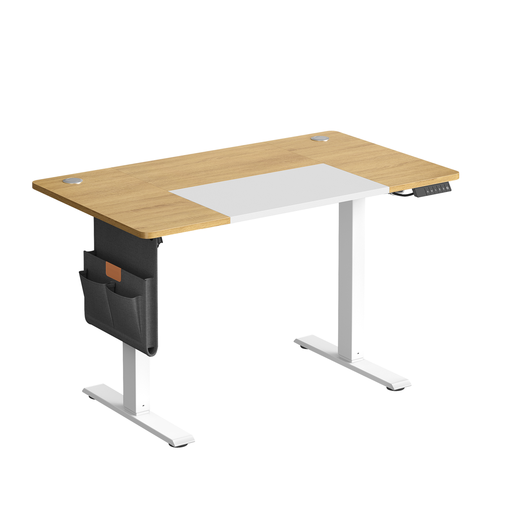
Why it suits this profile: This model combines a compact size with a memory function, USB-C port, cable management and hooks. It’s a good fit for users who adjust their desk frequently.
The product listing specifies the desktop size, a static load capacity of 70 kg and overheat protection during prolonged, continuous adjustment. Be sure to follow the rest period stated in the instructions.
Memory settings, USB-C port, storage pouch, three hooks, cable management and a height range of 72 to 120 cm.
We’ve put together a full, up-to-date list of products that meet these strict selection criteria and the applicable European safety requirements.
First, adjust your chair and feet until you’re comfortable. Then position your keyboard and mouse so your shoulders stay relaxed and your elbows are close to your body. Next, adjust the desk. When standing, check that your monitor is directly in front of you and isn’t too low or too high. Use the memory settings to save a sitting and standing height, but adjust them if your chair, monitor or accessories change.
Its lifespan depends on the frame, motor, load, assembly and frequency of use. It isn’t possible to give an exact lifespan based on the listed specifications. Keep the desk within its stated weight capacity, don’t place it directly against a wall when adjusting it, and follow the recommended rest periods when using the motor for extended periods.
That depends on the motor’s power rating, how often you adjust the height and its standby energy use. The available product information doesn’t state the full annual energy consumption. Check the wattage in the instructions and multiply it by the time you use the desk. A USB-C port may also use electricity when charging a device, depending on the connected device and adapter.
