
Vandaag of morgen in huis

Kwaliteit gegarandeerd

Welkomstaanbiedingen ontgrendelen: GRATIS bezorging | Tot 80% korting | Gratis 30 dagen JoyPlus-proefperiode
Download de app
An electric height-adjustable desk makes it easy to switch between sitting and standing while you work. However, not every electric sit-stand desk will suit your space, equipment or working posture. A low price may seem appealing, but you’ll notice every day if the desktop is too small, the height adjustment is limited or there’s no cable management.
So don’t focus only on the colour and sales copy. Check the dimensions, weight capacity, controls and safety information first. Read on to find out what to look for and which models suit different needs.
A desk with a maximum static load capacity of 70 kg can hold equipment such as a monitor, laptop, keyboard and accessories. However, that figure doesn’t tell you everything about how stable the desk is when adjusting its height. The construction, legs, adjustable feet and a level floor all play a part.
Also check whether the weight capacity is static. A desk carrying heavy equipment that’s moved frequently is under different strain from one where everything stays in place.
A height range of, for example, 72 to 120 cm sounds straightforward, but the right working height depends on your height, chair and keyboard position. Measure your preferred sitting height at home and check that the desktop rises high enough for you to stand without hunching your shoulders.
Consider the desktop size, too. An electric adjustable desk measuring 120 x 60 cm often fits in a bedroom or student room, but offers less space for two monitors. For a more spacious workstation, 140 x 60 cm or 160 x 70 cm is more practical.
A USB-C port, memory function or cable tray can be useful, but check exactly what’s included first. A USB-C port on the control panel doesn’t automatically make the desk a complete docking solution for a laptop. And memory functions don’t offer the same number of presets on every model.
According to the relevant brands’ product information, some models have two or four memory settings, USB-C functionality and cable grommets. Use this as product specification information, and check the current product page for details of the exact version.
Use this practical guide:
Measure not only the space where the desk will go, but also the area around the desktop. When adjusting the height, make sure the desktop won’t hit a shelf, windowsill or wall.
The models in this selection adjust electrically from around 72 to 120 cm. According to the product information, JoySelect models have a range of 72 to 118 cm and a digital display with two memory settings. Other models offer four height presets.
A standing desk with a memory function is especially useful if several people share the same desk, or if you want to switch quickly between your preferred sitting and standing heights. Set the presets only after you’ve positioned your chair, monitor and keyboard correctly.
According to their product specifications, the desks listed have a maximum static load capacity of 70 kg. Their frames are made of steel, while the desktops are mainly made of chipboard. Distribute heavy equipment evenly across the desktop and don’t exceed the stated limit.
Also look for:
For several JOYFURNOS models, the product information states that overheating protection activates if the desk is adjusted continuously for more than two minutes. You should then wait 18 minutes, according to the product information. Keep electrical components dry and don’t position the desk directly against a wall.

Why it suits this user: Its compact size is ideal for a small home workstation, student room or simple gaming setup. According to the product information, the electric height adjustment ranges from 72 to 118 cm.
The product information lists a digital control panel, two memory settings and a weight capacity of 70 kg. This means the key details you need to know before buying are clear.
120 x 60 cm, two memory settings, digital display, two hooks, and a walnut or oak finish depending on the version.
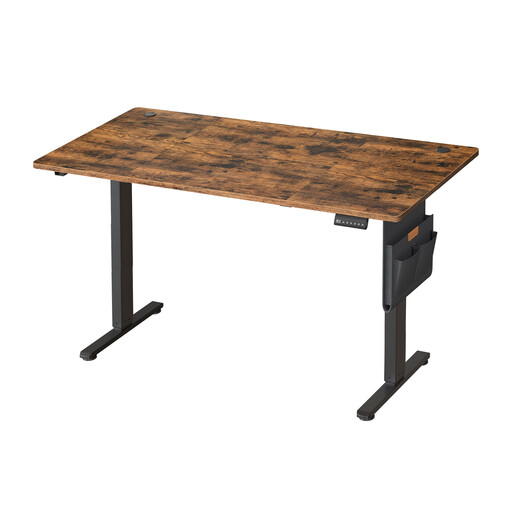
Why it suits this user: This size offers more room for office work and studying. According to the product information, the desk has a memory function, a USB-C port and cable grommets.
The specifications cover more than just the height: they also state the static load capacity of 70 kg, adjustable feet, a locking function and a sensor setting.
140 x 60 cm, memory function, USB-C port, two cable grommets, organiser and hook.

Why it suits this user: The large desktop is ideal for multiple screens, peripherals and an extensive gaming or home-working setup. The product information lists four memory settings and a height range of 72 to 120 cm.
The dimensions and maximum static load capacity are clearly specified. Cable grommets, an organiser and hooks help keep loose cables and accessories off the desktop.
160 x 70 cm, four memory settings, USB-C port, cable management, adjustable feet and a static load capacity of 70 kg.
We’ve put together a complete, up-to-date list of products that meet these strict selection criteria and current European safety regulations.
Cable management isn’t just about keeping things tidy. Cable grommets and an organiser also make it easier for your laptop, monitor and charger to move with the desk as you adjust its height.
Adjust the desk for sitting so that your elbows form roughly a right angle when you type. When standing, the desktop should be about level with your elbows. Use the memory settings only after adjusting your chair, monitor and keyboard correctly.
Its lifespan depends on the motor, frame, load and how often you use it. Don’t raise and lower the desk continuously for long periods, don’t exceed the maximum weight capacity, and follow the assembly and maintenance instructions. The product specifications don’t give a universal lifespan, so check the warranty and returns information on the product page too.
Most of the electricity is used while the desk is moving. A desk that stays at the same height for several hours generally doesn’t use motor power continuously. According to the product description, models with an energy-saving function may reduce standby power consumption. For an exact calculation, check the power consumption of the specific model.
