
Livraison le jour même et le lendemain

Qualité garantie

Débloquez vos offres de bienvenue: Livraison GRATUITE | Jusqu'à -80 % | 30 jours d'essai gratuits à JoyPlus
Téléchargez l'application
An electric height-adjustable desk can be a practical solution for working from home, studying or gaming. At the touch of a button, you can switch between sitting and standing. However, an attractive product photo says little about everyday use. A worktop that is too small, a limited height range or unclear load capacity can quickly lead to frustration after purchase.
As a Joybuy Product Recommendation Officer, I therefore focus mainly on verifiable specifications. Below, you can read which points matter and which models suit different usage situations.
A rating such as 70 kg sounds generous, but it usually refers to the maximum static load. This does not mean you should put the maximum weight on the desk while adjusting it. A monitor arm, multiple screens, a computer, books and accessories all add up. Also check whether the load capacity applies to the entire desk or, for example, to a separate CPU holder.
An 120 cm wide height-adjustable desk is suitable for a laptop, monitor and keyboard, but it may feel cramped with two screens or a large desk lamp. Depth is also important. With 60 cm, you have less distance from the screen and less space for documents. For a more extensive home office, a depth of 70 or 80 cm is more practical.
A memory function is only useful if the controls are intuitive and your preferred heights can be saved easily. A USB-C port is useful for charging compatible devices, but it does not automatically replace a fully-fledged charger. RGB lights on a gaming desk can create extra atmosphere, but they do not solve problems with cables, stability or workspace.
Look at both the lowest and highest settings. For example, the models in this selection range from approximately 72 to 120 cm. This range may suit many adults, but the correct height depends on your height, chair and monitor position. Your forearms should rest comfortably while typing, so adjust the desk after assembly using your own chair and equipment.
A desk with a memory function makes it easier to switch between your preferred sitting and standing heights. Check how many settings are available. Some models have two presets, while others have four. A digital display also makes the set height easier to monitor.
For a compact study or bedroom, 120 × 60 cm can be a sensible choice. If you use a monitor, laptop and documents at the same time, it is better to consider 140 × 60 or 160 × 70 cm. A large computer desk provides more space, but it also requires sufficient room around the frame for the moving parts.
Pay attention to the difference between maximum static load and dynamic use. Distribute heavy equipment across the worktop and do not exceed the stated limit. Also check whether a gaming PC will fit on a separate holder and whether that holder has its own maximum load capacity.
According to the product specifications, a steel frame can contribute to stability, but the overall experience also depends on assembly, the floor and weight distribution. A quiet motor is particularly relevant in a shared office or during online meetings. Brands sometimes describe their motors as quiet or smooth; this is a product claim made by the seller, not a guaranteed noise level.
Electric desks must be placed on a level surface. Keep walls and obstacles clear while adjusting the desk. Some JOYFURNOS models state that the overheating protection activates after approximately two minutes of continuous movement, after which you must wait 18 minutes. This is important if you want to raise and lower the desk frequently in succession.

Why it suits this profile: The compact 120 x 60 cm worktop is suitable for a simple home office, student room or bedroom. According to the product information, the controls feature a digital display and two memory settings.
The dimensions, 72–118 cm height range and stated 70 kg static capacity are clearly specified. This allows you to compare the size and load capacity in advance.
120 x 60 cm worktop; digital control panel; two memory settings; two accessory hooks.

Why it suits this profile: The generous worktop provides room for a monitor, laptop, documents and peripherals. The product information lists a steel frame, memory function, USB-C port, cable grommets and a storage compartment.
The 160 x 70 cm size prevents an extensive home office from running out of surface space. However, the stated sensor function and adjustable feet require correct assembly and sufficient clearance.
160 x 70 cm; square cable openings; USB-C connection; stated static load capacity of 70 kg.
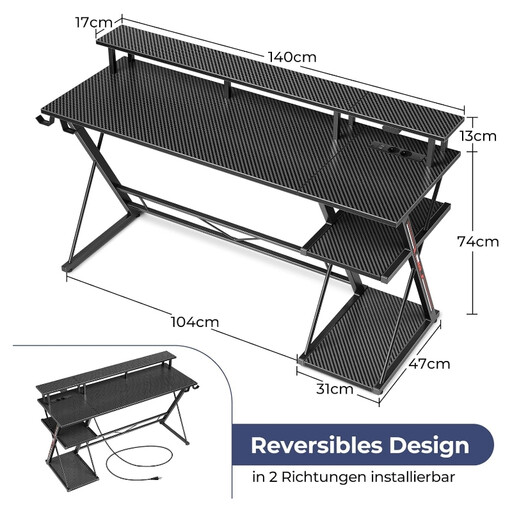
Why it suits this profile: This is a fixed gaming desk for users primarily looking for space, connections and accessories. The model is not electrically height-adjustable; this distinction matters when switching between sitting and standing is essential.
The product information clearly identifies the fixed construction, metal frame, CPU stand and electronic components. Check the available space for the PC and keep liquids away from the connections.
140 cm wide; CPU stand; monitor stand; app-controlled RGB lighting; two USB ports and two power sockets according to the product description.

Why it suits this profile: The combination of a 140 cm width, four memory settings and a USB-C port is ideal for users who regularly switch between working and standing heights.
The specifications state a height range of 71–120 cm, four presets and a maximum static load of 70 kg. This makes it possible to check the key purchase criteria in advance.
Four memory settings; USB-C port; cable management; storage compartment and three hooks according to the product information.
We have compiled a complete, up-to-date list of products that fully meet these strict selection criteria and the applicable European safety requirements.
Use this quick checklist:
Start with a comfortable sitting position. Adjust the worktop so that your elbows remain relaxed at your sides and your keyboard is not too high. Then check the standing height again. A memory function can save these two positions, but it does not replace individually adjusting your chair, screen and keyboard.
Its lifespan depends on the motor, frame, assembly, load and frequency of use. Use the desk within the stated load capacity and avoid adjusting it continuously for long periods. Follow the manufacturer’s maintenance instructions, check the connections regularly and keep electrical components dry.
Most power is consumed while the motor is moving. When idle, the desk generally uses little electricity, but the exact consumption varies by model. An energy-saving mode, such as that found on certain JOYFURNOS models, can limit standby consumption. For an accurate calculation, check the technical specifications of your chosen model.
