
Vandaag of morgen in huis

Kwaliteit gegarandeerd

Welkomstaanbiedingen ontgrendelen: GRATIS bezorging | Tot 80% korting | Gratis 30 dagen JoyPlus-proefperiode
Download de app
An electric height-adjustable desk may seem simple at first glance: choose a size, plug it in and alternate between sitting and standing. In practice, there are important differences in stability, controls, finish and ease of use. A desk with plenty of features on paper will not automatically suit your workspace.
For home workers, students, office professionals and gamers, three pitfalls are particularly relevant:
The right size depends on your equipment and the space available:
Do not just check the width; consider the depth too. A 60 cm-deep worktop leaves less room to position a monitor at the correct viewing distance than a 70 cm worktop. Also measure the space behind the desk. The desktop must be able to move freely when adjusting the height and must not rub against a wall, windowsill or cabinet.
An electric sit-stand desk should adjust low and high enough for its users. The product details for the recommended models show a range of approximately 71/72 to 118/120 cm. This is a useful starting point, but always check the exact specifications.
A desk with a memory function makes switching positions easier. Some models let you save four heights, while other versions offer two memory settings. Also look for:
According to the product descriptions, the motors are designed for quiet height adjustment. Treat this as a supplier product specification, not as a guarantee of completely silent operation in every situation.
A steel frame can contribute to a stable construction. However, the desk height, weight distribution and levelness of the floor all affect day-to-day use. The electric models mentioned here have a maximum static load of 70 kg. This is the total weight that, according to the product information, must not be exceeded.
Also pay attention to practical safety instructions:
Several models state that after approximately two minutes of uninterrupted adjustment, an 18-minute waiting period may apply. This is relevant if you frequently move the desk through a large height range.
A desk with a USB-C port can be useful for connecting a phone or other compatible device within easy reach. However, check whether the port is suitable for charging and how much power it supplies. A USB-C connection does not automatically replace a docking station or laptop charger.
Cable management prevents wires from hanging behind the desktop or becoming trapped while the desk is being adjusted. A storage pouch, hook or organiser helps keep headphones, cables and small accessories tidy. These details are useful for a gaming desk, but also check that the dimensions are sufficient for your monitor stand and PC.
A CE mark or reference to European standards should be checked in the product information and documentation. The JoySelect model’s listing mentions CE certification and certification according to a European standard. When the desk arrives, check the supplied information and installation instructions.
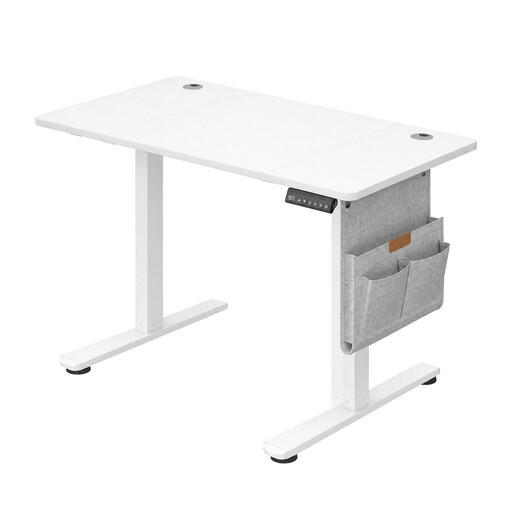
Why it suits this profile: The compact size fits in a student bedroom, small home office or shared home workspace. The four memory heights make it easy to switch between saved positions.
The dimensions and height range are clearly stated. However, bear in mind that 120 x 60 cm offers limited space for multiple screens.
Four memory heights, steel frame, cable holes and a stated static load capacity of 70 kg.

Why it suits this profile: The spacious worktop is suitable for an extensive home office or office setup with multiple screens, documents and accessories.
The 160 x 70 cm surface provides more workspace than a compact desk. The cable holes and organiser help reduce loose cables on the desktop.
160 x 70 cm, USB-C connection, memory function, control lock and adjustable feet.

Why it suits this profile: The mid-size design works well as a home office desk, office desk or gaming setup when you want more space than 120 cm without moving up to 160 cm.
The four memory settings reduce the need for repeated manual adjustments. The product information also mentions cable management and a USB-C port.
140 x 60 cm, height range from 72 to 120 cm, four memory settings and a stated static load capacity of 70 kg.
We have put together a complete, up-to-date list of products that fully meet these strict selection criteria and the applicable European safety regulations.
First adjust the sitting height so that your shoulders remain relaxed and your elbows are at roughly a right angle. Then set the standing height, with your screen at a comfortable viewing height. Save both positions as memory settings when this function is available. Ensure that cables, walls and other obstacles do not obstruct the desk while it is being adjusted.
Its lifespan depends on the motor, frame, load, assembly and frequency of use. Do not exceed the stated load capacity and follow the recommended breaks for the overheat protection. Tighten the connections securely after assembly according to the instructions and check them regularly.
Power consumption depends on the motor output, movement time and standby function. The motor mainly uses energy while the desk is being adjusted; the desk typically moves for only short periods each day. An energy-saving mode, as mentioned for some models, can limit consumption when the desk is idle. For an exact calculation, check the stated power rating in the product specifications.
