
Vandaag of morgen in huis

Kwaliteit gegarandeerd

Welkomstaanbiedingen ontgrendelen: GRATIS bezorging | Tot 80% korting | Gratis 30 dagen JoyPlus-proefperiode
Download de app
An electric height-adjustable desk can be useful if you want to alternate between sitting and standing while working, studying or gaming. However, not every electric desk is equally suitable for your space or needs. A large desktop, for example, can be impractical in a small study, while a compact model may not offer enough room for two monitors.
Joybuy Product Recommendation Officer helps you translate marketing language into verifiable features. Pay particular attention to these three common pitfalls before buying a sit-stand desk.
A stated load capacity usually refers to the static load: the weight the desk can support while stationary. A monitor arm, computer, speakers and accessories all count towards this total. Do not place heavy equipment on one side, as this can affect stability while the desk is being adjusted.
A stable desk with a quiet motor will still make some noise while it is being adjusted. The descriptions “quiet” or “silent” are product claims made by the brand, not universal noise standards. So also look at the frame, adjustable feet and how you position the desk. An uneven floor can cause more wobbling or contact noise than the motor itself.
A desk with a USB-C port is convenient for charging compatible devices, but check what the port is intended for and what charging capacity is specified. An electric desk with a memory function may have saved height settings, but the number of presets varies by model. Also check whether the controls include a lock, sensor or safety feature.
First measure the available space, including room for cables and movement of the desktop. A desktop measuring 160 x 70 cm provides room for several monitors, a laptop and accessories. For a smaller study, 120 x 60 cm or 140 x 60 cm may be a more practical choice.
Many models in this selection adjust from approximately 72 to 120 cm. This range may suit different users, but the ideal working height depends on your height, chair and monitor position. When sitting, your shoulders should remain relaxed and your forearms should rest roughly horizontally on the desktop. When standing, you should not need to keep raising your shoulders.
A steel frame and adjustable feet are important features for a stable desk. According to their product specifications, the selected electric models have a maximum static load capacity of 70 kg. Do not exceed this weight and make sure the load is distributed evenly.
A desk with cable management will not prevent wobbling, but it does help keep cables away from moving parts. Check whether it has cable grommets, an organiser, a hook or a storage compartment.
Look out for:
For several JOYFURNOS models, the product information states that the overheating protection is activated when the desk is adjusted continuously for more than two minutes. You must then wait 18 minutes before using the height adjustment again. Do not place the desk directly against a wall while it is moving, and keep electrical components away from liquids.

Why it suits this profile: The compact size is ideal for a student bedroom, home office or simple gaming setup. Four memory heights make it easy to switch between positions.
The product specifications state a range of 72 to 120 cm, a steel frame and adjustable feet. This means you can assess the available space and stability in concrete terms before buying.
120 x 60 cm, four memory heights, cable grommets, storage compartment and hook; maximum static load capacity: 70 kg.
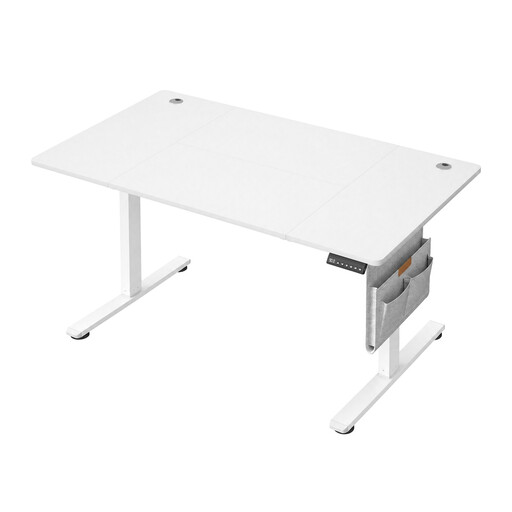
Why it suits this profile: The spacious desktop is suitable for a well-equipped home office with several monitors, a keyboard and accessories.
Two cable grommets and a fabric organiser help keep cables and small items tidy. The height, load capacity and material are clearly stated.
160 x 70 cm, memory function, USB-C port according to the product description, adjustable feet and 70 kg static load capacity.

Why it suits this profile: This spacious model is designed for users who switch between sitting and standing every day and place extra importance on controls and organisation.
The product information lists cable management, an organiser and hooks. It also describes a sensor, lock function and a limit for continuous adjustment.
160 x 70 cm, USB-C port, memory function, storage pouch, three hooks and a maximum static load capacity of 70 kg.
We have compiled a complete, up-to-date list of products that fully meet these strict selection criteria and the applicable European safety regulations.
There is no fixed height that works for everyone. Start with a position where your shoulders are relaxed and your forearms rest comfortably on the desktop. Check this both when sitting and standing. The height range of your chosen model should suit your height and chair.
The lifespan depends on factors including the load, assembly, frequency of use and maintenance. Use the motor according to the instructions, do not exceed the maximum static load capacity and do not force the desktop against a wall or another obstacle. A desk that is overloaded for long periods may wear out more quickly.
Power consumption depends on the type of motor, how long it is used and the standby function. For some models, the product description mentions an energy-saving mode on the controller. Check the product specifications and switch off the power supply when this is safe and practical according to the manual.
