
Vandaag of morgen in huis

Kwaliteit gegarandeerd

Welkomstaanbiedingen ontgrendelen: GRATIS bezorging | Tot 80% korting | Gratis 30 dagen JoyPlus-proefperiode
Download de app
An electric height-adjustable desk can be useful for homeworkers, students, professionals and gamers who want to alternate between sitting and standing. However, an attractive product photo tells you little about how practical a desk will be. For example, it may not offer enough legroom, could wobble on an uneven floor or might have features you rarely use in practice.
Before you order, look out for these common pitfalls.
A high weight capacity doesn’t automatically mean a desk will remain stable as you adjust it. The steel frame, desktop thickness, legs and adjustable feet all play a part. Also check whether the stated weight capacity is static. This usually means the desk is stationary, so it doesn’t tell you everything about how stable it will be while moving up or down.
An adjustable desk measuring 160 x 70 cm offers space for a monitor, laptop, keyboard and accessories. However, in a small home office, a desktop this size could take up too much floor space. Measure not only the available wall width, but also allow for cables, an office chair and enough room to move around while adjusting the desk.
An electric desk with a memory function can save several height settings, but the number of memory presets varies by model. Similarly, a desk with a USB-C port won’t necessarily suit every laptop or monitor. Check whether the port is designed for charging, what charging capacity is specified and whether you’ll still need a separate adapter.
Look at the full height range, not just the lowest and highest settings. For example, the models in this selection range from around 72 to 120 cm. The right setting depends on your height, office chair and monitor height.
When sitting, your shoulders should be relaxed and your forearms roughly horizontal. When standing, your screen should be directly in front of you, so you don’t have to look down for long periods. An adjustable desk is useful because you can change the working height, but it’s no substitute for a good chair, a properly positioned monitor or regular breaks.
For a home office or study desk, 120 x 60 cm and 140 x 60 cm are relatively compact sizes. They’re often suitable for one monitor and a laptop. If you use two screens, a printer or lots of books and papers, 160 x 70 cm may be a better fit.
Always check the stated maximum static weight capacity. For the JOYFURNOS models mentioned here, it’s 70 kg. Distribute heavy equipment across the desktop and don’t exceed the limit.
A stable computer desk has a sturdy frame and adjustable feet to compensate for small uneven patches in the floor. According to the JOYFURNOS product description, the desks have a steel frame, a quiet motor and an obstacle-detection sensor. These are product specifications, not a guarantee that every desk will be completely wobble-free in every situation.
Also check the usage restrictions. Some JOYFURNOS models state that the height adjustment temporarily switches off after around two minutes of continuous movement and can only be used again after 18 minutes. Don’t place the desk directly against a wall while adjusting it, and keep electrical components away from liquids.

Why it suits this user: Its compact size works well in a student room or home office where space is limited. The height adjusts from 72 to 120 cm, and the desk has a memory function for saving your preferred settings.
The product information lists the dimensions, a static weight capacity of 70 kg and the limitation imposed by the overheating protection. This means you can take the key constraints into account before buying.
120 x 60 cm, memory function, USB-C port, cable management, organiser and three hooks, according to the product description.
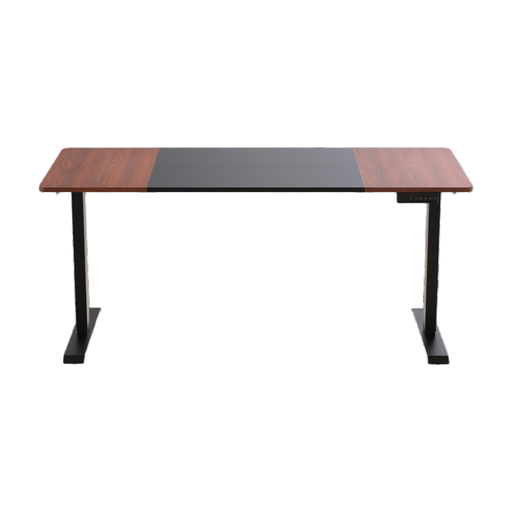
Why it suits this user: This model combines a 160 x 70 cm desktop with a dual-motor frame and programmable memory settings. It’s a good fit for a spacious workspace used for daily home working.
The dual motor and memory controls are clearly listed in the product description. When ordering, make sure you check the exact capacity and which parts are included.
Dual motor, memory settings, laminated desktop measuring approximately 160 x 70 cm and black frame, according to the product information.

Why it suits this user: The spacious desktop is suitable for multiple screens, study materials or a complete gaming setup. The memory function and USB-C connection are handy if you switch between working heights every day.
The product description lists the desktop size, a static weight capacity of 70 kg, cable grommets and adjustable feet. Measure your room beforehand to check that a 160 cm desk will fit.
160 x 70 cm, memory function, USB-C port, two cable holes, organiser, hook and lock function on the controls.
A desk with cable management keeps cables from hanging alongside the lifting columns or getting caught while you adjust the height. Route the cables to a power strip with enough slack, and check that they can accommodate the full height range.
Assemble the frame on a level surface and tighten all the connections evenly. Don’t place heavy equipment all on one side. After assembly, check that the feet sit firmly on the floor and that the desktop can move freely.
For running costs, actual power consumption is what matters most. Without a stated wattage, you can’t calculate the cost reliably. Check the product specifications or use an energy meter. The motor only runs while the desk is being adjusted, so consumption depends on how often you change the height.
We’ve put together a complete, up-to-date list of products that meet these strict selection criteria and the applicable European safety regulations.
First, adjust the sitting height so your shoulders are relaxed and your forearms are roughly horizontal. Then adjust the standing height so the screen is directly in front of you. Save both settings if the controls have a memory function. Make sure there’s nothing in the way, including walls, cables and other obstacles, while the desk is moving.
Its lifespan depends on the motor, frame, how often you use it and the load it carries. Keep within the stated weight capacity and don’t force the height adjustment. If the model has overheating protection, observe the stated pause after prolonged movement.
The purchase price is generally higher because of the motor and controls. Without the wattage, it’s not possible to calculate the power consumption during adjustment precisely. Check the rated power, then compare it with how often you adjust the height each day.
