
Livraison le jour même et le lendemain

Qualité garantie

Débloquez vos offres de bienvenue: Livraison GRATUITE | Jusqu'à -80 % | 30 jours d'essai gratuits à JoyPlus
Téléchargez l'application
An electric height-adjustable desk can be useful if you want to alternate between sitting and standing while working or studying. However, not every model is equally suitable for your space, equipment or working routine. A low price says little about stability, while a long list of features does not automatically mean you will need them every day.
As a Joybuy Product Recommendation Officer, I therefore focus mainly on verifiable details: dimensions, height range, load capacity, controls and practical features. This helps you avoid buying a sit-stand desk that turns out to be too small, unstable or inconvenient after assembly.
A desk measuring 120 cm wide may seem compact and practical, but monitors, a laptop, keyboard and documents quickly take up space. So do not just check the width; look at the depth too. A depth of 60 cm works well for a compact home office. For two screens or additional office equipment, 70 cm or more may be more comfortable.
Also check the free space underneath the desktop. A cable tray, drawer or storage compartment should not get in the way of your knees when you are sitting.
A manufacturer may state a maximum static load, but that figure does not tell you everything about wobbling while the desk is being adjusted. An electric height-adjustable desk with a steel frame, adjustable feet and a securely mounted desktop generally provides a more solid foundation than a lightweight frame.
The stated capacity also applies to a stationary load. A heavy monitor arm that moves while the desk is being adjusted can put different stresses on the frame. Keep within the recommended limit and add together the weight of your monitors, computer, lamp and accessories.
A desk with a memory function may store several heights, but check how many settings are available and how the controls work. A USB-C port is practical, but check whether the product information specifies charging functionality and charging capacity. A USB-C connection does not automatically mean that every laptop or monitor can be charged through it.
On some models, the overheating protection activates after prolonged, continuous adjustment. For the JOYFURNOS and Ochama models discussed here, the product information states that after two minutes of uninterrupted movement, an 18-minute waiting period may apply. This is particularly relevant in a shared office environment.
Most of the models selected here adjust from approximately 72 to 120 cm. This range suits many seated and standing work set-ups, but check your own situation. Measure the height of your office chair, armrests and monitor. When standing, your forearms should rest comfortably on the keyboard; when sitting, your shoulders should not be constantly raised.
A height-adjustable desk supports changing your posture, but it does not automatically ensure that your workstation is properly set up. A suitable chair, correct screen height and sufficient legroom are still essential.
In addition to the size, check the maximum load. Several models in this selection state a 70 kg static load capacity. Do not place the desk tightly against a wall while it is moving. According to the product information, this can cause scratches or collisions. Electrical components must be kept indoors and away from liquids.
A quiet motor is useful in a study or shared office. However, “quiet” is a product characteristic from the description, not a guarantee that you will hear no sound at all. Check whether the controls include memory settings, a lock function or an obstacle sensor.
Cable holes, an organiser and hooks help guide cables and accessories away from the moving desktop. However, make sure your power cable is long enough when the desktop is at its highest setting.
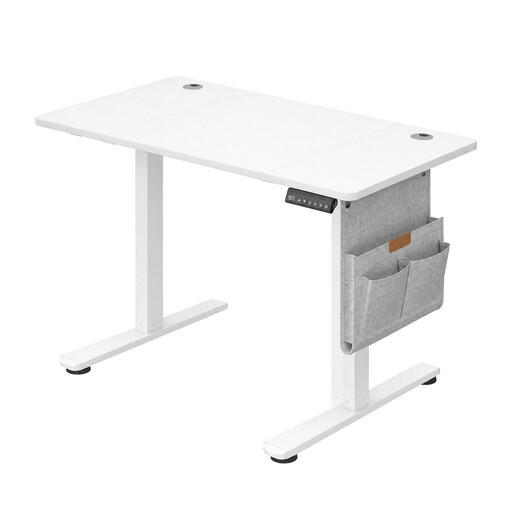
Why it suits this profile: The compact size is suitable for a student bedroom, small study or simple home office. The desk has four memory heights and a height range of 72 to 120 cm.
The dimensions and maximum static load of 70 kg are clearly stated. This allows you to assess in advance whether your equipment will fit.
Four memory heights, steel frame, cable holes, storage compartment and hook. According to the product description, the motor is designed for smooth height adjustment.

Why it suits this profile: This spacious desk is suitable for a dedicated home office or office workstation with multiple screens and accessories.
The broad work surface means you do not have to choose based solely on attractive design. The product information also lists adjustable feet and a lock function on the controller.
160 x 70 cm, height from 72 to 120 cm, 70 kg static load capacity and USB-C connection on the controls.

Why it suits this profile: The medium-sized desktop offers room for everyday home working without filling the entire room. Four memory settings are practical when several people share the same workstation.
The product information lists not only the memory settings, but also the usage limitation during prolonged adjustment. This makes it easier to plan realistically how the controls will be used.
140 x 60 cm, four memory presets, height range of 71 to 120 cm, USB-C port and a stated load capacity of 70 kg.
We have put together a complete, up-to-date list of products that fully meet these strict selection criteria and the applicable European safety regulations.
First, measure the height at which you sit comfortably and save that position to a memory button. Then set a standing height where your elbows remain relaxed and the screen is directly in front of you. Leave space around the desk for cables and obstacles. Do not place the desktop directly against a wall while it is moving.
Its lifespan depends on the motor, frame, assembly, load and frequency of use. Keep within the stated load capacity, distribute heavy equipment across the desktop and do not force the motor. Follow the manufacturer’s maintenance and safety instructions. With electronic components, liquid damage is an important consideration.
Power consumption depends on how often you adjust the height and how much standby power the controls use. A desk that moves only a few times a day generally uses power for just short periods while being adjusted. An energy-saving mode, as found on certain models in this selection, can reduce consumption when the desk is not in use. Check the product specifications if power consumption is a decisive factor for you.
