
Livraison le jour même et le lendemain

Qualité garantie

Débloquez vos offres de bienvenue: Livraison GRATUITE | Jusqu'à -80 % | 30 jours d'essai gratuits à JoyPlus
Téléchargez l'application
An electric height-adjustable desk might seem simple at first: press a button and the desktop moves up or down. But models can vary considerably in stability, size, controls and day-to-day use. A low price means little if the desk wobbles, offers too little space or has no good cable-management solution.
This buying guide helps home workers, students, office workers and gamers make sense of marketing claims by focusing on product specifications you can check.
A stated weight capacity, such as 70 kg, doesn’t tell you everything about how a desk will perform. Check whether this is a static load and whether the frame remains stable as you adjust the height. A monitor arm, computer tower and heavy equipment put a different load on the desk than a laptop alone.
Also consider how the weight is distributed. Ideally, place heavy equipment as centrally as possible and check that the floor is level.
A 120 x 60 cm desk is often a good fit for a compact study, student bedroom or home office. It may be large enough for a laptop, keyboard and one monitor. If you use two screens, have a large mouse mat or are looking for a gaming desk, you may prefer a 140 x 60 cm or 160 x 70 cm size.
Don’t just measure the available wall width. Allow for the space the desk needs when raised, as well as any cables at the back.
A desk with a memory function can be useful if several people share it or if you regularly switch between two working heights. The number of memory settings varies by model. Two presets aren’t the same as four.
A desk with a USB-C port can make charging accessories more convenient, but check the product details to see exactly what the connection supports. A USB-C port doesn’t automatically mean that it can power every laptop.
Compare the minimum and maximum height, for example 72–118 cm, 72–120 cm or 71–120 cm. The right working height depends on your height, chair and monitor setup. When working standing up, your shoulders should stay relaxed, and you should be able to reach the keyboard and mouse without raising your arms.
Check the type of controls:
A steel frame is a verifiable material specification, but it doesn’t tell you on its own how stable a desk will feel. The leg design, desktop fixings and floor surface all play a part too.
The models featured here have a stated maximum static load of 70 kg or 50 kg. Don’t exceed the stated limit. The desk is intended for indoor use, and electrical parts should be kept away from liquids.
Some models include overheating protection. According to the relevant manufacturer’s product information, the desk may need a break after around two minutes of continuous adjustment. This is worth bearing in mind if you often raise and lower the desk several times in a row.
A desk with cable management won’t hide every cable, but cable holes, hooks and storage pockets can help keep them tidy. Check whether there’s room for your extension lead and whether the cables have enough slack when you adjust the height.
Also consider:
A CE mark or reference to European standards can provide information about declarations of conformity. Don’t treat this as a general quality assessment. If in doubt, check the product documentation, manufacturer details and safety instructions.
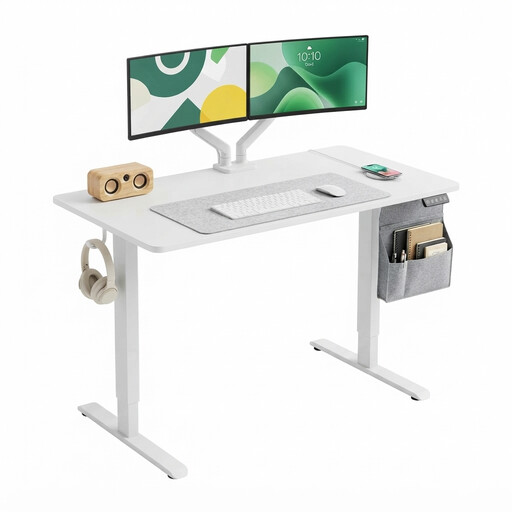
Why it suits this profile: Its compact size works well in a small workspace or bedroom, or as a simple desk for working from home, studying or gaming.
The product information specifies a height range of 72–118 cm, a weight capacity of 70 kg and a digital control panel with two memory settings. This makes the key specifications clear before you buy.
120 x 60 cm desktop, two memory presets, digital display and two included hooks.

Why it suits this profile: The wide desktop gives you room for multiple screens, documents and accessories in a fully equipped home office.
The 160 x 70 cm desktop helps prevent a busy workstation from feeling cramped. The product description also lists cable management, a memory function and a USB-C connection.
160 x 70 cm desktop, four memory settings, USB-C port and a stated static load of 70 kg.

Why it suits this profile: Four presets are useful if you regularly use several set positions, for example for sitting, standing and different users.
The 140 x 60 cm size gives you more surface area than a compact 120 x 60 cm desk, without needing the width of a 160 cm model. Cable management and hooks help keep loose accessories organised.
Four memory settings, height range of 72–120 cm, USB-C port, cable management and a stated weight capacity of 70 kg.
We’ve put together a complete, up-to-date list of products that meet these strict selection criteria and the applicable European safety requirements.
Place the desk on a level surface and leave a gap between it and the wall when adjusting the height. Check that monitor, power and network cables aren’t pulled taut. Assemble the desktop and frame according to the manual, then check all the connections once assembly is complete.
Your chair, monitor height and lighting also matter when creating a comfortable workspace. An adjustable desk is only one part of a complete setup. Use the memory settings as a guide, but adjust the height if your posture or equipment changes.
Consumption depends on the motor, how often the desk moves and its standby mode. The motor uses power mainly while the desk is being adjusted. Check the product specifications or manual for the exact power rating and standby consumption. A desk that moves only a few times a day will typically use a different amount of power from one that is adjusted constantly.
Its lifespan depends on assembly, load, frequency of use and maintenance. Stick to the stated weight capacity, keep liquids away from electrical parts and don’t force the mechanism. Overheating protection is designed to protect the motor during repeated, intensive adjustments; follow the rest period given in the manual.
120 x 60 cm can be practical for a laptop, one monitor, a keyboard and documents. For two monitors, speakers, a large mouse mat or a gaming setup, 140 x 60 cm or 160 x 70 cm will often give you more room. Measure your available space in advance and check where your cables and accessories will go.
