
Livraison le jour même et le lendemain

Qualité garantie

Débloquez vos offres de bienvenue: Livraison GRATUITE | Jusqu'à -80 % | 30 jours d'essai gratuits à JoyPlus
Téléchargez l'application
An electric height-adjustable desk makes it easier to switch between sitting and standing. However, not every electric sit-stand desk is right for every workspace. A low price, for example, may come with a small desktop, limited stability or little room for cables.
So don’t focus only on terms such as “ergonomic desk” or “quiet motor”. Check the dimensions, height range, weight capacity and available features. This will help you avoid finding that your desk doesn’t fit after assembly, wobbles when raised or doesn’t provide enough space for your monitor and accessories.
A desk may be electrically adjustable but still not suit your height. Always check the minimum and maximum height. For example, the models in this selection have a range of around 72 to 118 or 120 cm.
Pay attention to the depth, too. A 120 x 60 cm desk is suitable for a laptop, monitor, keyboard and documents, but offers less space than a 160 x 70 cm desktop.
The stated weight capacity tells you how much weight the desk can support when stationary, according to the product information. It doesn’t automatically mean the desk will feel equally stable at every height. A monitor arm, multiple screens and heavy equipment also put more strain on the frame than a laptop alone.
So check:
A memory function, USB-C port or cable management can be useful, but check exactly what’s included. A USB-C port isn’t automatically a full laptop charger. And “quiet” doesn’t mean you won’t hear the motor.
Also check whether:
For working or studying at home, a height range of 72 to 120 cm is practical for many users. The right height depends on your own height, chair and monitor position. Your forearms should rest roughly horizontally while you type, so adjust the desk to suit your posture rather than relying on a standard height.
A 120 x 60 cm desktop often fits in a bedroom, student room or home office. A 160 x 70 cm desktop gives you more room to move when you’re using two screens, speakers and documents. Before buying, measure the space where the desk will go and allow room for movement behind it.
According to the product information, a 70 kg weight capacity is suitable for everyday equipment such as a monitor, laptop, keyboard, books and desk lamp. Add up the weight of all your equipment and make sure it stays below the stated limit.
A sturdy steel frame helps provide support, but assembly is important too. Place the desk on a level floor, check all the connections and tighten the fixings as instructed in the manual. An electric height-adjustable desk also needs room to move freely. Don’t place it right up against a wall if the product instructions advise against it.
A desk with a memory function can store set sitting and standing heights. This is particularly useful if several people use the desk or you regularly change position throughout the day.
Some models include overheat protection. The product information for various JOYFURNOS and Ochama models states that you may need to pause after around two minutes of continuous adjustment. Read the manual before using the desk extensively. Keep electrical components away from liquids and check that obstacle detection is set up correctly.
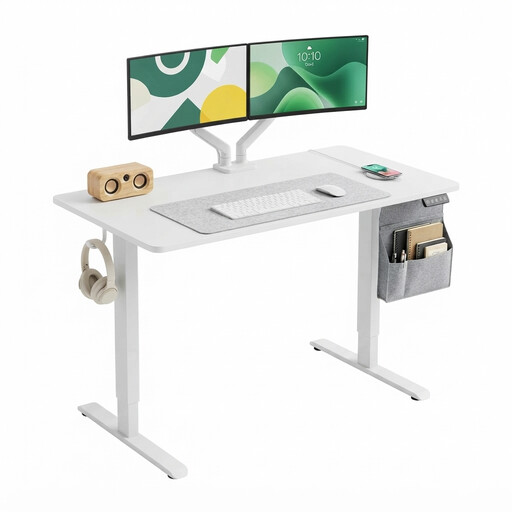
Why it suits this profile: This compact electric desk has a 120 x 60 cm desktop, a height range of 72 to 118 cm and two memory settings. It’s a good fit for people working from home, students and smaller rooms.
The product information lists specific heights, a weight capacity of 70 kg and a digital control panel. This means you don’t have to rely on general marketing claims alone.
120 x 60 cm desktop, two memory settings, digital display, stated weight capacity of 70 kg and two hooks.

Why it suits this profile: The larger desktop is ideal for office professionals and people working from home who use multiple screens or need extra space for documents. The USB-C port, cable management and memory function are designed to help keep your workspace organised.
The dimensions, maximum static load of 70 kg and limits on prolonged adjustment are clearly stated. This makes it easier to check whether the desk is suitable for a heavier setup.
160 x 70 cm desktop, memory function, USB-C port, cable management, organiser and three hooks.

Why it suits this profile: Four saved heights are useful if you often switch between working styles or share the desk with other people. The 140 x 60 cm desktop offers more room than a compact 120 x 60 cm desk.
The product details list a height range of 72 to 120 cm, a maximum static load of 70 kg and a USB-C port. The manual’s guidance on overheating helps set realistic expectations for continuous use.
Four memory settings, 140 x 60 cm desktop, USB-C port, cable management and three hooks.
We’ve put together a complete, up-to-date list of products that meet these strict selection criteria and the applicable European safety regulations.
Yes, a 120 x 60 cm model takes up relatively little space. But measure more than just the desktop: allow for the frame’s movement, too. Check that the desk can rise freely without hitting a windowsill, cupboard or shelf.
Its lifespan depends on the motor, frame, assembly and how you use it. Stick to the maximum load, keep liquids away from electrical components and use the overheat protection as described in the manual. Regularly checking and tightening the joints can help reduce wobbling.
The motor mainly uses electricity while the desk is being adjusted. Consumption is generally low when it’s stationary, but you can only work out the exact cost if you know the stated power rating and how often you adjust the desk. Check the technical details for your chosen product, and unplug the adaptor when appropriate according to the instructions.
