
Vandaag of morgen in huis

Kwaliteit gegarandeerd

Welkomstaanbiedingen ontgrendelen: GRATIS bezorging | Tot 80% korting | Gratis 30 dagen JoyPlus-proefperiode
Download de app
An electric height-adjustable desk can be a practical choice for working from home, studying, gaming or creating a flexible office setup. With the press of a button, you can switch between sitting and standing. However, an electric frame alone does not determine whether a desk is right for you. Dimensions, stability, controls and cable management all affect how comfortable it is to use every day.
As a Joybuy Product Recommendation Officer, I filter product information based on verifiable specifications. This makes it easier to identify which features are genuinely relevant and which marketing terms say little about your specific needs.
A desk that adjusts, for example, from 72 to 120 cm will not automatically suit every user. Also check the desktop thickness, chair and armrest height, and the available space beneath the desktop. You should be able to sit comfortably without raising your shoulders and stand without constantly leaning forward.
An adjustable desk for working from home should also fit the space available. A 160 x 70 cm desktop offers plenty of workspace, but may be too large for a small bedroom or student room.
A stated load capacity, such as 70 kg, is a verifiable product specification. However, it does not tell you everything about movement while the desk is being adjusted. A monitor arm, desktop computer and multiple screens place different demands on the frame than a laptop.
Pay attention to:
A stable computer desk should remain practical even at its highest setting. Position heavy equipment as centrally as possible and check that the desk is level.
A desk with memory presets may store two or four height settings, but the number of presets varies by model. Likewise, a desk with a USB-C port does not automatically offer the same charging performance as a dedicated charger. Check whether the product description clearly specifies the charging type and intended use.
Also consider practical limitations. Some models feature overheat protection when the motor is used continuously for an extended period. For some JoyFURNOS models, the product information states that after approximately two minutes of continuous adjustment, an 18-minute cooling period may be required.
For a home office, 120 x 60 cm is suitable if you work with a laptop, one monitor and documents. If you use two screens, speakers or a printer, 140 x 60 cm or 160 x 70 cm may be a better fit.
Many models in this selection offer a height range of approximately 72 to 120 cm. This makes them suitable for a variety of workspaces, but the ideal height remains personal. When sitting, adjust the desk so that your forearms are approximately horizontal. When standing, the keyboard and mouse should be positioned at a relaxed height.
A load capacity of 70 kg provides room for everyday office equipment, provided the total weight remains below the stated limit. Add together the weight of monitors, monitor arms, computer, books and accessories. Do not exceed the limit.
A steel frame and a sturdy desktop are useful, objectively verifiable features. Product descriptions may use terms such as “quiet”, “smooth” or “premium motor”. Treat these as the seller’s descriptions and focus primarily on the technical parameters and usage notes.
A digital control panel displays the selected height. Memory buttons are useful when several people share the same desk or when you frequently switch between two working positions.
Also look for:
An ergonomic desk does not replace a good chair, the correct screen height or regular breaks. Its main benefit is allowing you to vary your working posture.

Why it fits: A well-proportioned option for a student room, bedroom or compact home office. This model is designed for work, study and gaming.
The product information states a range of 72–118 cm, a digital display and two memory settings. The load capacity is specified as 70 kg.
The 120 x 60 cm desktop and included hooks help keep the setup compact. According to the product listing, CE and European standard certification are stated; check the corresponding documentation before purchasing.

Why it fits: The spacious work surface accommodates multiple screens, a laptop and documents. This makes the model suitable for remote workers and office professionals with extensive equipment.
The specifications list dimensions of 160 x 70 cm, a height range of 72–120 cm and a maximum static load of 70 kg. Make sure your equipment is distributed evenly.
The product description mentions a steel frame, two cable grommets, an organiser and a USB-C port with fast-charging functionality according to the manufacturer.

Why it fits: A practical choice for anyone who regularly switches between several working heights and wants a medium-sized desktop for working from home or studying.
The listing specifies four memory settings, a range of 71–120 cm and a static load capacity of 70 kg. This makes the relevant specifications easier to compare in advance.
The product description mentions a USB-C port, cable management and three hooks. Charging performance depends on the specific version and the connected devices.
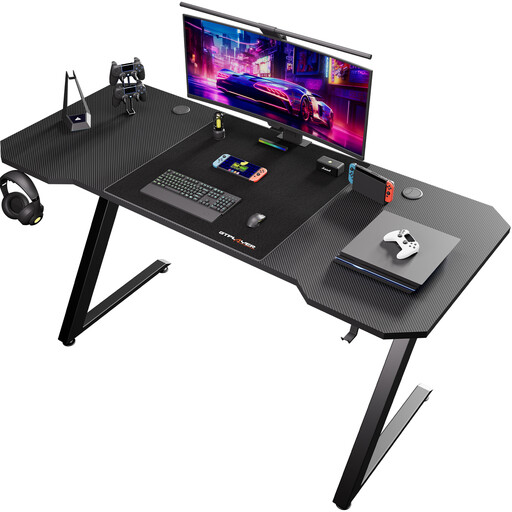
Why it fits: Designed for gamers who primarily want a fixed, compact PC desk with room for accessories such as a headset.
This is not an electric sit-stand desk. The product information does not mention height adjustment or load capacity. Choose this model only if a fixed gaming desk meets your needs.
The desk measures 120 x 60 cm, while the product name mentions a carbon-fibre surface and headset hook. Check the complete product specifications before ordering.
Explore a current selection of desks and compare dimensions, materials and features for your workspace in the Netherlands.
Power consumption depends on the motor, the number of adjustments and the duration of use. The motor typically runs only while the desk is being adjusted. A desk with an energy-saving mode may limit standby consumption, but check the product specifications for confirmation.
Service life depends on assembly, load, frequency of use and maintenance. Stay within the maximum load capacity, prevent obstructions while the desk is moving and use the overheat protection as described in the manual. Any stated service life or number of movement cycles should come from the manufacturer; do not treat it as a general expectation.
Start by sitting with your feet flat on the floor and your shoulders relaxed. Adjust the desktop so that your forearms rest comfortably towards the keyboard. Then set a standing height that allows you to work without leaning forward. Use the memory settings as a starting point only and adapt them to your own chair, screen and body height.
