
Vandaag of morgen in huis

Kwaliteit gegarandeerd

Welkomstaanbiedingen ontgrendelen: GRATIS bezorging | Tot 80% korting | Gratis 30 dagen JoyPlus-proefperiode
Download de app
An electric height-adjustable desk can make your workspace more flexible. With the press of a button, you can switch between sitting and standing without moving your monitors, laptop or accessories. However, not every electric desk is automatically right for your room, working posture or day-to-day needs.
The most common buying mistakes usually come down to three pitfalls:
Look beyond the width: check the depth and minimum and maximum height too. Many models in this selection have an adjustment range of around 72 to 120 cm. This is useful to know for both sitting and standing, although the ideal height depends on your own height and chair.
Use these sizes as a practical guide:
A larger desktop doesn’t automatically mean a higher weight capacity. Check the difference between maximum static load and the load the desk can handle while adjusting. The supplied product information gives a maximum static load of 70 kg. Distribute heavy equipment evenly and always check the latest product specifications.
An electric sit-stand desk is most practical when it’s easy to operate. A desk with a memory function can save your preferred height settings, so you don’t have to find the right height from scratch each time. Some product descriptions also mention reminders to change your posture regularly. This is a control feature, not a medical benefit.
Check the following:
According to the product descriptions, several JOYFURNOS models feature a steel frame, quiet motor, memory function and lock. The overheating protection may activate if you adjust the desk continuously for a long time. The specifications listed say you should then wait 18 minutes. This is worth bearing in mind if you adjust the desk frequently, one movement after another.
A desk with a USB-C port can be handy for charging a mobile phone or compatible device. Check whether the USB-C connection is intended for charging and what charging capacity is specified. Don’t assume that every laptop can be powered through this port.
Cable holes, a fabric organiser and a hook can help keep your workspace tidy. Leave enough slack in the cables as you route them along the moving frame, and don’t connect electrical components near spilled liquids. The product descriptions also advise against placing the desk directly against a wall while raising or lowering it.
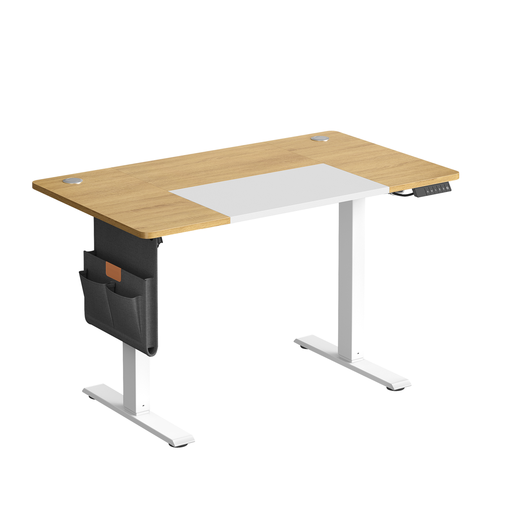
Why it suits this profile: Its compact size works well in a student room, home office or small bedroom. The memory function and USB-C port are handy additions for everyday use.
The dimensions, adjustment range of 72 to 120 cm and maximum static load of 70 kg are all clearly specified. This makes it easier to assess the space and equipment you’ll need in advance.
120 x 60 cm, memory function, USB-C port, cable management and three hooks, according to the product description.
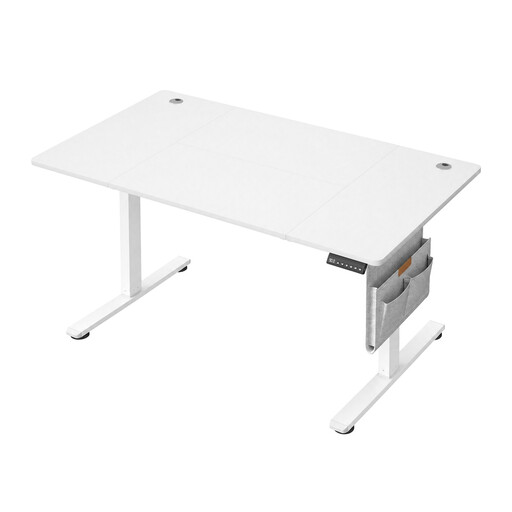
Why it suits this profile: The 160 x 70 cm work surface has room for several screens and accessories. It’s a good fit for professionals and home workers who spend long periods at their desk each day.
The product description lists a steel frame, adjustable feet, cable holes and lockable controls. Before buying, make sure you have enough floor space and room for the cables.
160 x 70 cm, weighs 24,8 kg, maximum static load of 70 kg and USB-C connection, according to the product information.

Why it suits this profile: This spacious model is designed for users with several screens, a desktop PC or lots of peripherals. Its brown-and-black finish suits a professional or gaming setup.
The stated 70 kg limit helps you assess the suitability of the desk for heavier equipment. However, the overheating protection means you should avoid raising and lowering it continuously.
160 x 70 cm, memory function, USB-C port, cable holes, organiser and adjustable feet, according to the product description.

Why it suits this profile: Four memory settings are handy when several people share the same desk or when you regularly switch between working and gaming.
The number of memory settings, adjustment range and maximum static load are all specified. This lets you compare the features rather than relying on marketing terms alone.
140 x 60 cm, four memory presets, USB-C port, organiser and cable management, according to the product description.
We’ve put together a complete, up-to-date list of products that meet these strict selection criteria and the applicable European safety requirements.
Measure the space with the desk at both its lowest and highest settings. Allow for a monitor arm, cables, a rug and a wall socket. Also check that the motor and controls are suitable for the weight of your equipment.
During assembly, remember to:
Power consumption depends on the motor’s power rating, how often you use it and its standby mode. A desk that’s adjusted only a few times a day will generally use electricity actively only while it’s moving. An energy-saving mode can reduce consumption when the desk isn’t in use, but check the technical details for your chosen model for a more precise estimate.
Its lifespan depends on assembly, load and use. Don’t exceed the stated maximum load, avoid collisions and don’t keep adjusting the height continuously. On some models, the overheating protection switches on after prolonged continuous use. If this happens, let the desk cool down as instructed in the product guidance.
For two monitors, 160 x 70 cm is usually more practical than 120 x 60 cm, as it gives you more depth and width for screens, a keyboard and accessories. A 140 x 60 cm model may be enough if you have compact monitor stands or a monitor arm. Measure the footprint of your monitor stands in advance and leave room for cables.
