
Livraison le jour même et le lendemain

Qualité garantie

Débloquez vos offres de bienvenue: Livraison GRATUITE | Jusqu'à -80 % | 30 jours d'essai gratuits à JoyPlus
Téléchargez l'application
An electric height-adjustable desk can be useful for working from home, studying, gaming and creating a flexible office. At the touch of a button, you can switch between working while seated and standing. However, not every sit-stand desk is automatically suitable for daily use. A smart desktop, quiet motor or memory function means little if the construction wobbles, the dimensions are unsuitable or cables become trapped.
As a Joybuy Product Recommendation Officer, I filter the key information based on verifiable specifications. This helps you avoid paying mainly for marketing language.
A 120 x 60 cm desk often fits well in a smaller study, but a monitor, laptop, keyboard and desk lamp can quickly take up a lot of room. For a large screen or two monitors, a 160 x 70 cm desktop is more practical. Also consider the depth: 60 cm leaves less room to position a monitor at the correct viewing distance than 70 or 80 cm.
Brands regularly use terms such as quiet, sturdy or professional without stating the noise level, load capacity or frame specifications. So check the maximum static load capacity, the frame material and the height adjustment range. A steel frame is a useful starting point, but stability also depends on the shape of the legs, the floor and how the weight is distributed.
The product descriptions for the models below state a maximum static load capacity of 70 kg. This is not a recommendation to keep the desk loaded to its maximum capacity. Add together the weight of monitors, computer, speakers and other accessories, and leave some margin.
A desk with a memory function is only useful if you can save positions easily and the controls are intuitive. A USB-C port sounds practical, but the product information does not always state which charging output or data function is supported. So do not automatically use the port as a replacement for a laptop charger.
Cable management also deserves attention. Cable grommets, a storage pouch and hooks help keep accessories organised, but check that the cables are long enough while the desk is moving upwards. Do not position an electric desk tightly against the wall, and keep electrical components away from liquids.
Many models in this selection move from approximately 72 to 120 cm. This range may suit different users, but the correct setting depends on your height and chair. When working seated, your shoulders should remain relaxed and your forearms should lie roughly horizontally on the desktop. When standing, the desktop should be high enough that you do not have to raise your shoulders.
A height-adjustable desk is not a substitute for a good chair, monitor stand or correctly positioned keyboard. Consider adjustability as one part of your workstation.
Choose according to your equipment and available space:
A larger desktop usually also means more weight. So check that the frame and motor are suitable for your setup.
Before buying, check that the manual, adapter information and responsible economic operator are clearly stated. For electrical products, a CE marking is relevant, but also look at the accompanying product information and safety instructions. A marking on its own does not tell you how stable a desk is.
According to their product information, the JOYFURNOS and Ochama models described have overheating protection. Some models state that after approximately two minutes of uninterrupted adjustment, an 18-minute waiting period is required. This is particularly important for a workstation where you want to adjust the desk frequently in succession.
During assembly, make sure the desk is on a level surface, check the adjustable feet and allow enough clearance. Set the collision sensor according to the manual and test the movement before placing delicate equipment on the desktop.
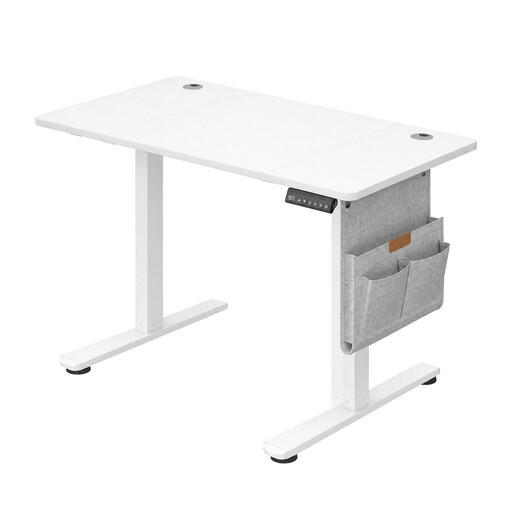
Why it suits this profile: This compact electric sit-stand desk is aimed at people working from home, students and smaller rooms. According to the product description, it has four memory settings, a steel frame and a height range of 72 to 120 cm.
The product information lists specific dimensions, a load capacity of 70 kg and a memory function, rather than relying only on general claims about flexibility.
Compact size, four memory settings, cable grommets, storage pouch and hook. Available in white or rustic brown.

Why it suits this profile: The larger desktop provides room for multiple screens, a laptop and documents. According to the product description, it includes a memory function, USB-C connection, two cable grommets and adjustable feet.
The 160 x 70 cm dimensions reduce the risk of having a cramped workstation. The stated cable grommets help route cables, but check the length of your connections yourself.
Spacious desktop, USB-C port according to the product description, memory function, steel frame and a stated static load capacity of 70 kg.

Why it suits this profile: This size provides more desktop space than a compact 120 cm model without immediately moving up to 160 cm. It may suit a home workstation with one monitor, a laptop and accessories.
The four saved height settings make repeated adjustments straightforward. However, the manual warns that a waiting period is required after prolonged, continuous adjustment.
Four memory settings, USB-C port according to the product description, height range of 72 to 120 cm, cable management and a stated load capacity of 70 kg.
We have put together a complete, up-to-date list of products that fully meet these strict selection criteria and the applicable European safety regulations.
Start with the lowest seated position. Adjust your chair so that your feet are flat on the floor, then adjust the desk height. Next, save a suitable seated and standing height if the controller supports this. Before adjusting the desk, check that cables, drawers and walls are clear.
Its lifespan depends on the motor, frame, load, assembly and frequency of use. There is no reliable general timeframe without information from the manufacturer. Use the desk within its stated load capacity, keep liquids away from electrical components and follow the rest period in the manual when the overheating protection is activated.
Exact consumption can only be calculated using the motor’s power rating and the duration of use. The motor generally runs only while the desk is being adjusted, not throughout the entire working day. According to the product description, models with an energy-saving mode may pay extra attention to standby consumption. Check the adapter specifications if energy use is important to you.
