
Vandaag of morgen in huis

Kwaliteit gegarandeerd

Welkomstaanbiedingen ontgrendelen: GRATIS bezorging | Tot 80% korting | Gratis 30 dagen JoyPlus-proefperiode
Download de app
Compact speakers for your desk may seem like an easy choice. However, gaming speakers with RGB lighting can disappoint in practice if they have awkward connections, limited sound settings or lighting that doesn’t suit your workspace. According to the product description, the Edifier G1500 gaming speakers combine USB, AUX and Bluetooth 5.3 in one compact system. But are they right for you? And which specifications should you pay attention to before ordering?
Gaming speakers with lighting look appealing, but RGB says nothing about sound quality or ease of use. So first check whether the speakers will connect to your PC, laptop or games console.
According to the product specifications, the Edifier G1500 speakers have:
USB speakers for PC are practical, but check whether the USB connection is used only for power or also handles the audio signal. USB is listed as an input for this model. Its exact functionality may vary depending on the device and operating system.
A higher wattage doesn’t automatically mean a speaker will sound better in every situation. Look for the difference between peak power and RMS power. Peak power describes the maximum output for a short period, while RMS is generally a better indication of performance over extended use.
The Edifier G1500 is listed as having 10 watts peak power, delivered by two 2.5-inch full-range drivers. This is most relevant for a desk setup in a bedroom, home office or gaming room. If you want to fill a large room, you’ll probably have different requirements from someone sitting close to their speakers.
A gaming mode is a sound profile, not a universal quality standard. According to the product description, you can switch between Game, Music and Movie modes on the Edifier G1500. These modes can adjust the sound in different ways, but the best choice depends on the game, the music and your personal taste.
Claims about an immersive experience also come from the brand’s product information. Treat them as a description of the intended effect, rather than a guaranteed result for every user.
Having several connections is useful for a PC setup. A PC speaker with an AUX connection works with many laptops, monitors, tablets and other devices with a 3.5mm output. Bluetooth is handy if you want to play music from your phone without a cable.
Check the Bluetooth version and where the information comes from. According to the product details, the Edifier G1500 uses Bluetooth 5.3. This supports a modern wireless connection, but actual stability and latency also depend on the device you connect it to.
USB-powered speakers usually take up less space than systems with a separate mains adaptor. Check in advance that you have enough USB ports available. You may need a USB hub with a laptop, particularly if you’ve also connected a mouse, keyboard, microphone and external storage.
Also think about where you’ll place them. Measure the space beside your monitor and check that the cables are long enough to position the speakers on either side of the screen.
A physical control for volume, power and lighting is handy if you don’t want to open software every time. On the Edifier G1500, the controls are on the speaker. The product description lists five RGB lighting effects and an indicator that changes colour depending on the connection.
Bear in mind that RGB lighting isn’t for everyone. In a shared room, a bright lighting mode can be distracting. So check whether you can change or switch off the lighting before ordering.

Why it suits this profile: This compact system combines several connection options with straightforward controls. That makes it a good fit for a first gaming or desk setup where PC audio, music and films are the main priorities.
The connections are clearly listed: USB, AUX and Bluetooth 5.3. The five RGB lighting effects and three sound modes are also specified, rather than simply referring to gaming in general.
Two 2.5-inch full-range drivers, 10 watts peak power, USB input, 3.5mm AUX and Bluetooth 5.3.
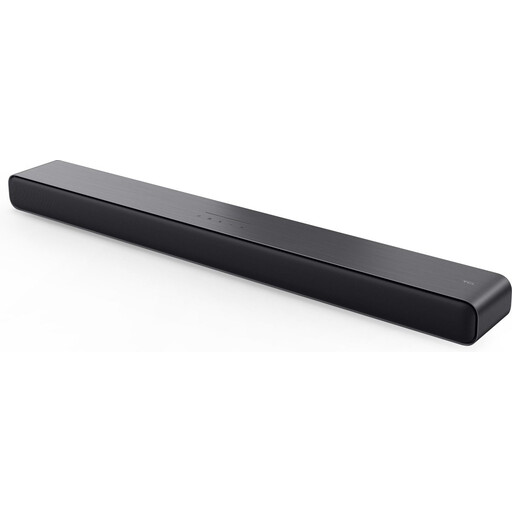
Why it suits this profile: This soundbar is a good choice if you watch films and TV as well as gaming, and would rather place one longer audio system under or in front of your screen.
The connections are clearly described, including HDMI, optical, USB and 3.5mm analogue. So you don’t have to rely on Bluetooth alone.
2.0-channel system, 25 watts RMS, Bluetooth 5.2, HDMI ARC/eARC and an integrated subwoofer according to the product specifications.
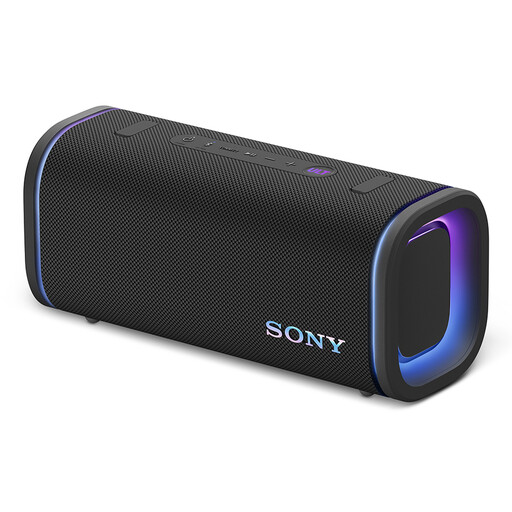
Why it suits this profile: This model is designed for anyone who wants to use their speaker away from the desk too, for example in a living room, hobby room or on a patio.
Its portable design, battery power and IP67 rating make it clear that this is intended for a different use from fixed desktop speakers. When using it outdoors, always check that the covers are closed and follow the safety instructions.
Bluetooth 5.3, up to 25 hours of battery life according to the product description, 3.5mm input and IP67 rating.
We’ve put together a full, up-to-date list of products that meet these strict selection criteria and the applicable European safety regulations.
According to the product description, the Edifier G1500 are designed as computer speakers and have USB input. You can also connect a PC or another device via the 3.5mm AUX connection. Before buying, check which audio output your computer uses.
Yes, Bluetooth 5.3 is listed as a supported connection. Turn on Bluetooth on your laptop, PC or mobile device, then follow the pairing steps in the manual. Your source device must support Bluetooth.
USB speakers draw power from a USB port. Consumption depends on the design, volume and use of the lighting. Switch off the RGB lighting when you don’t need it, and disconnect the USB cable if the speakers won’t be used for an extended period.
