Choose earbuds based on their connection, fit and controls: no model will free up storage on your phone. Streaming audio and limiting downloads can help save space, but Spotify also stores cached data on your device. Check your learning app’s storage settings, then test whether your chosen earbuds work with the microphone feature you need.
Who are these earbuds for?
Practising with a phone that’s nearly full
You compare pronunciation examples, but want to stop lesson audio and app cache from filling up your remaining phone storage. Spotify explains how cache and downloads use device storage, while NT2 TaalMenu offers audio exercises.
Comparing sounds in a noisy environment
You want to replay short examples without continually turning up the volume, so fit and noise isolation matter. VeiligheidNL recommends a good fit to help reduce sound leakage.
Practising by listening back to your own voice
You repeat an example and compare your recording with the original. The recording feature in your learning environment needs to work with the microphone you’re using. NT2 TaalMenu shows an exercise sequence that involves listening and speaking.
What should you look for when choosing?
First decide how you’ll store and play audio. Then choose a connection, fit and controls that suit where you practise.
| What to consider |
What should you check? |
Who is this important for? |
| Audio storage |
Check where your learning app stores its cache, downloads and your own recordings. Streaming doesn’t automatically prevent the app from storing cached data. |
I don’t want lesson audio and app cache to use up my last bit of free phone storage. Around 33% of consumers say storage is their top priority. |
| Hearing the sounds clearly |
Look for a snug fit. VeiligheidNL says a good fit helps reduce sound leakage, so you’re less likely to need to turn up the volume. |
When I’m comparing sounds in a noisy environment, I want to hear them clearly without continually turning up the volume. Around 27% of consumers prioritise clarity. |
| Recording your own voice |
Test the complete process in your own practice app: play an example, record yourself and listen back. Check which microphone the app uses. |
I want to listen back to my pronunciation alongside the example and check that my recording is usable. Around 20% of consumers say listening back is their top priority. |
| Connecting and using the controls |
Check whether your device supports USB-C, 3.5 mm or Bluetooth, and whether the controls work with your practice app. |
When I’m replaying short examples often, I want to listen on my usual device without connection hassles. Around 20% of consumers prioritise ease of connection. |
Common buying mistakes
-
Assuming more earbud features mean more phone storage
Cache and downloads from apps such as Spotify use storage on the playback device. A different pair of earbuds won’t change that.
First check your learning app’s storage settings, then decide which fit, connection and controls you need.
-
Assuming a built-in microphone will work for pronunciation recordings
Having a microphone on your earbuds doesn’t prove that your practice app will use it as the recording source.
Try the whole exercise on your own device: play the example, repeat it and listen back to your recording.
-
Choosing wired earbuds without checking the connection
Wired models can have different connections, such as USB-C or 3.5 mm.
Check the port and compatibility of your phone or computer. You may need a suitable adapter if the connections don’t match.
Brands to consider
Apple
The EarPods (USB-C) are a wired option for devices that support this connection.
- Apple lists playback and volume controls.
- Check your device’s system requirements and connection. Their fit provides less isolation than in-ear earbuds with well-fitting tips.
Sony
The WF-C710N are wireless in-ear earbuds with noise cancelling and an ambient sound mode.
- Sony lists Bluetooth 5.3 and support for SBC and AAC.
- The earbuds and charging case need to be charged. Noise cancelling doesn’t prove that pronunciation sounds will be easier to recognise.
soundcore
The Liberty 5 are wireless in-ear earbuds with controls and ambient sound features.
- According to the manufacturer, this model has adjustable noise cancelling, a transparency mode and controls on the stem.
- The microphone specifications provided don’t independently confirm how the earbuds work with recordings in a learning app. Test them with your own device.
Samsung
The Galaxy Buds4 Pro are wireless in-ear earbuds with interchangeable tips.
- Samsung lists three sizes of ear tips and a two-way speaker for this model.
- Samsung’s claim of greater detail comes from the manufacturer. Check how the features work with your own playback device and practice app.
JBL
The Tune 210 are wired in-ear earbuds for devices with a compatible 3.5 mm connection.
- The product description lists a cable and microphone, so no charging or Bluetooth pairing is needed.
- The advertised bass tuning doesn’t prove there’s an advantage when comparing pronunciation examples.
Joybuy products for pronunciation practice
This selection includes wired and wireless earbuds for replaying pronunciation examples, with options for different connections and practice settings.
 No image available
JBL Tune 305C USB-C (Blue)
A wired USB-C option if you’d rather not pair via Bluetooth. The product description lists playback and volume controls. Check that it’s compatible with your device and practice app.
View at Joybuy
 No image available
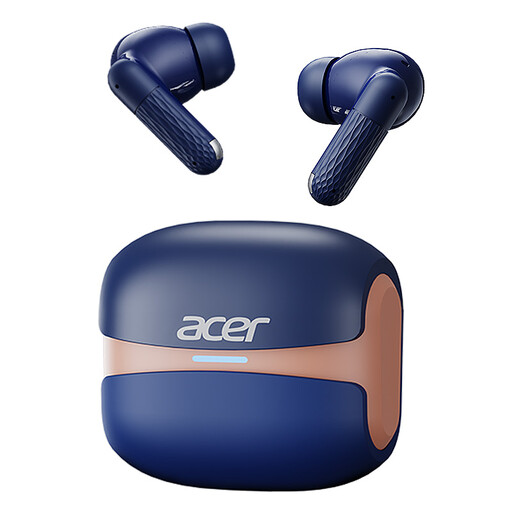
Acer OHR548, Bluetooth 5.4
A wireless in-ear option if you want to listen without a cable. The product name lists Bluetooth 5.4 and touch controls. Check that the controls work with your playback device and practice app.
View at Joybuy
 No image available
Samsung Galaxy Buds4 Pro (Black)
A wireless in-ear option for practising with less background noise. Don’t use noise cancelling when you need to hear ambient sounds for safety.
View at Joybuy
 No image available
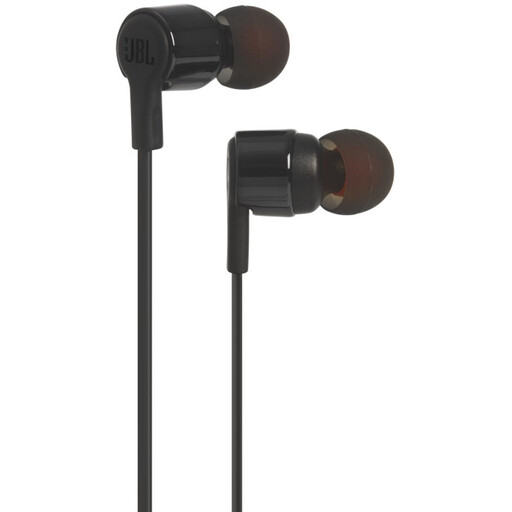
JBL Tune 210, 3.5 mm (Black)
A wired in-ear option if you want to avoid Bluetooth pairing and charging. Check that your device has a compatible 3.5 mm connection; the product information also lists a microphone.
View at Joybuy
 No image available
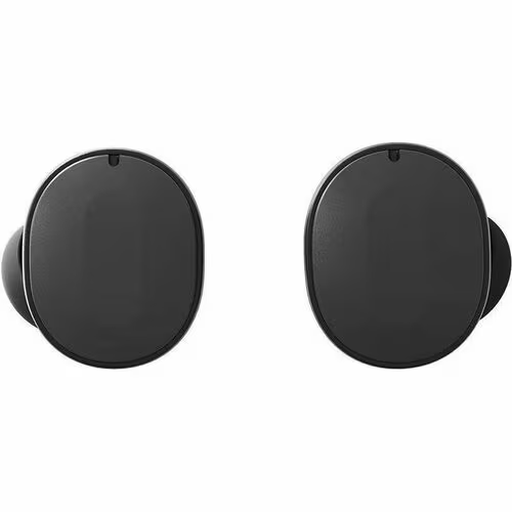
Fairphone Fairbuds Black
Could suit you if you want to switch between two devices while practising; check that multipoint works with your devices. The product description also lists active noise cancelling.
View at Joybuy
Frequently asked questions
Do earbuds need their own storage for pronunciation examples?
When listening from a phone, what matters most is where the app you’re using stores audio. Spotify, for example, explains how cache and downloads use device storage; this doesn’t necessarily apply to every pronunciation app. Check your learning app’s storage settings.
How can you compare your pronunciation with an example?
Play the example first, repeat it, then listen back to your recording. Before you start, check that the exercise on your device uses the microphone you intend to use.
How can you save storage if you also want to practise offline?
Keep only the examples you need offline and check the cache and download settings in the app you’re using. Spotify’s download options and subscription terms apply to Spotify only, not automatically to NT2 exercises.
What should you consider when practising for a long time?
Look for a snug fit and keep an eye on the volume level. VeiligheidNL says a good fit helps reduce sound leakage, so you’re less likely to need to turn up the volume. Follow the instructions for your chosen model when cleaning and charging it.
What warranty applies if a product develops a fault in the Netherlands?
According to the Dutch government, you’re entitled to a product that works properly; there is no fixed statutory warranty period that applies equally to every product. If something is faulty, contact the seller. An additional manufacturer’s or retailer’s warranty doesn’t replace your statutory rights.


