Who are these earbuds for?

Language learners who practise repeating sentences

If you listen carefully to Dutch lesson files, check that you can easily pause and replay a sentence using your device and playback app. Consumentenbond includes speech clips in its testing methods; JBL lists button controls on specific wired models.

Listeners in noisy surroundings

If background noise distracts you during spoken lessons, compare the fit and level of noise isolation before considering active noise cancelling. Consumentenbond highlights fit and noise cancelling as factors to consider when choosing.

Listeners who want to hear their surroundings

If you want to hear announcements or traffic while listening, an open-ear design may suit your preferences. Consumentenbond explains that open-ear models leave the ear canal unobstructed; this also means they do less to block out your lesson.

What should you look for when listening to Dutch news lessons?

Wired USB-C in-ears

A good fit if: your device supports USB-C audio and you want to listen without a battery.

Bear in mind: the cable, and whether both the audio and controls are compatible with your device and app.

Wireless in-ears with noise cancelling

A good fit if: background noise gets in the way of your spoken lessons and you find in-ears comfortable.

Bear in mind: performance depends partly on fit and the type of noise; the quoted listening time per charge may be shorter with noise cancelling on.

Wireless in-ears without active noise cancelling

A good fit if: you want to listen wirelessly and active noise cancelling isn’t a priority.

Bear in mind: an ambient sound mode isn’t the same as active noise cancelling, and wireless earbuds need charging.

Open-ear with ear hooks

A good fit if: you want to keep your ear canals clear and hear the sounds around you.

Bear in mind: an open design does less to block out your lesson and isn’t intended to keep noise out as much as possible.

What to consider What should you check? Who is this important for?
Files and controls Play one of your own lesson files and test pausing, resuming and rewinding with the app, device and earbuds you plan to use. If I want to replay a sentence often, I want to test the controls with my own set-up. Around 33% of consumers give replaying lesson files the highest priority.
Speech in noisy surroundings Compare the fit and noise cancelling in the place where you listen; check the battery life per charge with your preferred mode switched on. When I follow spoken lessons in a noisy place, being able to understand them matters more to me than other features. Around 27% of consumers prioritise listening in background noise.
Comfort and your surroundings Compare a well-fitting in-ear tip with an open-ear model, and think about where you listen. If I want to keep hearing my surroundings or find in-ears uncomfortable, I pay extra attention to the design and fit. Around 20% of consumers prioritise wearing comfort and being able to hear background noise.
Connection and charging Check that your device supports USB-C audio; for Bluetooth models, compare the listening time per charge and the mode used for that figure. I want to know whether my device connects directly and whether I’ll need to charge the earbuds during long lessons. Around 20% of consumers prioritise connection and charging convenience over other considerations.

Buying pitfalls

  • Confusing battery life including the charging case with continuous listening time

    Total battery life with a charging case isn’t the same as the time you can wear the earbuds continuously. They need to be in the case to charge.

    Compare the quoted listening time per charge with the noise-cancelling or ambient mode you plan to use.

  • Assuming every USB-C port works with every wired USB-C earbud

    For the JBL Tune 310C USB, JBL specifically asks you to check compatibility with your device.

    Check that your device supports USB-C audio, and test the buttons with your own playback device and app.

  • Choosing open-ear earbuds to block out noise

    An open design leaves the ear canal unobstructed, so it serves a different purpose from noise-isolating in-ears or noise cancelling. If you’re out in traffic, it’s still important to pay attention to your surroundings.

    Choose according to where you listen: compare noise isolation in noisy places with an open design or ambient mode when you want to hear surrounding sounds.

  • Confusing a fixed manufacturer’s warranty with your statutory rights

    ACM ConsuWijzer distinguishes between a manufacturer’s or retailer’s warranty and the legal expectation that a product will be of satisfactory quality when used normally.

    Check what an extended warranty package covers and what other rights apply to the product.

Relevant brands to consider

JBL

The Tune 310C USB is a wired USB-C option for listening to lesson files without having to charge the earbuds.

  • JBL lists three buttons and Default, Bass and Vocal EQ settings for this model.
  • JBL advises checking USB-C compatibility with your device. The Vocal setting alone doesn’t prove that lessons will be easier to understand.

Sony

The WF-C510 and WF-C710N offer different wireless in-ear features: an ambient sound mode on the WF-C510 and noise cancelling on the WF-C710N.

  • Sony lists multipoint connectivity for both models.
  • Quoted listening time varies by model and the mode switched on. Don’t assume specifications apply to the whole range, and check the fit for yourself.

Shokz

The OpenFit Air is an example of an open-ear option for anyone who wants to keep their ear canals clear.

  • Shokz describes the open design and ear hook as features of this model.
  • Its open construction does less to block out your lesson. Shokz quotes up to 6 hours of music per charge and 28 hours with the charging case.

Philips

The TAE5008BK/00 is an example of wired USB-C in-ears with controls and interchangeable ear tips.

  • Philips lists USB-C, a built-in DAC and three sizes of ear tips for this model.
  • On the Dutch manufacturer page consulted, Philips marks this model as no longer available; that doesn’t automatically apply to other models or retailers.

Earbuds for different listening preferences

This product selection includes wired USB-C earbuds, as well as wireless in-ear and open-ear models for listening with a compatible device.

JBL Tune 305C wired USB-C earbuds, blue

JBL Tune 305C wired USB-C earbuds

A wired option for controlling audio on a device that supports the connection.

The product description lists three-button controls and EQ options via the cable. Check that your device supports USB-C audio.

Joybuy
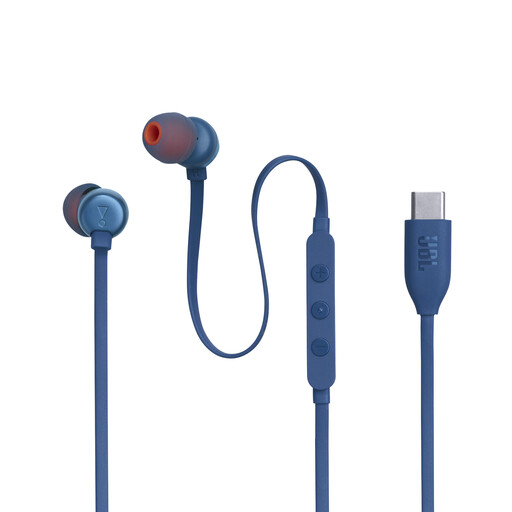
JBL Tune 310C wired USB-C in-ears, blue

JBL Tune 310C wired USB-C in-ears

A wired choice if you want to listen to lesson files without charging your earbuds.

The product description lists three control buttons and EQ options, including Vocal. Check that your device supports USB-C audio; an EQ setting doesn’t prove that pronunciation will be easier to understand.

Joybuy
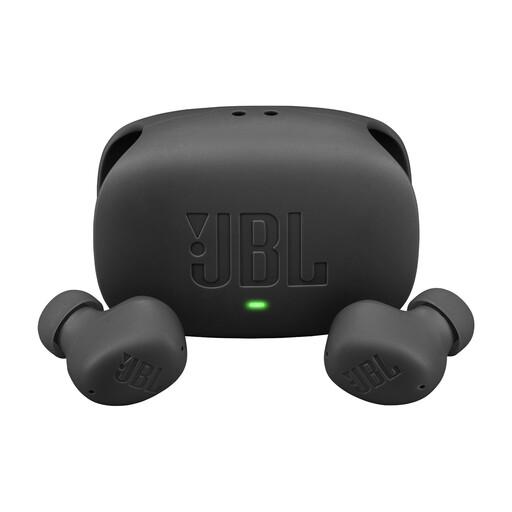
JBL Wave Buds 2 wireless in-ears, black

JBL Wave Buds 2 wireless in-ears

A wireless option if you want to switch between fewer distractions and hearing more of your surroundings.

The product description lists active noise cancelling, Smart Ambient and multipoint connectivity for two Bluetooth devices. Quoted playback time is up to 10 hours with ANC off; total time including the case is different.

Joybuy
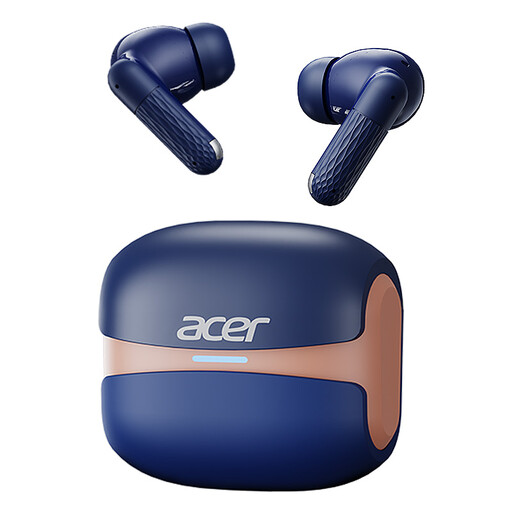
Acer OHR548 Bluetooth earbuds with touch controls and Type-C charging case

Acer OHR548 Bluetooth earbuds

A wireless in-ear option for playing audio from a Bluetooth device.

The product name lists Bluetooth 5.4, touch controls and a Type-C charging case.

Joybuy
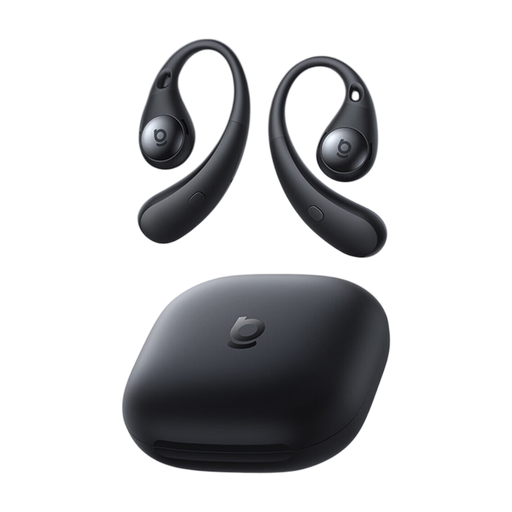
OS-Baseus Eli Sport 2 open-ear earbuds

OS-Baseus Eli Sport 2 open-ear earbuds

An open-ear option if you want to hear surrounding sounds while listening.

The product description lists Bluetooth compatibility, USB-C charging and up to 8 hours of listening per charge. The open design isn’t intended to block out as much sound as possible.

Joybuy

Frequently asked questions

Are my Dutch news lessons stored on the earbuds themselves?

Don’t assume they are: you play the file on a phone, computer or another suitable device. VideoLAN, for example, explains how to play local audio in VLC for Android; check the file format and controls in the app you use.

Do I need a Vocal EQ setting to hear Dutch pronunciation?

No, the name of the EQ setting alone doesn’t tell you that. JBL lists a Vocal setting for the Tune 310C USB, but that isn’t a comparative listening test. Try a familiar lesson clip on your own device and decide for yourself whether it sounds comfortable to listen to.

How can I listen for a long time without putting unnecessary strain on my hearing?

Keep the volume low and take breaks. The World Health Organization gives 80 dB for up to 40 hours a week as an example; at higher sound levels, safe listening time drops considerably. The percentage shown on the volume control doesn’t tell you the sound level produced by your particular set-up.

What if the earbuds I bought online don’t fit or break quickly?

According to ACM ConsuWijzer, online purchases generally come with a statutory cooling-off period of up to 14 days after delivery; some hygiene products may be exempt. Before opening the packaging, check which terms apply. You can also expect a product to be of satisfactory quality when used normally; your statutory rights aren’t automatically limited to a fixed manufacturer’s warranty period.

Can I listen to a news lesson on my bike while wearing earbuds?

The police say that cycling with headphones or earbuds isn’t prohibited, but distractions can lead to dangerous situations. Stay aware of your surroundings and choose a listening setting that lets you hear traffic well enough.
