
Vandaag of morgen in huis

Kwaliteit gegarandeerd

Welkomstaanbiedingen ontgrendelen: GRATIS bezorging | Tot 80% korting | Gratis 30 dagen JoyPlus-proefperiode
Download de app
Earbuds may seem simple to choose, but small differences in connectivity, fit and controls can make a big difference to how much you enjoy using them. A budget pair may prove inconvenient if your smartphone doesn’t have a 3.5mm jack. Wireless earbuds may be less practical if you often forget to charge them. And a product labelled “noise cancelling” doesn’t automatically offer the same features as a model with active noise cancellation.
As a Joybuy Product Recommendation Officer, I filter through the key product specifications and explain what they mean for everyday use in the Netherlands. This helps you find earbuds to suit listening to music, making calls, enjoying podcasts, gaming or working.
More and more smartphones and tablets use USB-C instead of a 3.5mm headphone jack. So first check which port your device has. USB-C earbuds work directly only if the USB-C port supports audio. Some devices require an adapter.
A 3.5mm model, such as certain wired earbuds, works with laptops, older smartphones, tablets and games consoles that have a compatible jack. And with a cable, there’s no need to charge them.
In-ear earbuds passively block some ambient noise because the silicone ear tips seal the ear canal. This is different from active noise cancellation, which uses electronics to try to reduce ambient noise.
So check the product specifications. If they say “passive”, the noise reduction comes from the fit and physical seal. Active noise cancellation should be stated explicitly in the product information. According to the manufacturer, the Bose QuietComfort Earbuds feature active noise cancellation and an Aware mode. This is a brand claim, not a guarantee that every user will have the same experience.
In-ear earbuds that don’t fit properly may come loose when you walk or let in more sound. Look for models supplied with ear tips in several sizes. For example, the HyperX Cloud Earbuds II are listed as coming with four sizes of silicone ear tips. Shape and weight also matter if you wear your earbuds for long periods.
For calls, online meetings and gaming, earbuds with a microphone are more useful than models without voice functionality. Check whether the microphone is in the cable or the earbud. An in-line remote may let you play or pause audio, adjust the volume or answer calls. The buttons may work differently depending on the device.
For wireless models, check the earbuds’ listening time as well as the extra capacity provided by the charging case. For example, the Sony PULSE Explore product information lists up to five hours of use and a charging case that provides additional listening time. The technical table on the same product page lists different figures, so always check the current specifications before buying.
Also check the charging port, whether a cable is included and how long recharging takes. Battery life isn’t a concern with wired earbuds, but cable quality and length are. Many models in this selection have a cable about 1.2 metres long.
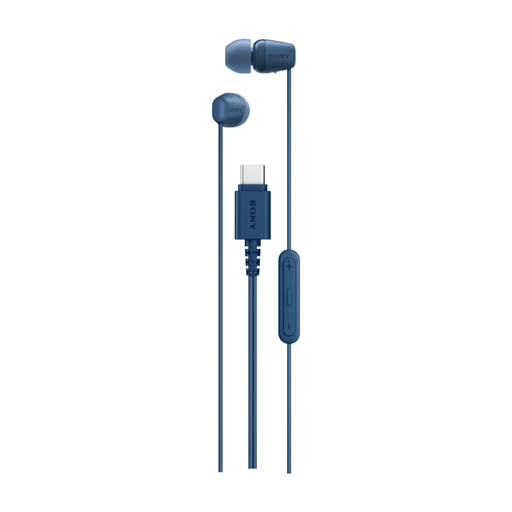
Why it suits this profile: This model is designed for everyday listening and calls with a USB-C device, without pairing or charging.
The USB-C connection means you don’t need a 3.5mm port. The 120 cm cable and built-in control panel reduce your reliance on Bluetooth and a battery.
USB-C, microphone, remote control, in-ear design and a listed weight of 3 grams.
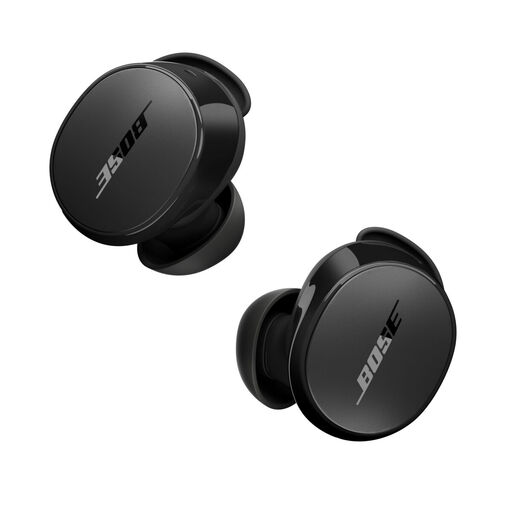
Why it suits this profile: A good choice for users who value wireless listening, app settings and noise cancellation.
The product information lists active noise cancellation and an Aware mode. This makes it clearer which type of noise reduction is offered than when a product mentions only “passive isolation”.
Bluetooth 5.3, a listed battery life of 8.5 hours, an IPX4 rating and control via the Bose app.
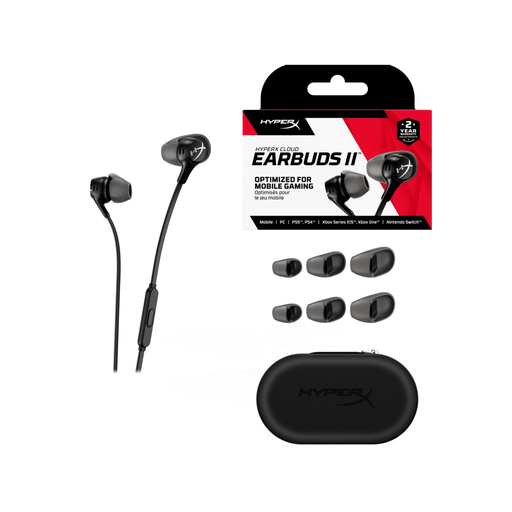
Why it suits this profile: Designed for gaming, podcasts, video and calls with a 3.5mm device, including a PC, Nintendo Switch and mobile devices with a compatible jack.
The four sizes of ear tips help you find a comfortable fit. According to the product description, the 90-degree plug and flat cable are designed to help prevent tangles.
14.3mm drivers, microphone, multifunction button, 1.2-metre cable and an included carry case.
We’ve put together a complete, up-to-date list of products that meet these strict selection criteria and comply with current European safety regulations.
That depends on the microphone and whether your phone or computer supports it. Check that the model has a built-in microphone and lists call controls. For important calls, it’s also worth checking where the microphone is positioned and whether it has any noise reduction for speech.
Their lifespan depends on how you use, store and handle them. With wired models, the cable and plug are often the parts that take the most wear. So pull on the connector, not the cable. The battery capacity of wireless earbuds decreases over time. Keep them in the charging case and make sure the connections stay dry. In the EU, many products come with a minimum two-year legal guarantee if they don’t conform to the contract.
Wired earbuds don’t have charging costs or use a battery. Wireless earbuds generally cost very little to charge. The more significant costs arise if the battery loses capacity or the charging case needs replacing. So look beyond the purchase price and consider battery life, the guarantee, accessories and compatibility with your current devices.
