
Vandaag of morgen in huis

Kwaliteit gegarandeerd

Welkomstaanbiedingen ontgrendelen: GRATIS bezorging | Tot 80% korting | Gratis 30 dagen JoyPlus-proefperiode
Download de app
Earbuds may seem simple to choose, but the difference between a good buy and a costly mistake often comes down to the details. A low price tells you little about comfort, while a well-known brand name doesn’t automatically mean they’ll work with your phone, laptop or games console.
If you’re looking for wireless earbuds, wired earbuds, in-ear earbuds or earbuds with a microphone, it’s worth thinking about how you’ll use them first. Will you mostly listen to podcasts on the go, make frequent calls, play games or block out distracting background noise? Each situation calls for different specifications.
A USB-C connection only works if your device supports audio over USB-C. Some smartphones have a USB-C port, but not every USB-C port automatically handles analogue or digital audio in the same way. So check the product information for compatibility.
A model with a 3.5 mm connection is handy for devices with a headphone socket, such as certain laptops, handheld consoles and older smartphones. If your computer has separate sockets for the microphone and audio, you may need a splitter.
Noise-cancelling earbuds use active noise cancellation, while wired models often only offer passive noise isolation through their fit. Active noise cancellation can be useful on the train or in the office, but how well it works depends on your surroundings and the fit. Treat claims made by brands as product information, rather than a guarantee of a specific level of quiet.
Keep safety in mind, too: in-ear earbuds can partially block out background noise. So don’t use them when cycling, driving or in other situations where you need to hear traffic.
With Bluetooth earbuds, battery life determines how often you’ll need to charge them. Check whether the stated battery life is for a single charge or includes the charging case. Wired earbuds don’t have battery life to consider, but their cable can get caught on things.
A larger driver, such as the 14.3 mm driver in the HyperX Cloud Earbuds II, is a measurable specification, but it doesn’t tell you on its own how the music will sound to you. Fit, tuning and personal preference are just as important.
In-ear earbuds should stay securely in place without putting constant pressure on your ears. Check how many sizes of silicone ear tips are included. The HyperX Cloud Earbuds II comes with four sizes; the Bose QuietComfort Earbuds comes with small, medium and large ear tips and stability bands, according to the product information.
A good fit also helps with passive noise isolation. Comfort is still a personal matter, though. If you wear earbuds for several hours a day, it’s worth looking beyond sound features alone.
Earbuds with a microphone are handy for calls, online meetings and team chat. Check whether the microphone is in-line on the cable or built into the wireless earbuds. Also look for a multifunction button, volume controls or a mute function.
The button may work differently with different devices. For example, the HyperX product information notes that the available functions may depend on the connected device.
For Bluetooth earbuds, check the Bluetooth version, supported devices and whether they work with an app. For gaming, latency is also important. According to the product information, the Sony PULSE Explore uses PlayStation Link as well as Bluetooth and is designed to work with devices including PS5, PC, Mac and PlayStation Portal.
If you use a Nintendo Switch, Steam Deck, PlayStation or Xbox, check whether you’ll need a cable, dongle or adapter. A model that works well with a smartphone won’t necessarily work with every console.
Look for a stated IP rating if you’ll use your earbuds outdoors or during light exercise. According to the product specifications, the Bose QuietComfort Earbuds have an IPX4 rating. This doesn’t mean they’re suitable for submersion.
Also check the warranty and seller information. Several of the models mentioned come with a two-year warranty or a statutory EU guarantee. Keep your proof of purchase and follow the safety instructions on volume, moisture and small parts.
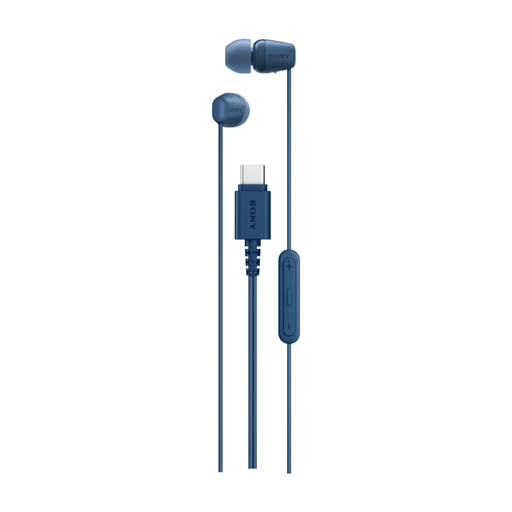
Why it suits this profile: The USB-C connection is handy for everyday listening, calls and podcasts on compatible smartphones, tablets and laptops. There’s no need to pair via Bluetooth or use a charging case.
The connection and 1.2-metre cable are clearly specified. Just check first that your USB-C device supports audio.
USB-C, built-in microphone, remote control and a lightweight design, according to the product information.
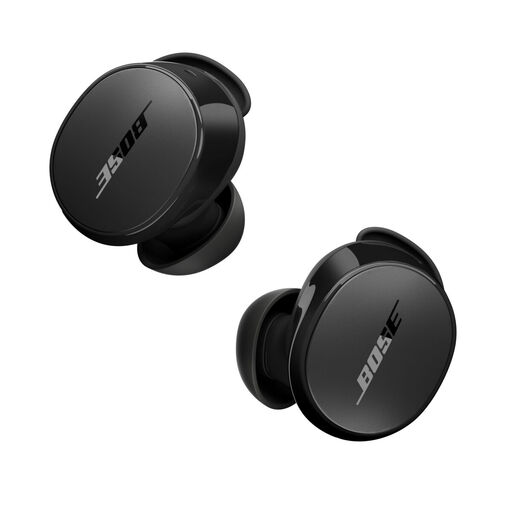
Why it suits this profile: If you travel often, work from home or listen to music and podcasts in changing surroundings, this wireless model offers active noise cancellation and an Aware mode.
The noise-cancelling feature is specified as active noise cancellation. The IPX4 rating helps you avoid overestimating how water-resistant the earbuds are.
Bluetooth 5.3, multipoint according to the product information, app settings and a stated battery life of up to 8.5 hours per charge.
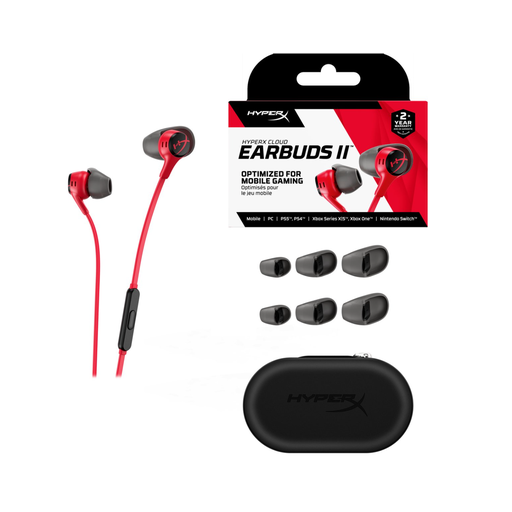
Why it suits this profile: These wired gaming earbuds are designed for mobile gaming and use with a PC, Nintendo Switch, Steam Deck and devices with a 3.5 mm connection.
There’s no battery to charge, and the 3.5 mm connection avoids Bluetooth pairing issues. Some PCs may require a splitter.
14.3 mm dynamic drivers, microphone, multifunction button, four sizes of ear tips and a 1.2-metre cable.
We’ve put together a complete, up-to-date list of products that meet these strict selection criteria and the current European safety requirements.
Wired earbuds don’t have a built-in battery, so they don’t need charging. That makes them handy if you often forget to charge your devices or enjoy long listening sessions. Wireless earbuds give you more freedom to move around, but their battery capacity decreases over time. So the choice comes down to convenience, connections and how long you use them for.
Not always. Check whether your smartphone’s USB-C port supports audio and whether the model is compatible with digital USB audio. A USB-C to 3.5 mm adapter may be an alternative, but compatibility can vary between devices.
Their lifespan depends on cable strain, battery wear, moisture, storage and everyday use. Wired earbuds may last longer if you avoid wrapping the cable tightly or pulling on the connector. Keep wireless models in their charging case, and make sure both the earbuds and their connections stay dry. If they’re persistently uncomfortable or damaged, it’s safer to replace them rather than carry on using them.
