
A charger for one charging case
You mainly want the adapter, your existing cable and the case’s connection to work together. Extra ports aren’t necessary if you’re only charging your earbuds.


Choose a USB mains charger that matches the charging port and requirements of your exact charging case, and check whether the right cable is included. One USB-C port is enough if you’re only charging the case; extra ports are useful mainly if you want to connect a second device at the same time. Place the charger and case on a clear, hard surface, away from bedding, and check that the specific product carries the required CE marking.
You mainly want the adapter, your existing cable and the case’s connection to work together. Extra ports aren’t necessary if you’re only charging your earbuds.
You want to charge the case within easy reach and need space to place the adapter and case on a clear surface, away from pillows and duvets.
You have one socket by the bed and want to connect two devices to it. In that case, the number of ports, their connections and the cables all matter.
Keep the adapter and charging case clear of bedding so heat can dissipate. The Netherlands Fire Service advises against charging devices under a pillow or duvet. Then choose based on the case, the cable and the space around the socket.
| What to consider | What should you look for? | Who is this important to? |
|---|---|---|
| Placing it safely | Keep the adapter and case clear of pillows and duvets; don’t use a damaged cable or adapter. | When I charge the case by my bed, I want to be able to place the adapter and case on a clear surface. Around 34% of consumers rank safe placement as their top priority. |
| Connection and cable | Check that the output matches your existing cable and whether a suitable cable is included in the box. | I want my case, cable and adapter to work together, so I can charge the case without having to find another cable first. Around 33% of consumers prioritise a compatible connection. |
| Charging two devices at once | Check the number and type of ports, and the power available from each port when used simultaneously. | If I also want to connect my phone by the bed, I need two suitable connections. Around 20% of consumers prioritise charging devices simultaneously. |
| Space on the bedside table | Check the dimensions of the exact model and leave enough space around the adapter. | When there’s little room by the socket, I’m looking for a straightforward adapter that fits and can be placed on a clear surface. Around 13% of consumers focus mainly on space and simplicity. |
The wattage shown on an adapter is its maximum output. The manufacturer’s stated specifications alone don’t show that it will charge a case faster.
Follow the charging instructions for your exact case, and choose extra power only if you also want to connect another device.
What’s in the box varies by model and version. If an adapter doesn’t come with a compatible cable, you may need to buy one separately.
Check the full model code, what’s included in the box and the connection at both ends of the cable.
If the right cable isn’t included, you may need to buy a compatible one separately.
The Consumers’ Association of the Netherlands has reported on unsafe and counterfeit chargers bought through UK marketplaces. These examples don’t prove that all chargers are unsafe, but a brand name or logo alone doesn’t confirm the origin of a specific product.
Check the seller, model details, markings and condition of the adapter. Stop using a charger if it smells unusual or works inconsistently.
An adapter under a pillow or duvet may not be able to dissipate heat properly. The Netherlands Fire Service advises against charging devices under bedding.
Place the adapter and case on a clear surface. Choose another place to charge them if you can’t do that by the bed.
Belkin offers both a single-port USB-C charger and a model with USB-C and USB-A. The right option depends on your cable and how many devices you want to connect at once.
The 20 W USB-C power adapter is a single-port option for use with a compatible cable. Apple lists AirPods models in its compatibility information.
The Anker 511 Charger (Nano Pro), model A2637, is a single-port USB-C option for one device.
The Samsung EP-T2510 series includes a USB-C adapter with a maximum output of 25 W. Samsung’s model-specific charging guidance is also relevant for Galaxy Buds.
These Joybuy products include single-port USB-C adapters and adapters with USB-C and USB-A, for charging a case on its own or alongside a second device. Before buying, check whether the specific product carries the CE marking. This marking is required in the Netherlands for electrical equipment covered by the Commodities Act Decree on Electrical Equipment.
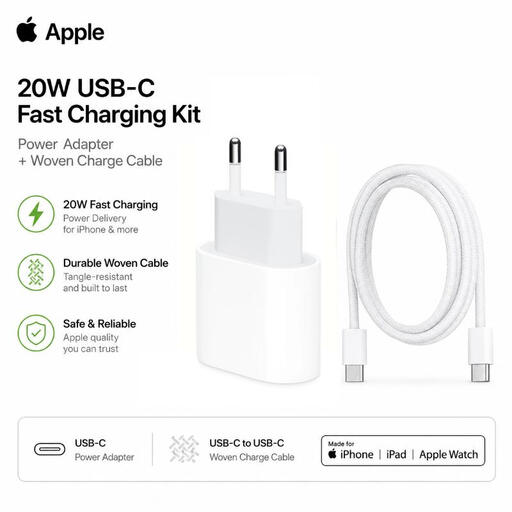 Image unavailable
An option if you charge your case via USB-C and want to choose your adapter and cable together.
The product name lists a USB-C mains adapter and a braided USB-C charging cable.
 Image unavailable
An option if you want to connect a second device as well as your charging case, and both port types are compatible with your cables.
The product name lists USB-A and USB-C and an output of 80 W. Check the connection and cable for each device.
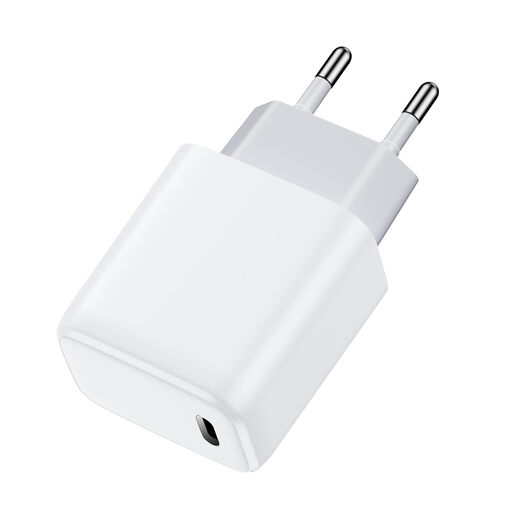 Image unavailable
A single-port option if your case’s cable has a USB-C connector at the adapter end.
The product name lists one USB-C port and an output of 30 W. That maximum output alone doesn’t tell you how long your case will take to charge.
 Image unavailable
An option if you want to connect your charging case and a second device at the same time, and the ports are compatible with your cables.
The product name lists USB-A and USB-C and an output of 30 W. Check how the power is distributed when both ports are in use.
 Image unavailable
An option if you want to connect two devices and need both USB-A and USB-C.
The product name lists USB-A and USB-C and an output of 20 W. Check that your case’s cable fits one of the ports.
No. First check which cable and charging method are specified in the instructions for your exact case. Samsung explains that Galaxy Buds can be charged via the case’s connector or, where supported, with a wireless charger. Apple specifies USB-C and particular wireless charging methods for the AirPods Pro 3 case; these aren’t universal specifications for all earbuds.
Place the adapter and case on a clear surface so heat can dissipate. Don’t charge them under a pillow or duvet, and don’t use a damaged cable. The Netherlands Fire Service also recommends charging in a room with a working smoke alarm. This safety advice doesn’t guarantee that charging while you sleep is risk-free.
Don’t charge a wet case. Samsung warns against moisture in the connector of the Galaxy Buds2 Pro case and advises contacting a service centre if charging problems persist. For other models, check the manufacturer’s instructions.
For a standard online purchase, you generally have a statutory cooling-off period of up to 14 days after delivery, subject to legal exceptions. You’re also covered by statutory guarantees if the product doesn’t perform as you could reasonably expect under normal use; the seller is your point of contact. ACM ConsuWijzer distinguishes these rights from a voluntary manufacturer’s warranty.
CE marking is required for electrical equipment covered by the Commodities Act Decree on Electrical Equipment. Check the marking and origin of the specific product; a CE logo alone doesn’t prove that a potentially counterfeit product is safe.