
Singer practising with a recording
Wants to listen back to the harmony line on its own and is looking for a suitable, portable listening solution.


If you only want to practise a recorded harmony line, wired in-ears are enough, provided the connection is compatible with your playback device. To hear a mix of your live vocals and backing track, you’ll also need a suitable monitor output and possibly extra equipment. Wireless listening gives you more freedom to move, but you’ll need to keep an eye on battery life and the connection. Keep the volume low and stay alert to important sounds around you, as the WHO recommends for safe listening.
Wants to listen back to the harmony line on its own and is looking for a suitable, portable listening solution.
Wants to hear their own voice and the backing track while singing. The available mixer outputs and the number of mixes needed will help determine the setup.
Doesn’t want to be tethered to the mixer by an audio cable while practising, so also needs to consider battery life and the wireless connection.
Choose this option: if you want to listen to a pre-recorded harmony line and your playback device has a compatible headphone output.
Bear in mind: you won’t need a separate monitor transmitter or beltpack, but the in-ears won’t create a mix of your live vocals and backing track.
Choose this option: if a suitable monitor output or mix is available where you practise and you want to control it yourself.
Bear in mind: the Behringer P2 amplifies a monitor signal sent to it, but it isn’t a mixer or a pair of in-ears.
Choose this option: if you have a suitable audio output and want to move around while monitoring live, without a cable running to the mixer.
Bear in mind: the Xvive U4 set doesn’t include in-ears and the manufacturer specifies a maximum battery life of five hours. Also check which frequency regulations apply at your location.
| What to consider | What should you look for? | Who is this important for? |
|---|---|---|
| Hearing the harmony line | Distinguish between playing a recording and mixing live vocals with a backing track; check which outputs are available. | When I’m learning a harmony line, I want to be able to follow it clearly in a recording without immediately setting up a live mix. For around 36% of consumers, listening back to the harmony line is the top priority. |
| Fit and surroundings | Check the included tip sizes, how comfortable they are to wear and whether you can still hear important sounds around you. | I want to practise in comfort while still being able to hear important sounds at the campsite. Around 29% of consumers give fit and ambient sound the highest priority. |
| Connection and power | Check the output on your player or mixer, which cables or adapters you’ll need, and the power requirements of any extra equipment. | If I’m bringing my existing player or mixer, I want to know in advance which connections and power the setup requires. For around 21% of consumers, connections and power are the top priorities. |
| Freedom to move | Decide whether you need a live monitor mix and check whether the chosen set includes in-ears. | When I want to move around while listening to a live mix, I don’t want to be connected to the mixer by a cable. Around 14% of consumers value freedom of movement while monitoring live above all else. |
The Xvive U4 set reviewed doesn’t include in-ears. Without them, you can’t use the set to listen for yourself.
Check what’s included in the specific set and make sure your audio source’s output is compatible with the connection.
A well-fitting tip can reduce ambient noise, but strong isolation can also make sounds around your practice area harder to hear.
Choose tips that fit well, keep the volume low and stop practising when you need to hear important sounds. The WHO notes that volume, listening time and exposure all matter.
The Behringer P2 amplifies a monitor signal sent to it; it doesn’t create the mix itself. The manufacturer also states that two AAA batteries aren’t included.
Plan the complete signal chain in advance: source or mixer output, cables, beltpack and in-ears.
Along with the beltpack, the P2 setup requires a compatible source, cables, in-ears and two AAA batteries.
The wired IE 100 Pro is an option to compare for listening to recordings and monitoring.
The wired SE215 is worth comparing if fit and a detachable cable are important to you.
The U4 is a wireless monitoring option for anyone who already has a suitable audio source or mixer.
The P2 is a wired beltpack amplifier for an existing monitor mix, not a pair of in-ears.
These product choices are aimed at listening back to a recording through wired in-ears connected to a compatible playback output. Before buying, check that the connection matches your player or adapter.
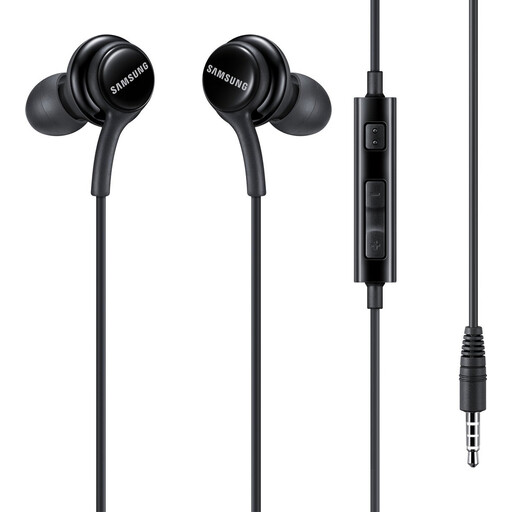 No image available
A wired option for listening back to a recording, provided your playback device has a compatible audio output.
The product information specifies a 3.5mm connection.
 No image available
Wired in-ears for listening to a practice recording via a compatible USB-C audio output.
The product information specifies several ear tip sizes. Check that your source’s USB-C connection supports audio.
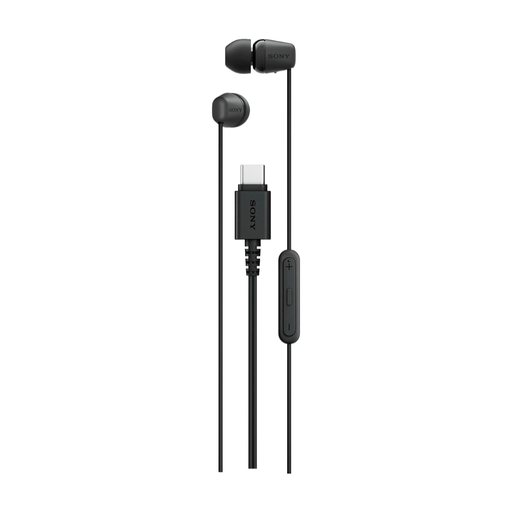 No image available
A wired listening option for a practice recording if your playback source has a compatible USB-C connection.
The product information specifies several ear tip sizes and a tangle-resistant cable.
 No image available
The product description specifies wired in-ear monitors for listening back to a harmony line through a compatible playback source.
The product information specifies 2-pin connectors; check that they’re compatible with your equipment.
 No image available
A wired option for listening to a recording if your playback source supports the compatible USB-C connection.
The product information specifies several ear tip sizes and stability bands. It also mentions noise cancellation, which could make ambient sounds at the campsite harder to hear.
No, not if you’re only listening to the recording: wired in-ears are enough as long as the connection is compatible with your playback device. To hear a live mix of vocals and backing track, you’ll also need to check which monitor outputs and mixes are available.
First, decide which signals you need in the mix and which output your mixer provides for it. According to Behringer, the P2 receives a signal via XLR or 6.3 mm, and you connect in-ears via 3.5 mm; the P2 doesn’t create the mix itself.
Keep the volume low and take regular breaks. The WHO identifies volume, listening time and exposure to loud sounds as important factors. Its example of 80 dB for a maximum of 40 hours per week doesn’t guarantee that a particular volume setting is safe for a specific pair of in-ears.
According to the Dutch Authority for Digital Infrastructure, a licence usually isn’t required for wireless microphones, but you must use the correct frequencies and comply with the relevant conditions. Available UHF frequencies may vary by location, so check the frequency band for the specific system and campsite.
For online purchases, you generally have a 14-day cooling-off period after delivery, according to ACM ConsuWijzer. An exception may apply to certain hygiene products once their seal has been broken; check the terms for the specific product before buying.