
Evening reader beside someone who’s asleep
You want to read long texts in bed without switching on a bedside lamp. Adjustable lighting and controls you can use from your reading position are important considerations.


Choose an e-reader with adjustable screen lighting and set it to the lowest brightness that still lets you read comfortably. This doesn’t guarantee that the light won’t disturb your roommate. Check where your biographies are available, too: Kindle doesn’t support the Adobe DRM-protected e-books from the Dutch online Library. For mostly continuous text, black and white may be all you need; a colour screen is most useful if your chosen edition contains important colour images.
You want to read long texts in bed without switching on a bedside lamp. Adjustable lighting and controls you can use from your reading position are important considerations.
You want to know in advance whether your borrowed e-books will work on your chosen e-reader. The online Library uses Adobe DRM for its e-books, which Kindle doesn’t support.
You read more than just text, including photos or pages with a fixed layout. Check both the digital edition and how the device displays it.
First, check whether you can borrow or buy the titles you want on your intended device. Then compare the lighting and screen display with the way you read in bed.
| What to consider | What to look for | Who will find this most important? |
|---|---|---|
| Light in a shared room | Check whether you can adjust the brightness and colour temperature. Try the settings from your usual reading position; they don’t automatically tell you how much light your roommate will notice. | If I’m reading while someone sleeps beside me, I want to see the text without switching on a bedside lamp. Around 36% of consumers say evening lighting is their top priority. |
| Access to books | Look up the exact title and edition at your usual bookshop or library, and check the format and DRM. The online Library uses Adobe DRM, which Kindle doesn’t support. | If you mainly want to borrow books, you’ll want to know before buying whether you can put your chosen biography on the device. Around 29% of consumers prioritise access to books. |
| Handling and reading space | Compare the screen size, text settings and controls with the way you sit or lie in bed. The Consumers’ Association considers reading in bed when assessing ease of reading. | If I’m reading lying down, the device needs to be comfortable to hold and the text needs to suit my preferences. Around 21% of consumers say ease of handling is their top priority. |
| Photos and fixed-layout pages | Look at a preview of the exact edition to see whether colour matters. You may need to zoom in on PDF pages with a fixed layout; the Consumers’ Association notes that this is easier on a tablet. | If I find photos or illustrations just as important as the text, I want to assess how the chosen edition looks before I buy. Around 14% of consumers prioritise image display. |
An adjustable warm colour temperature is a feature of the e-reader, not a guarantee that the light won’t disturb your roommate.
Set the brightness to what you need to read, and talk to the person you share the room with about the light.
How much light someone else notices also depends on the room and where you’re reading.
Try the e-reader in your usual reading position and adjust the settings to suit the conditions in your bedroom.
A colour screen is most useful if the digital edition itself contains important colour images.
Look at a preview of that exact edition. If it has a fixed page layout, check whether you’ll need to zoom in often.
An option to compare if you mainly read biographies as continuous text, or if the digital edition contains colour images.
The Verse Pro Azure is a black-and-white option; the Verse Pro Color has a colour screen.
The shine (5th generation) is a compact black-and-white option with adjustable colour temperature.
Could suit you if the biographies you want are available for Kindle; it isn’t suitable for e-books from the Dutch online Library protected with Adobe DRM.
This selection features Bigme e-readers that may be suitable for biographies where colour display matters. Check the digital edition itself, too: a colour screen is most useful if it contains important colour images.
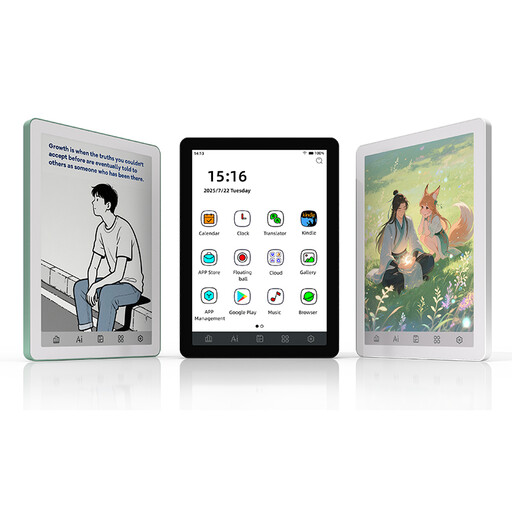 Image unavailable
Suited to anyone who wants to read biographies on a compact e-reader and values adjustable frontlight levels.
6-inch E Ink screen; frontlight with 36 levels.
Android 14 with Google Play; 4+64 GB.
 Image unavailable
Suited to anyone looking for a colour-screen e-reader for biographies who also wants to consider the other listed device features.
6.13-inch E Ink colour screen; Android 14.
8 GB+256 GB; 5 MP/20 MP cameras.
 Image unavailable
Suited to anyone looking for a 7-inch colour screen and adjustable frontlight levels for biographies with relevant colour images.
7-inch colour screen; 300 ppi.
Frontlight with 36 levels; 4+64 GB.
No, not if it’s an e-book from the online Library protected with Adobe DRM. The online Library confirms that Kindle doesn’t support this protection; also check whether each title’s edition is suitable for an e-reader.
The online Library explains how to transfer books using Adobe Digital Editions on a computer and a USB connection. Since 23 June 2026, new users and new authorisations have had to follow updated account steps using ByteBooks.
Not just because of the subject. Check whether the digital edition contains relevant colour photos; for a PDF with a fixed page layout, also consider how you’ll view the text and images.
According to ACM ConsuWijzer, you generally have a statutory 14-day cooling-off period from delivery when you buy an e-reader online. This is separate from your statutory rights if the product doesn’t meet what you could reasonably expect; if a fault develops during normal use, the seller must offer an appropriate solution free of charge.