If you mainly read continuous text outdoors, a non-glare e-reader is often a better choice than a standard tablet, which can reflect direct sunlight, according to the Consumers’ Association. A tablet is worth considering if photos, maps, PDF layouts or other apps matter to you. In either case, check that your books and any library loans work on the device you choose.
Who is this choice relevant to?
Outdoor reader of long travel stories
You mainly read text, often in the sun, and want a device that’s easy to take with you. The screen matters more than extra apps. The Consumers’ Association highlights reflections when reading in bright daylight, while Kobo describes non-glare e-ink screens designed for reading text, among other things.
Library reader on the go
You borrow travel books through the Online Library or already have a collection of e-books. File and security support can determine which device works with your books. The Online Library states that its Adobe DRM-protected e-reader loans don’t work on Amazon Kindle.
Reader of illustrated travel books
Photos, maps or a fixed page layout are part of the story for you. The Consumers’ Association points out that image-rich books can be difficult to read on a small e-reader screen. Weigh this against reading in bright daylight.
What should you look for when choosing?
Start with the lighting conditions and the type of book you read. Then check that your own books and any lending services work on the device.
Black-and-white e-reader
Choose this option: if you mainly read continuous text and often sit outside.
Bear in mind: colour photos, maps and fixed PDF pages may be less suitable for a small screen.
Colour e-reader or e-ink tablet
Choose this option: if you want to view colour illustrations as well as text, while still using e-ink.
Bear in mind: colour e-ink isn’t automatically equivalent to a standard tablet for detailed images or PDFs.
Standard tablet
Choose this option: if image-rich books and using other apps are important to you.
Bear in mind: reflections can be a nuisance outdoors. Assess the screen in lighting conditions similar to where you’ll be reading.
| What to consider |
What to look for when buying |
Who is this important to? |
| Reading in bright daylight |
Check whether the screen is non-glare, and whether the screen size and text display are comfortable for longer reading sessions. |
If I mainly read long texts in the sun, I want to minimise reflections. Daylight and text are top priorities for around 36% of consumers. |
| Access to books |
Check where your books come from and which file formats and DRM are required for the titles and lending service you want to use. |
If I borrow books, I want to know in advance whether they’ll open on the device. Access to books is the main priority for around 29% of consumers. |
| Photos, maps and PDFs |
Look at a sample page and check that the details remain legible on the screen you’re considering. |
For maps and photos, I want to check that details and colours remain clear enough to use. Around 21% of consumers prioritise images and page layout. |
| Reading and other apps |
Decide which apps you really need, and whether a tablet’s weight and reflections suit your reading spot. |
If I want to use reading apps and other apps on the same device, I weigh that up against reading outdoors. This combination is the main reason to buy for around 14% of consumers. |
Common buying mistakes
-
Choosing a tablet based on its brightness specification alone
A stated brightness level doesn’t prove that a screen is easy to read in direct sunlight. The Consumers’ Association highlights reflections as something to consider when using tablets to read outdoors.
Assess the actual screen in similar lighting conditions, and weigh up extended outdoor reading against your need for colour and apps.
-
Assuming every e-reader opens library books
The Online Library states that its Adobe DRM-protected e-reader loans don’t work on Amazon Kindle. Compatibility can also depend on the required file formats.
For the exact model, check that it supports Adobe DRM, ePub and PDF if you want to borrow books this way.
-
Assuming colour e-ink is the same as a standard colour tablet
For the PocketBook Verse Pro Color, PocketBook specifies 300 ppi for greyscale and 150 ppi for colour. A small screen can also make some PDF layouts difficult to view.
Look at sample pages from your own travel books, and don’t choose based on colour alone.
Brands to compare
Kobo
Kobo’s Dutch range includes the black-and-white Clara BW and the larger Libra Colour, with a colour screen and physical page-turn buttons.
- Kobo says the models mentioned have non-glare e-ink screens.
- The Clara BW is black and white. For image-rich PDFs, check how the pages actually look rather than focusing only on the colour feature.
PocketBook
The Verse Pro is a compact black-and-white e-reader for text and a wide range of file formats; the Verse Pro Color adds a colour screen.
- PocketBook lists a 6-inch screen, Adobe DRM and IPX8 for the Verse Pro.
- For the Verse Pro Color, PocketBook specifies 300 ppi in greyscale and 150 ppi in colour. Assess maps with fine colour details on the actual model.
Amazon Kindle
The Kindle Paperwhite 16 GB (2024 model) is a text-focused option with a 7-inch anti-glare screen, according to Amazon.nl.
- The anti-glare screen suits readers who mainly want to read text outdoors.
- The Online Library states that its Adobe DRM-protected e-reader loans don’t work on Amazon Kindle.
BOOX
According to BOOX, the Go Color 7 (Gen II) is a compact colour e-ink reader with Android apps and page-turn buttons.
- BOOX lists a 7-inch screen, adjustable front light and the option to switch the light off in bright sunlight.
- Having apps doesn’t guarantee that every reading service or travel book will work on the device. Check the app and title you want to use.
Apple
The 11-inch iPad (A16) sold in the Netherlands is an example of a standard colour tablet for reading and using other apps.
- Apple specifies 500 nits and a weight of 477 grams for the Wi-Fi version of this model.
- The brightness specification alone doesn’t prove that reflections won’t be a problem in direct sunlight.
Joybuy products
This Joybuy selection includes colour e-ink readers and standard tablets for reading travel stories, with a focus on illustrated books and using other apps.
 No image available
Bigme B751C S 7-inch colour e-ink reader
A colour e-ink reader to consider if you want to view colour illustrations as well as text.
The product title lists a 7-inch colour e-ink screen, 4+64GB, 300 ppi and 36 levels of front light.
View at Joybuy
 No image available
HONOR Pad X8b 128GB tablet, Space Grey
A standard tablet to consider if you want to read travel stories on a device that’s also designed for using other apps.
The product title lists 128GB of storage and the colour Space Grey. Assess the screen in the daylight you plan to read in.
View at Joybuy
 No image available
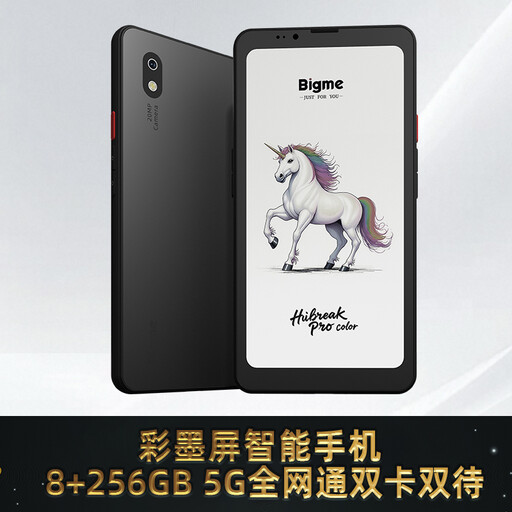
Bigme HiBreak Pro Color 6.13-inch e-ink reader, Android 14
A colour e-ink reader to consider if you want to view colour illustrations and use reading apps.
The product title lists a 6.13-inch e-ink screen, Android 14 and 8GB+256GB. Check that the reading app and books you want to use work on this model.
View at Joybuy
 No image available
TECLAST T65 13.4-inch tablet, 120 Hz, with folio case
A standard tablet to consider if you want to view travel books with large images or a fixed page layout.
The product title lists a 13.4-inch screen, 120 Hz and an included folio case. The product information advises against prolonged exposure to sunlight, so bear this in mind when reading in bright daylight.
View at Joybuy
 No image available
TECLAST P50 11-inch Android 16 tablet, 128GB
A standard tablet to consider if you want to read travel stories with images and use other apps too.
The product title lists an 11-inch IPS screen, Android 16 and 128GB of storage. The product information advises against prolonged exposure to sunlight, so bear this in mind if you mainly read outdoors.
View at Joybuy
Frequently asked questions
Can I read an illustrated travel story just as well on a small e-reader?
Not always. Continuous text works well on an e-reader, but lots of photos or a PDF with a fixed page layout can be difficult to read on a small screen. Check the size of your edition and, if possible, look at a sample page before choosing, as the Consumers’ Association recommends.
How do I put a borrowed e-book on a compatible e-reader?
The Online Library describes a process using Adobe Digital Editions and an e-reader that supports Adobe DRM, ePub and PDF. Since 23 June 2026, the sign-in process for new registrations and authorisations has changed to a ByteBooks account. According to the Online Library, users who are already signed in don’t need to authorise again straight away.
What rights do I have if I buy a tablet or e-reader online from a company in the Netherlands?
For online purchases from a company, you generally have a 14-day cooling-off period, according to the Dutch government. You’re also entitled to a product that meets the required standard. There is no fixed statutory warranty period in the Netherlands, and the retailer is your point of contact if a product is faulty. The exact rules depend on the purchase and the circumstances.


