
Outdoor fiction reader
You mainly read long mythological stories as text and want to see the screen clearly during the day.


If you mainly read long-form text outdoors, start with an e-reader with a non-reflective e-ink screen. For colour illustrations, larger PDF pages, note-taking and other apps, a standard tablet may be a better fit, although glare and heat are still worth considering. Also check that your own books and Dutch library loans work on the specific device.
You mainly read long mythological stories as text and want to see the screen clearly during the day.
You use maps, illustrations or PDF editions, and weigh up colour, page size and zooming against the benefits of e-ink.
You want to access your existing EPUBs or Dutch library books; file format and copy protection help determine which devices are suitable.
Start with the types of books you read and the services you get them from. Then compare screen type and size with the conditions you read in.
| What to consider | What should you check? | Who is this most important for? |
|---|---|---|
| Reading text in daylight | Try your own text in daylight and check that the screen is non-reflective. Don’t treat a stated brightness figure as an independent test in direct sunlight. | If I mainly read novels outdoors, I want to follow long passages of text easily and be bothered by reflections as little as possible. Around 39% of consumers make daylight readability their main priority. |
| Books and library access | Check the file format and DRM for each title. The online Bibliotheek says that Kindle does not support the Adobe DRM used for its loan books. | If I want to read my own EPUBs or Dutch library books, I first check that my specific device works with my book service. Around 23% of consumers consider access to books the deciding factor. |
| Illustrations and PDFs | View a representative page with small map labels. According to the Consumentenbond, zooming in on PDFs is smoother on a standard tablet; check colour detail on the e-ink screen you’re considering. | If maps, illustrations or fixed-layout PDF pages matter, I want to read the details without constantly scrolling or zooming. Around 23% of consumers prioritise illustrations or PDFs. |
| Portability and outdoor use | Compare the size and protection of the exact variant. Don’t leave a device in direct sunlight for long periods; Apple warns that an iPad may dim if its internal temperature gets too high. | If I take my device with me often, I weigh up its size against the space maps and pages need. Around 15% of consumers make portability and outdoor conditions the deciding factors. |
The Dutch online Bibliotheek says Kindle does not support the Adobe DRM used for its loan books. Not every illustrated title is available as an e-reader book, either.
Before buying, check a few titles you actually want to read, including their format, copy protection and available reading options.
The PocketBook Verse Pro Color has different stated resolutions for colour and greyscale. The Consumentenbond also explains that zooming in on PDFs is smoother on a standard tablet.
Try a representative map or PDF page, especially the small captions, on the screen size you’re considering.
Samsung gives a peak brightness figure for the Galaxy Tab S10 Lite; Apple warns that an iPad may dim if its internal temperature gets too high. These are specifications for different devices, not a direct comparison under real-world conditions.
Assess reflections and heat separately from the stated specifications, and keep a device away from prolonged direct heat.
Kobo offers e-readers for text and colour. According to Rakuten Kobo, the Clara BW has a 6-inch non-reflective screen; the Libra Colour has a larger colour screen and page-turn buttons.
The Verse Pro is a black-and-white e-reader; the Verse Pro Color adds colour.
According to Amazon, the 2024 Kindle Paperwhite is an e-reader with a 7-inch anti-glare screen.
The Galaxy Tab S10 Lite is a standard tablet for illustrated books, PDFs, apps, note-taking and more.
BOOX distinguishes between the black-and-white Go 7 and the Go Color 7 (Gen II), and describes Android apps as an option.
These Joybuy products include colour e-ink readers for text and illustrations, as well as standard tablets for larger pages and note-taking. Screen size and outdoor use are still important considerations.
 No image available
The product title specifies colour e-ink, making this worth considering if you want to view text and illustrations on an e-reader.
The title lists 7 inches, 4+64GB, 300 ppi and 36-level Frontlight.
 No image available
The product title specifies a colour e-ink screen and Android 14; check that the book and reading apps you use work with the model you choose.
The title lists 6.13 inches and 8GB+256GB. Its smaller screen offers less room for large, fixed-layout pages than a standard tablet.
 No image available
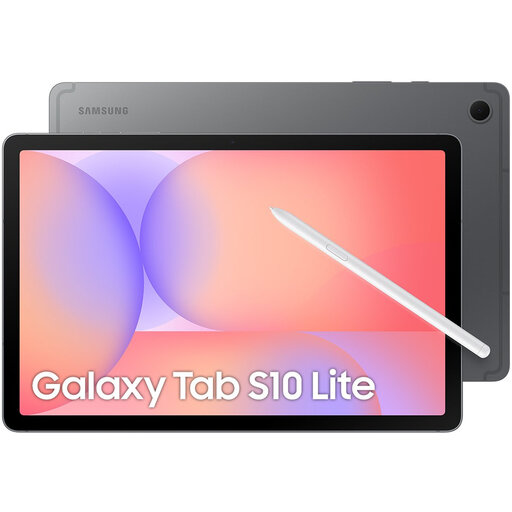
The larger tablet size could suit you if you want to view illustrated books, PDFs and notes on one device; a standard tablet screen may reflect sunlight.
The product title lists an 11.1-inch 3.2K 144Hz touchscreen, Snapdragon 8 Gen 3, 12GB LPDDR5X, 256GB UFS 4.0, Wi-Fi 7 and Android 15. It also mentions a Tab Pen Pro included.
 No image available
If you want to use illustrations, PDFs and notes on a standard tablet, this model offers an alternative to e-ink. Bear in mind the advice not to expose the device to direct sunlight.
Samsung states that the Galaxy Tab S10 Lite has a 10.9-inch screen and comes with an S Pen. Samsung also lists Vision Booster and peak brightness of up to 600 nits; this is not an independent test in sunlight.
 No image available
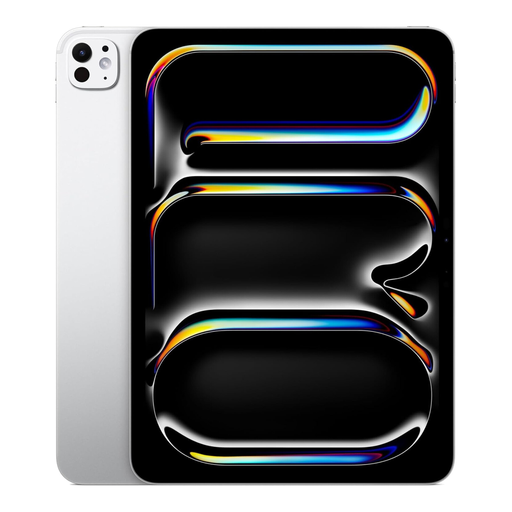
A standard tablet could suit you if you want to combine illustrated books, documents and other tablet features on one device. Bear in mind Apple’s warning about prolonged exposure to direct sunlight.
The product title lists 11 inches, 1TB, Wi-Fi and Nano Texture.
Not as an online Bibliotheek e-book on that e-reader: according to the library, Kindle doesn’t support the Adobe DRM it uses. Also check whether the specific title is available as an e-reader file.
According to the online Bibliotheek, you use Adobe Digital Editions on a computer to transfer a compatible borrowed title. For unprotected EPUB or PDF files, Kobo describes a different transfer method using a computer; check which process applies to your book and device.
A non-reflective e-ink screen could suit you if you mainly read long-form text, while a standard tablet may offer more space and options for illustrations, PDFs and note-taking. Compare the screen with your own books, and bear reflections and heat in mind when using it in direct sunlight.
ACM ConsuWijzer explains that online product purchases generally come with a statutory cooling-off period of up to 14 days after delivery, with some exceptions. There is also a legal guarantee if the product doesn’t meet what you could reasonably expect under normal use; you should contact the seller about this.
Not necessarily on every device. BOOX says the adjustable front light on the Go 7 series can be switched off in bright sunlight; check the result on your chosen model and in the conditions you read in.