For short stories on a long-haul flight, a compact tablet is a good fit if you also want to use apps, watch videos or view image-heavy files. If you’ll mainly read text, want to charge less often and prefer a lightweight reading device, a standard e-reader is the more obvious choice. An Android device with an e-paper screen may appeal if you want both e-paper and apps, but check in advance that your reading app and stories will work on it. The Dutch Consumers’ Association outlines the trade-off between the versatility of tablets and the reading-focused, generally more energy-efficient screens of e-readers.
Who is this guide for?
Air travellers who mainly read stories
If you’ll mainly be reading text on a long flight and don’t want to rely on finding a power socket, it’s worth comparing a lightweight e-reader with a compact tablet. The Dutch Consumers’ Association explains the differences between these types of device.
Readers with library books
If you want to take borrowed stories with you, check in advance that your reading app or e-reader supports the title, file format and DRM. The Online Library explains the relevant transfer options and requirements.
Readers who also use other media
If you want to switch between stories, videos, apps and image-heavy files, a tablet’s versatility may be worth considering. The Dutch Consumers’ Association distinguishes tablets designed for more than just reading from devices focused mainly on books.
What should you consider when choosing?
Compact LCD tablet
Choose this option if: you want to switch between stories, apps, videos, colour content or PDFs.
Bear in mind: the Dutch Consumers’ Association points out that tablets generally produce more screen glare and have a shorter battery life than e-readers.
Android device with an e-paper screen
Choose this option if: you want an e-paper display with access to Android apps.
Bear in mind: e-paper refreshes relatively slowly, so check that your specific reading app and title will work before you travel.
Standard e-reader
Choose this option if: you mainly read continuous text and versatile apps are less important to you.
Bear in mind: image-heavy PDFs and apps are less suited to e-readers. For library books, DRM, file format and transfer method all need to work.
| What to consider | What should you check? | Who is this more important to? |
|---|
| Opening stories offline |
Check the specific title, app or file format, and open the story without an internet connection before you leave. |
If I want to read a borrowed story during the flight, I need to know that this particular title and reading method will work. Around 25% of consumers say access to stories is their main purchasing concern. |
| Reading without recharging |
Compare battery figures only for the same task and settings, and charge the device before you leave. |
If you don’t want to rely on having access to power during a long flight, battery life may matter more than extra features. Around 25% of consumers say uninterrupted reading time is their top priority. |
| Screen readability |
Consider glare, adjustable brightness and text size in the lighting conditions you’ll be reading in. |
If I’m reading in changing cabin or daylight conditions, I want the text to be easy to read without unnecessary screen glare. Around 20% of consumers put screen comfort first. |
| Holding and carrying it |
Compare the weight and dimensions of the exact model, including the case you’ll be taking with you. |
If you’ll be holding the device for a long time and carrying it in your hand luggage, compact size and ease of handling may matter more. Around 15% of consumers say portability is their main purchasing concern. |
| Reading and enjoying other media |
Decide which other things you’ll actually use during your trip, and check that they work on the device you choose. |
If I want to use apps, watch videos or view image-heavy files after reading a story, versatility matters more to me than a device designed for text alone. Around 15% of consumers say using a device for multiple purposes is their top priority. |
Buying pitfalls
-
Assuming every e-reader can open library books
Access depends on the title, DRM, file format and transfer method. The Online Library says that its Adobe DRM is not supported by Kindle.
Check the specific title and complete the full transfer process before you leave. Bear in mind that the Online Library’s sign-in process may have changed.
Setup, authorisation and transferring files can take time, so try the steps at home first.
-
Assuming a battery-life figure guarantees a certain reading time
Usage and settings affect battery life. A figure based on a particular test task doesn’t automatically tell you how long the device will last with your reading settings.
Only compare figures when the test task and settings match, and set off with a fully charged device.
-
Choosing a power bank without checking the rules for flying
There are rules for carrying lithium batteries on board, and airlines may have additional requirements.
Check the Wh rating and your airline’s rules before relying on a power bank. The Human Environment and Transport Inspectorate states that batteries above 160 Wh are not allowed on board and must be transported as cargo; separate approval requirements apply to batteries of 100–160 Wh.
Relevant brands to consider
Apple
The iPad mini (A17 Pro) is a compact tablet for anyone who wants to combine reading with other apps or colour content.
- Apple lists an 8.3-inch screen and a weight of 293 grams for the Wi-Fi model.
- The Dutch Consumers’ Association says that tablets generally produce more glare and use more power than e-readers. These figures don’t measure how long you can read on a flight.
Samsung
The Galaxy Tab A9 is a compact Wi-Fi tablet for anyone who wants to combine reading apps with other media.
- Samsung confirms that the Wi-Fi model has an 8.7-inch screen.
- Check the exact model and version. Don’t confuse the Tab A9 with the larger A9+, or assume anything about battery life from the model name.
Lenovo
The Tab M9 is a 9-inch Android tablet for anyone who wants to use standard tablet features as well as read stories.
- Lenovo lists a reading mode and expandable storage with a microSD card, sold separately.
- Lenovo says specifications may vary by region and model, so check the exact version.
BOOX
The Go 7 is a 7-inch e-paper device with Android app support, for anyone looking for a reading-focused screen and apps.
- BOOX lists page-turn buttons and adjustable front lighting.
- E-paper isn’t an LCD colour screen for all types of media. Test your specific reading app and any DRM features in advance.
Kobo
The Clara BW is a standard e-reader for anyone who mainly reads text.
- Kobo confirms that the Clara BW has ComfortLight PRO.
- For library books, support for DRM and file formats, as well as the transfer method, remains essential.
Joybuy products for reading on the go
These Joybuy products include standard e-readers, Android e-paper devices and tablets for reading and using other apps. Before you leave, check that your stories and reading service will work on the model you choose.
 No image available
Bigme B751C S, 7-inch colour E-Ink, 4+64GB, White
A standard e-reader for anyone who mainly reads stories on an e-paper screen.
The product name lists 300 ppi and front lighting with 36 brightness levels.
View at Joybuy
 No image available
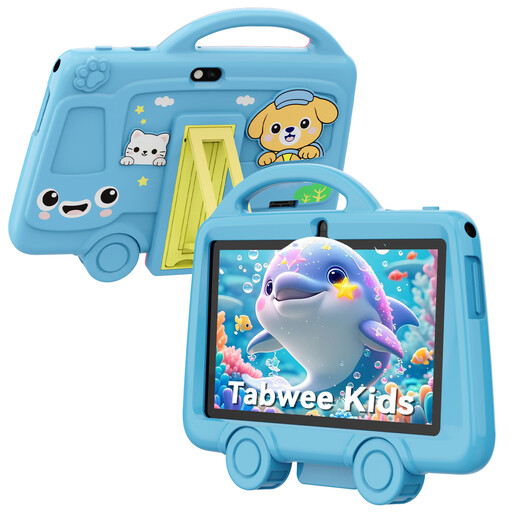
TABWEE K8 Kids' tablet, 7-inch, 2GB RAM + 32 GB
A small tablet for anyone who wants to combine stories with other types of tablet media.
The product name lists a 7-inch IPS screen, a weight of 285 grams, a 3000 mAh battery, 2.4 GHz Wi-Fi and Bluetooth 4.2.
View at Joybuy
 No image available
Lenovo Tab K11 Gen 2, 11-inch, 2.5K, ZAFS0069CZ
An Android tablet for anyone who wants to switch between stories and other apps. Its 11-inch screen is less compact to hold for long periods during a flight.
The product name lists a 2.5K screen and a MediaTek Dimensity 6300 processor.
View at Joybuy
 No image available
Lenovo Tab One, 8.7-inch Wi-Fi, 4GB RAM, 128GB, Luna Grey (ZAF00221GR)
A compact Android tablet for anyone who wants to use one device for stories and other apps.
The product information lists a microSD card slot.
View at Joybuy
 No image available
Bigme HiBreak Pro Color Display, 6.13-inch E-Ink, Android 14
An e-paper device with Android for anyone who wants to combine reading text with Android apps.
The product name lists 8GB+256GB of storage and a 5MP/20MP camera.
View at Joybuy
Frequently asked questions
Can I read on my tablet or e-reader during a flight?
According to EASA, you can normally use a tablet or e-reader on board to read. Always follow the crew’s instructions and your airline’s rules.
What are the rules for taking a power bank on a plane?
The Human Environment and Transport Inspectorate states that lithium batteries above 160 Wh are not allowed on board and must be transported as cargo; separate approval requirements apply to batteries of 100–160 Wh. Check your airline’s rules too: KLM prohibits the use or charging of a power bank on board its flights.
How do I put a library book on an e-reader?
First check that the title is available for e-readers and that your device supports the required DRM and file format. The Online Library explains how to transfer books using Adobe Digital Editions and a computer. Since 23 June 2026, new users and anyone reauthorising have had to follow a revised sign-in process via ByteBooks. Try the full transfer process before you leave.
Do books from the Online Library work on a Kindle?
Not through the e-reader method described by the Online Library: it says Kindle does not support its Adobe DRM. Reading through the tablet app is a different option; check that your device, app and title will work.
Do I need to buy an extended warranty to have a statutory guarantee?
No. According to ACM ConsuWijzer, Dutch statutory consumer rights apply alongside any commercial warranty. If a product doesn’t do what you could reasonably expect under normal use, the seller must put things right; the statutory guarantee period is not always exactly two years.


