
Outdoor reader of long novels
You mainly read continuous text in daylight and want to know whether an e-reader would suit you better than a standard tablet. Consumentenbond and Stichting Lezen look at the choice in terms of reading habits.


If you mainly read long stretches of text outdoors, start with a black-and-white e-reader with an e-paper screen. A colour e-reader is a good fit if illustrations matter to you; choose a standard tablet if you also use lots of apps, images or PDFs. Before buying, check that your book source and its file protection work with the device. The Online Library uses Adobe DRM, so make sure your chosen device supports it.
You mainly read continuous text in daylight and want to know whether an e-reader would suit you better than a standard tablet. Consumentenbond and Stichting Lezen look at the choice in terms of reading habits.
Your choice depends on how you access your fantasy books and the file protection they use. The Online Library explains which of its e-books are supported and how to transfer them to an e-reader.
You want to view maps or illustrations in colour and weigh up how many app options and how much screen space you need as well. Consumentenbond discusses reading apps, while PocketBook Nederland provides separate specifications for a colour model.
First decide whether long novels, access to your books, colour illustrations or extra apps matter most to you. Then assess the screen in the conditions where you plan to read.
| What to consider | What should you check? | Who is this important for? |
|---|---|---|
| Novel text in daylight | Compare the screen type and, if possible, assess how easy it is to read in the daylight where you’ll use it. | If I mainly read long novels in bright daylight, I want to know how the text looks on screen; around 39% of consumers put text readability in daylight first. |
| Access to your books | Check the provider, title, file format and any Adobe DRM support for the exact device. | If my purchased or borrowed books need to work on my new device, I’ll check compatibility first; around 31% of consumers give access to their existing books top priority. |
| Colour illustrations | Check whether your edition includes colour pages and compare the colour and greyscale specifications for the exact model. | If colour maps or illustrations are an important part of my reading experience, I want to know how the model displays colour; around 15% of consumers put colour illustrations first. |
| Other apps and documents | Check that the apps you need work on the device and assess the screen in the conditions where you’ll read. | If I want to use apps or documents as well as reading novels, I’m looking for a device that can handle both; around 15% of consumers prioritise versatility. |
The Online Library uses Adobe DRM. A device that doesn’t support this protection won’t be able to open those books.
Before buying, check the provider, the title you want, the file format and DRM support for the exact model. If you’re borrowing books, follow the Online Library’s latest instructions.
If your borrowing service isn’t compatible, you may need a different device for those titles.
A screen specification alone won’t tell you how comfortable a tablet will be to use where you plan to read. Apple warns that prolonged direct sunlight and overheating can cause an iPad’s screen to dim.
Assess the screen outdoors and bear the manufacturer’s usage instructions in mind.
PocketBook lists separate greyscale and colour figures for the Verse Pro Color: 300 ppi and 150 ppi respectively.
Check both figures for the exact model and think about whether you’ll mainly be reading text or viewing colour illustrations.
The Clara BW is a black-and-white e-reader for anyone looking for a book-focused reading experience.
The product information covers both a black-and-white Verse Pro and a separate Verse Pro Color.
The Go Color 7 (Gen II) is a colour e-reader with additional app options.
The 11-inch iPad Air (M4) is an example of a versatile tablet with an illuminated screen.
This selection includes colour e-readers with e-paper screens and standard tablets for anyone who wants to use other apps or documents as well as reading novels.
 No image available
Ideal if you want to view fantasy maps or illustrations in colour on an e-reader with an e-paper screen.
The product name lists a 7-inch colour E-Ink screen, 4+64GB, 300 ppi and a 36-level front light.
 No image available
Ideal if you want a standard tablet for more than just reading novels; the listed specifications don’t measure readability in bright sunlight.
The product name lists a 10.36-inch HD screen, Android 13, 16 GB (8 GB + 8 GB) RAM and 256 GB storage.
 No image available
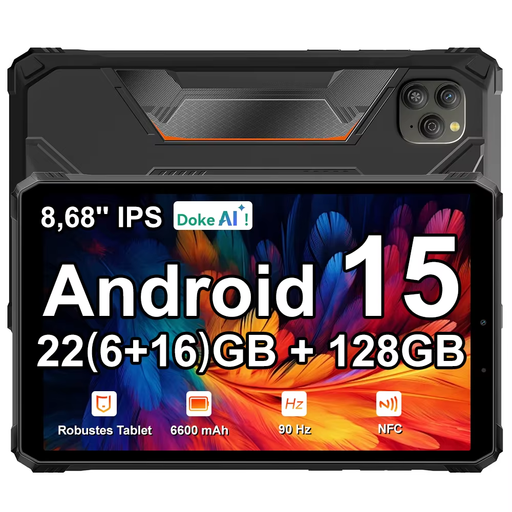
Ideal if you’re looking for a tablet-sized device for novels and other tablet uses; check how readable the screen is in the conditions where you plan to read.
The product name lists an 8.68-inch IPS screen with 90 Hz.
 No image available
Ideal if you want a tablet for everyday tasks as well as reading novels; assess the screen for the outdoor conditions you have in mind.
The product name lists 4GB RAM and 128GB storage.
 No image available
Ideal if you’re looking for a colour E-Ink screen and app use matters too; check that your preferred reading apps are available on the device.
The product name lists Android 14, 8GB+256GB and a 6.13-inch E-Ink screen.
No, it depends on whether the device supports the file protection. The Online Library uses Adobe DRM, so check that the exact device can handle this protection and the file format you need.
Follow the Online Library’s latest borrowing instructions and check beforehand that your device and book format are compatible. Since 23 June 2026, new users and users who need to log in or authorise again must create an account with ByteBooks.
Apple warns that an iPad may dim its screen if it overheats. Apple gives an operating temperature range of 0 to 35 °C for iPads; this is manufacturer information for iPads, not a limit for all e-readers.
For eligible distance purchases from a business, you generally have a 14-day cooling-off period. This is separate from your right to receive a product that is fit for purpose. According to the Dutch government, statutory guarantees in the Netherlands don’t have a fixed guarantee period. If a product is faulty, contact the seller.
The Dutch government lists CE marking as a safety requirement for electronic devices placed on the EU market. If in doubt, check the product information and the marking on the specific device.