
Reading short stories outdoors
You mainly read in daylight and want a handy screen that keeps text easy to see. According to Rakuten Kobo Netherlands, the Kobo Clara BW has a non-reflective screen.


For reading short stories in bright daylight, a compact e-reader with a non-reflective e-ink screen is a sensible first choice. A standard tablet is better if you also need apps, colour or lots of PDFs with fixed layouts. Before you buy, check that your stories and any library loans work on the exact device: a screen that’s comfortable to read won’t overcome file format or DRM restrictions.
You mainly read in daylight and want a handy screen that keeps text easy to see. According to Rakuten Kobo Netherlands, the Kobo Clara BW has a non-reflective screen.
You want to borrow stories, so you check in advance that the device supports your library’s file format and copy protection. The Dutch online Library explains that it supports ePub and PDF and uses Adobe DRM for its e-books.
You switch between stories, reading apps, colour content and PDFs, and weigh up a tablet’s versatility against an e-ink screen. Check whether the specific service works on your chosen device, including for borrowed titles.
Best for: reading mostly continuous text in daylight and wanting a handy device.
Consider: a small screen is less suited to lots of A4 PDFs or pages with fixed layouts. Check that your books are supported, too.
Best for: combining e-ink with reading apps; BOOX lists Google Play for the Go 6 (Gen II).
Consider: being able to install apps doesn’t guarantee that every reading service or borrowed title will work.
Best for: using apps, colour content or lots of PDFs with fixed layouts. The Consumers’ Association says a tablet is more suitable for reading lots of PDFs.
Consider: an anti-reflective coating doesn’t make a backlit tablet screen the same as e-ink. Assess readability in the light you’ll be reading in.
Best for: reading mainly Kindle books or using supported personal documents.
Consider: according to the Dutch online Library, its e-books with Adobe DRM don’t work on Kindle e-readers. Don’t choose this option if you need to borrow those books.
| What to consider | What should you check? | Who is this important for? |
|---|---|---|
| Readability in bright daylight | Compare the screen type and stated anti-reflective properties of the exact model. If possible, assess a tablet screen in similar lighting. | If I mainly read outdoors, I want to see the text clearly without unnecessary reflections. Around 33% of consumers prioritise readability in daylight. |
| Handy size | Compare the dimensions, weight and screen size of the exact model. Also consider whether you mainly read continuous text or pages with fixed layouts. | For short reading sessions, I want a device that’s comfortable to hold and easy to take with me. Around 27% of consumers give portability top priority. |
| Access to stories | Check that your title is available and that both the service and the exact device support the file format and any Adobe DRM. | If I want to borrow books, I need to know before buying whether my titles will actually open. Around 20% of consumers prioritise access to stories. |
| Apps, colour and documents | Decide whether you need apps and PDFs. Check that the specific apps work on e-ink, and assess readability in daylight on a tablet. | If I use apps, colour or documents as well as reading stories, that versatility matters. Around 20% of consumers prioritise extra features. |
A book might not open because of its file format or copy protection, even if the device can read e-books. The Dutch online Library says that Kindle e-readers don’t support its e-books protected by Adobe DRM.
First, check where your stories come from and what copy protection they use. Then compare this with the support offered by the exact device.
An independent review of the Kobo Libra Colour found that this model had less contrast than a black-and-white Carta screen. This finding doesn’t automatically apply to other models.
If you mainly read black-and-white stories, compare black-and-white e-readers too. Choose colour when your content calls for it.
According to the Consumers’ Association, reading A4 PDFs on a small e-reader may require a lot of zooming, while reflowing the text can change the layout.
Before choosing, open a sample of your own documents and check that the page layout still works for you.
The Clara BW is a compact black-and-white option, while the Libra Colour is an alternative for those looking for colour and page-turn buttons.
The Verse Pro Azure is a compact black-and-white e-reader with stated support for a range of e-book file formats.
The Kindle Paperwhite 16 GB (2024 model) is an e-ink option for those who mainly use the Kindle catalogue or supported personal documents.
The Go 6 (Gen II) is a compact e-ink option for readers who want to install Android reading apps.
The iPad mini (A17 Pro) is a compact standard tablet for readers who also want colour content and tablet features.
This selection includes a compact e-ink reader and standard tablets. Compare the screen type with your reading environment, and check in advance that your books and apps work on your chosen device.
 Image unavailable
Suited to anyone looking for a compact e-ink reader who also wants to use Android reading apps. Check that your specific app works.
The product name lists a 6.13-inch E-Ink screen, Android 14 and 8 GB + 256 GB.
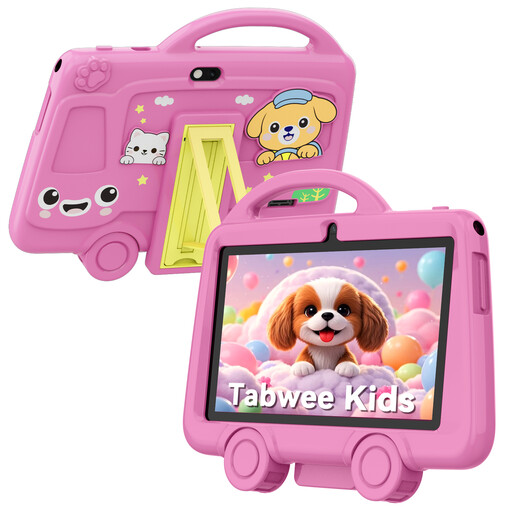 Image unavailable
A standard tablet option for anyone looking for a small screen. The IPS screen isn’t e-ink, so check how easy it is to read in your lighting conditions.
The product name lists a 7-inch screen, 2 GB of RAM, 32 GB of storage and the colour pink.
 Image unavailable
Suited to anyone who wants a larger tablet and Android apps as well as reading stories. The LTPS screen isn’t e-ink.
The product name lists an 11.1-inch touchscreen, 3.2K, 144 Hz, Android 15 and a Tab Pen Pro.
 Image unavailable
A standard tablet option for anyone who wants to read stories on a tablet screen. Check that the screen is comfortable to read in the conditions you’ll be using it in.
The product name lists 128 GB of storage and the colour Space Grey. The IPS screen isn’t e-ink.
 Image unavailable
Suited to anyone who wants to read stories on a standard tablet and use Android apps. The IPS screen isn’t e-ink.
The product name lists 10.1 inch, 128 GB of storage, 4 GB and Android 14.
No. If you mainly read continuous text, a compact e-reader with a non-reflective screen is a sensible first option to consider. A standard tablet is better if you also need apps, colour or lots of PDFs with fixed layouts. Assess the screen in the light you’ll be reading in.
The Dutch online Library describes a process using Adobe Digital Editions. First, check that the book is available for e-readers and that your device supports the file format and copy protection used.
According to the online Library, no: Kindle e-readers don’t support the Adobe DRM that the library uses for these e-books. Amazon’s support for personal EPUB documents doesn’t change this restriction.
When you buy as a consumer, you’re entitled to a product that works as it should. According to the Dutch government, the seller must provide a solution if something goes wrong. An additional commercial warranty doesn’t replace this statutory right.
In the Netherlands, when you buy from a business at a distance, you generally have 14 days from delivery to change your mind, according to ACM ConsuWijzer. Check the terms that apply to your purchase. This isn’t the same as a general right to return items bought in a physical shop.