
Library borrower travelling abroad
Wants to load books from a Dutch library onto their e-reader before leaving. Check for Adobe DRM support, the format of your chosen title and whether you’ll need to transfer it using a computer.


First, choose an e-reader that lets you open your adventure novels before you leave. Then weigh up a compact screen and adjustable reading light against the benefits of a larger display. Kobo, PocketBook and tolino are possible options for borrowing books from the Dutch Online Library using Adobe DRM, while Kindle doesn’t support this borrowing method. Check that your specific book is compatible and test it offline before you fly.
Wants to load books from a Dutch library onto their e-reader before leaving. Check for Adobe DRM support, the format of your chosen title and whether you’ll need to transfer it using a computer.
Wants to take several adventure novels without using too much hand luggage space. Compare the screen size and weight of the model you plan to take.
Wants to read even when the cabin lights are dimmed. Adjustable front lighting may be useful, so try out the light settings beforehand in the way you usually read.
First, check that your books work and are available offline. Then compare portability, reading light and battery use for your flight.
| What to consider | What should you look for? | Who is this important for? |
|---|---|---|
| Opening books offline | Check the title’s format, Adobe DRM support and the full transfer process. Open the book in advance without an internet connection. | If I want to take a borrowed novel with me, I need to know it will open on my e-reader before I leave. Around 31% of consumers put access to books first. |
| Easy-to-carry reading size | Check the screen diagonal and the weight of the exact model, and allow for the weight of a case if you plan to use one. | If I’m reading for a long time with limited room for my arms and hand luggage, a device that’s easy to carry matters. Around 25% of consumers say compact portability is their top priority. |
| Adjustable reading light | Check whether the front light is adjustable and whether you can change the brightness or light colour to suit your preferences. | With cabin lighting that changes, I want to keep reading without relying on a reading lamp. For around 25% of consumers, reading light is their main concern when buying. |
| Preparing the battery | Charge your e-reader before you leave and test it with your usual reading light settings. Download your books in advance if you plan to turn off Wi-Fi. | If I don’t want to rely on a power socket during the flight, I need to know how my own settings affect the battery. Around 19% of consumers give battery life their highest priority. |
A file format alone doesn’t tell you whether a specific library title is available on your e-reader or will open with the protection it uses. The Dutch Online Library says that Kindle doesn’t support its Adobe DRM books.
Check the format of the novels you’ve chosen and go through the full borrowing and opening process before you leave.
Transferring books using Adobe Digital Editions requires some preparation on a computer, including setting up and authorising your devices.
Battery life depends partly on settings and usage. A manufacturer’s maximum estimate won’t tell you how long your e-reader will last on your particular flight.
Charge the device in advance and test it with the settings and reading light you plan to use on your journey.
Kobo doesn’t list the Netherlands among the countries supported by its built-in OverDrive feature. The Dutch Online Library describes a separate way to transfer eligible books using a computer.
Check how your Dutch library book is provided, and assess that borrowing process separately from any built-in feature.
Allow extra time to transfer books using Adobe Digital Editions.
An option for readers looking for a compact black-and-white e-reader with adjustable lighting, and who may want to transfer books using Adobe Digital Editions.
The Verse Pro is a compact option for novel readers who may need support for EPUB with Adobe DRM.
The Paperwhite 16GB (2024 model) is a 7-inch option for readers who get their novels through Kindle.
The fifth-generation tolino shine is a compact option for compatible EPUB books or a suitable Adobe DRM setup.
The Go 6 (Gen II) is worth considering if you want to use Android apps as well as an e-ink screen.
This selection includes e-readers and devices whose product titles mention an e-book or e-ink feature. Screen sizes and additional features vary by model.
 No image available
An option if you’re looking for a 7-inch colour e-ink screen and adjustable front lighting.
The product title lists 300 ppi and a front light with 36 brightness levels.
 No image available
An option to compare if you’re looking for an e-ink reader with Android.
The product title lists 8GB+256GB of storage.
 No image available
An option if you’re looking for an E Ink tablet with a stylus and want to take notes as well as read.
The product title lists an 8.2-inch screen.
 No image available
An option to compare if you’re looking for an E Ink tablet that also lets you take notes.
The product title lists a 10.65-inch screen.
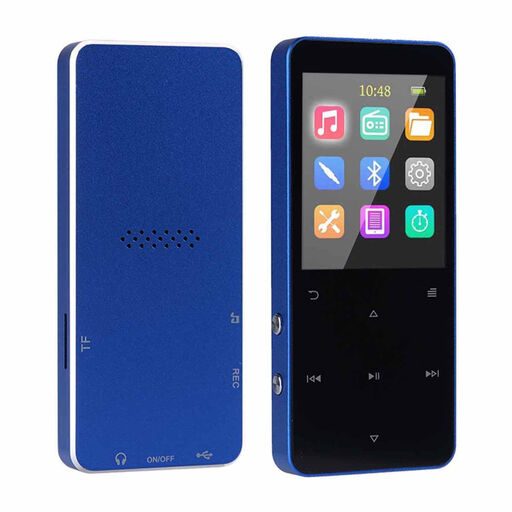 No image available
An option if you’re looking for a device with an e-reader function as well as an MP3 player.
The product title lists a 1.8-inch colour screen. That’s a small reading area to bear in mind if you’re planning long reading sessions.
Not if you mean e-books from the Dutch Online Library: the service says Kindle doesn’t support its Adobe DRM. For other e-readers, also check that your chosen title is available in the ‘For e-reader’ format.
The Dutch Online Library describes a process using Adobe Digital Editions on a computer: authorise the computer and a compatible e-reader, borrow an eligible title and transfer it. Test that the book opens before your flight. According to the Dutch Online Library, since 23 June 2026, new users and users who need to log in or authorise again must create a ByteBooks account.
The Human Environment and Transport Inspectorate states that devices with lithium batteries can be carried in hand luggage, but not in hold luggage. Airlines may have stricter conditions, so check the rules for your flight too.
Download or transfer your books to your e-reader before you leave, and open them in advance without an internet connection. Just before you leave, also check that your library’s download method is available. Don’t rely solely on a book you still need to download.
Charge your e-reader in advance and test it with the reading light you plan to use. Kobo says that turning off Wi-Fi can extend battery life, so transfer your books to the device first.