Who is this guide for?

Reader of original letter scans

You want to see the handwriting and original page layout. That makes PDF viewing and screen space more important to you than having the smallest possible device. Kobo lists PDF support for its e-readers; the Consumers’ Association notes that PDFs are easier to enlarge on a tablet.

Train reader of transcriptions

You mainly read typed-up letters and want to be able to enlarge the text on a handy device. First, check whether your files are available as EPUBs; Kobo lists support for EPUB and PDF.

Archive reader who makes notes

You want to keep notes alongside letters, so you’re looking for a model that supports PDF annotation. Kobo lists this feature for the Elipsa 2E, which comes with a stylus; BOOX lists PDF annotation for the Go 10.3 (Gen II) series.

What should you look for?

Start with the type of file you read: a transcription has different requirements from a scan with a fixed page layout. Then compare screen space, portability, file access and whether you need to make notes.

What to consider What to look for Who is this most important for?
Reading original scans Open a representative scan of your own on the model you’re considering, and assess the screen space and PDF controls. If I want to see the handwriting and the whole letter page, I check that the scan remains easy to read on screen. Around 33% of consumers prioritise reading original scans.
Convenient reading on the train Compare the screen size, stated weight and controls; consider whether you mainly read transcriptions or scans. When I mainly read typed-up letters on the go, I want a device that’s easy to carry and hold. Around 27% of consumers prioritise portability on train journeys.
Access to files Check the file format and any DRM. For e-books from the Online Library, also check Adobe DRM support and the current transfer steps. If I want to read my own files as well as borrowed e-books, I check in advance what protection and transfer steps are involved. Around 27% of consumers put file access first.
Making notes Check whether PDF annotation is listed for the exact model, whether a stylus is included and whether the version you’ve chosen has the lighting you want. When I want to keep notes alongside a letter while studying it, I look for a model that’s suitable for this. Around 13% of consumers prioritise annotation.

Things to watch out for when buying

  • PDF support doesn’t mean every handwritten letter will be easy to read

    A scan retains the original page layout. Knowing that a device can open PDFs doesn’t tell you whether small writing will be easy to read on its screen.

    Before buying, try a scan similar to the letters you want to read, and assess it on the model you’re considering.

  • A Kindle isn’t automatically suitable for borrowing library e-books

    The Online Library states that its Adobe DRM-protected e-books don’t work on Kindle. So the fact that Send to Kindle accepts PDF and EPUB files doesn’t make those borrowed e-books compatible.

    Check where your files come from and how they’re protected, not just which file formats a transfer service accepts.

  • Check the exact BOOX version

    According to BOOX, the standard Go 10.3 (Gen II) has no front light, while the Lumi version does.

    Compare the full model name and lighting details for the version you’re considering.

  • Don’t confuse an extended warranty package with your statutory rights

    The Dutch Government distinguishes between your statutory rights if a product is faulty and any additional warranty. If there’s a problem with a product, the retailer is your point of contact.

    Before choosing an additional package, check which extra situations it covers.

Brands to consider

Kobo

From compact models such as the Clara BW to larger ones such as the Elipsa 2E, for reading on the go or working with PDF documents.

  • Kobo lists support for EPUB, PDF and Adobe DRM. For the Elipsa 2E, the brand also mentions PDF note-taking with the included stylus.
  • A supported PDF isn’t automatically easy to read on a 6-inch screen. If you often read whole letter pages, try one of your own scans.

PocketBook

The Era is a mid-sized option for readers looking for a 7-inch screen and physical page-turn buttons.

  • According to PocketBook, the Era supports EPUB and PDF, among other formats, and has side buttons.
  • PocketBook lists the weight as 228 g; that doesn’t tell you whether a particular scan with small handwriting will be easy to read.

BOOX

The Go 10.3 (Gen II) series is worth considering if large documents and annotation are important to you.

  • BOOX lists PDF annotation and support for multiple file formats.
  • According to BOOX, the standard Go 10.3 (Gen II) has no front light, while the Lumi does; make sure you check the exact version.

Amazon Kindle

An option for readers with Kindle books and compatible personal documents.

  • Amazon lists PDF and EPUB as supported file types for Send to Kindle. For the 2024 Paperwhite, Amazon specifies a 7-inch screen.
  • According to the Online Library, its Adobe DRM protection doesn’t work on Kindle; check this if you borrow e-books.

Bigme

The B6 Color is a compact Android option for anyone who wants colour and apps as well as an e-reader.

  • Bigme lists a 6-inch screen and adjustable front lighting for the B6 Color.
  • Check the exact colour and storage version. A compact screen doesn’t automatically give you enough room to view a whole letter scan.

Joybuy product selection

This Joybuy selection is aimed at compact reading on the go, with colour and Android. Bear in mind that its screen offers less physical space for full scans than a larger display.
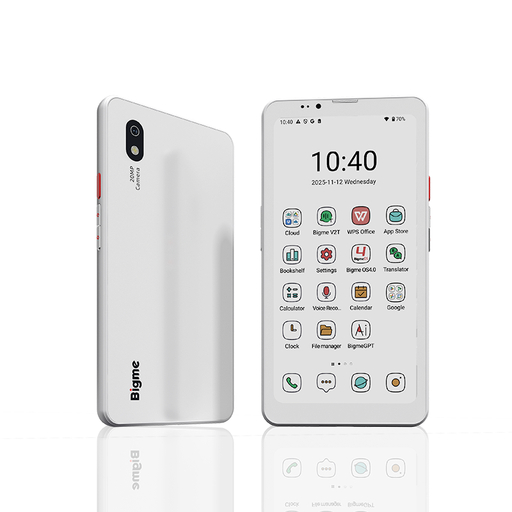
Bigme HiBreak Pro Color Display, 6.13-inch E-Ink e-book reader, Android 14, 8GB+256GB

Bigme HiBreak Pro Color Display, 6.13'', Android 14, 8GB+256GB

This compact e-reader is worth considering if you also want colour and Android on the go. For full scans, its 6.13-inch screen offers less physical space than a larger display.

The product name lists a 6.13-inch E-Ink colour screen, Android 14 and 8GB+256GB.

View at Joybuy

Frequently asked questions

Is a 6-inch e-reader suitable for a scanned, handwritten letter?

It can be, if your scan remains readable on that screen, but PDF support alone doesn’t prove that it will. Try a representative letter; if you often read full scans, compare it with a model that has a larger screen.

How do I put my own letter file or a borrowed e-book on an e-reader?

Kobo explains how to transfer unprotected PDF and EPUB files using a computer. E-books from the Online Library also require Adobe DRM and Digital Editions steps. The Online Library states that, from 23 June 2026, new users and accounts that need to be authorised again will have to sign in using a ByteBooks account. Kindle doesn’t support the library’s Adobe DRM-protected loans.

What do return rights and warranties mean when you buy an e-reader online?

When you buy a device online from a professional seller, you generally have 14 days from the delivery date to change your mind, according to the European Union’s Your Europe website; check the relevant returns policy and any costs. The Dutch Government states that the Netherlands has no fixed statutory warranty period, and that you should contact the retailer if a product is faulty. A manufacturer’s warranty doesn’t replace your statutory rights.

Can I download and use historical letter scans from the National Archives freely?

Check the rights information for the specific scan. The National Archives states that scans with a download button and the label ‘Public Domain’ or ‘CC0’ are free to use; restrictions apply to images without a download option. The age of a letter alone doesn’t prove that every scan available is free to use.
