
Reading text in the garden
You mainly read explanations and step-by-step guides outdoors, and don’t need colour to understand the text. The Consumentenbond says an e-reader’s non-reflective screen is suitable for reading in the sun.


If you mainly read continuous text, a non-reflective black-and-white e-reader should suit your needs; a colour model is more relevant for plant photos and colour illustrations. For small images and fixed-layout PDF pages, first check how legible they are on the screen you have in mind, and make sure your book provider and any library loans are compatible with the device. For frequent zooming in PDFs, the Consumentenbond says a tablet is more practical, while an e-reader screen is comfortable for reading in the sun, according to the Consumentenbond.
You mainly read explanations and step-by-step guides outdoors, and don’t need colour to understand the text. The Consumentenbond says an e-reader’s non-reflective screen is suitable for reading in the sun.
You use colour photos or illustrations to get information from gardening books and want to consider how much screen space you need. eReaders.nl noted that small images can be difficult to make out on the 6-inch Kobo Clara Colour screen.
You read pages with images, diagrams or a fixed PDF layout, and want to know whether you can zoom in without making the page awkward to navigate. The Consumentenbond notes that zooming in on PDFs is quicker and smoother on a tablet.
Start with the type of gardening book you read: continuous text, colour illustrations and fixed-layout PDF pages each place different demands on the screen.
| What to consider | What should you check? | Who is it for? |
|---|---|---|
| Reading in daylight | Check whether the screen is non-reflective, and compare how the text looks with the type of gardening book you read. The Consumentenbond says an e-reader’s non-reflective screen is suitable for reading in the sun. | If I mainly read continuous gardening text outdoors, I want to follow the words without distracting reflections; around 29% of consumers prioritise readability in daylight. |
| Colour in illustrations | Look at a sample page from your own book. PocketBook Nederland lists 150 ppi for colour and 300 ppi for black and white on the Verse Pro Color and InkPad Color 3. | When I use plant photos or colour illustrations to look up information, I need colour; around 24% of consumers give colour illustrations top priority. |
| Room for fixed-layout pages | Check whether your gardening book is a reflowable EPUB or a fixed-layout PDF, and try a representative page. More screen space doesn’t automatically mean you’ll never need to zoom in. | With PDF pages containing diagrams, I want to spend less time zooming and moving around; around 18% of consumers prioritise screen space for images and fixed-layout pages. |
| Access to books | Check the file format and any DRM protection for each title. The Online Library uses Adobe DRM for protected e-reader books; also check whether the specific title is available for an e-reader. | If I want to borrow gardening books or read the titles I’ve already bought, I want to know in advance whether those particular books will work on my device; around 17% of consumers prioritise access to books. |
| Using it outdoors | Compare the water protection and controls of the exact model. Check the conditions for an IPX8 rating and consider whether physical page-turn buttons would be useful for you. | If I read outdoors where the device might get wet, I want to know about its protection and controls; around 12% of consumers give these outdoor conditions top priority. |
Colour doesn’t automatically make small captions legible on a compact screen. eReaders.nl found that small images can be difficult to view on the Kobo Clara Colour; this finding doesn’t necessarily apply to other models.
Check a representative page featuring both photos and text at the screen size you’re considering.
The Online Library uses Adobe DRM for protected e-reader files and says some image-heavy titles are only available in the app or online.
Check whether the individual title is available and whether the device supports the DRM it uses.
File support doesn’t tell you whether small text and diagrams are comfortable to view on a compact screen. The Consumentenbond describes zooming in on PDFs on a tablet as quicker and smoother.
Try a PDF page from your own book. If you expect to zoom in often, consider comparing it with a larger screen or a tablet.
The Kobo Clara BW has a 6-inch black-and-white screen; the Clara Colour has a 6-inch colour screen, and the Libra Colour has a 7-inch colour screen with physical page-turn buttons.
The Verse Pro Color has a 6-inch colour screen, while the InkPad Color 3 has a 7.8-inch colour screen.
The vision color is a 7-inch colour model with page-turn buttons; a stylus for taking notes is available separately.
This selection includes compact and larger colour e-readers, plus a tablet as an alternative for gardening books with lots of images.
 No image available
A 7-inch colour e-reader that gives you more screen space for viewing gardening books with colour illustrations.
The product name lists 4+64GB and 300 ppi. According to the product information, a power adapter isn’t included, and a CCC-certified adapter is required for use.
 No image available
A compact colour model for anyone who wants to view illustrations on a smaller screen.
The product name lists a 6.13-inch E-Ink display, Android 14 and 8GB+256GB. Check that your book provider and any DRM used for your titles are compatible with the device.
 No image available
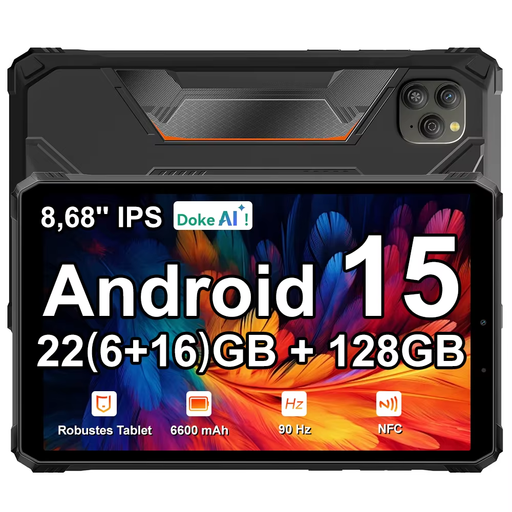
A tablet option for gardening books with lots of images, especially if you regularly need to zoom in on PDF pages.
The product name lists an 8.68-inch 90 Hz IPS display and Android 15. It doesn’t confirm a non-reflective e-ink screen; check how the display handles light outdoors.
No, not every title is available. The Online Library says some books with lots of images can only be read in the app or online. Check whether each book is available for an e-reader and whether your device supports Adobe DRM.
The Online Library explains how to transfer e-books using Adobe Digital Editions. Since 23 June 2026, new users and anyone who needs to log in or authorise their device again must create a ByteBooks account to do so; according to the Online Library, anyone who is still logged in doesn’t need to do anything straight away.
Online purchases come with a statutory cooling-off period; according to ACM ConsuWijzer, it ends 14 days after the product has been delivered. This is separate from faults: if a product breaks too soon under normal use, the seller must put things right free of charge, for example by repairing or replacing it.