
Student with one e-reader
Wants to keep using their existing charger or choose a suitable replacement, without paying for extra ports they don’t need. Kobo provides specific charging advice for its e-readers, so check the guidance for your model.


If you’re only charging an e-reader and already have a charger that meets your model’s instructions, you generally don’t need an extra charging station. Choose a multi-port USB charger if you also want to connect other USB devices, or an extension lead with USB ports if you need additional mains sockets too. Check your e-reader’s connector and charging advice, keep the charger uncovered and don’t connect extension leads to each other.
Wants to keep using their existing charger or choose a suitable replacement, without paying for extra ports they don’t need. Kobo provides specific charging advice for its e-readers, so check the guidance for your model.
Wants to connect an e-reader and other devices in one convenient place. Work out how many USB ports and mains sockets you actually need.
Has a small room and wants somewhere clear to place the charger. The Fire Service advises against using chargers under pillows or duvets, and says not to connect extension leads to each other.
Choose this if: you mainly charge one e-reader and your cable and adapter meet the instructions for that model.
Bear in mind: you won’t get any extra connections; if you’re having charging problems, a suitable cable or adapter may be more useful than more ports.
Choose this if: you want to charge other USB devices as well as your e-reader, and don’t need extra mains sockets.
Bear in mind: a high stated maximum power rating isn’t in itself an advantage for an e-reader; check the connector and charging advice for each device.
Choose this if: you need both USB ports and extra mains sockets in one place.
Bear in mind: the space it takes up and how you manage the cables; don’t connect extension leads to each other, and think about how many devices you plug in.
| What to consider | What to check before buying | Who should pay particular attention? |
|---|---|---|
| Connection and charging method | Check the exact e-reader model, port, cable connectors and charging instructions. For its e-readers, Kobo advises trying another cable and a 10 W, 5 V adapter if you have charging problems, and advises against high-wattage fast chargers. | If I want to be sure my e-reader will work with the cable and charger I choose, compatibility comes first. Around 33% of consumers are mainly concerned about this. |
| The right connections | Count USB ports and mains sockets separately; also check that the cable is long enough to reach the spot on your desk. | If you want to connect an e-reader and other devices together, you’ll benefit from the right combination of ports and sockets. Around 25% of consumers prioritise these connections. |
| Safe set-up | Choose a clear spot for the charger and check the maximum load of an extension lead. The Fire Service advises keeping chargers uncovered and not connecting extension leads to each other. | In a small room, I want to set up a charging area without joining extension leads together or putting the charger under bedding. Around 25% of consumers prioritise a safe set-up. |
| Avoiding an unnecessary purchase | First check whether your existing cable and charger meet your e-reader’s guidance; only buy extra ports if you need them. | If my current charger is suitable for one e-reader, I don’t want to pay for connections I won’t use. Around 17% of consumers mainly want to avoid an unnecessary purchase. |
A higher advertised power rating doesn’t mean an e-reader needs that much power. Kobo advises against high-wattage fast chargers for its e-readers.
Before choosing a charger, check the port, cable and official charging advice for your exact e-reader model.
An extension lead with extra sockets doesn’t remove the need to consider the devices connected and the maximum load. The Fire Service warns against plugging too many devices into one extension lead and connecting extension leads to each other.
Only plug in what you need, check the stated maximum load and don’t connect extension leads together.
Belkin states that, on the SRB002vf2M, an unlit protection indicator may mean that connected equipment is no longer protected against power surges.
For a model with an indicator light, follow the model-specific instructions for checking and replacement.
If the protection is no longer active, you may need to replace the extension lead.
Belkin’s product range includes both a USB wall charger and an extension lead with USB ports and extra mains sockets.
Hama offers extension leads with USB ports, among other products, for desks where you use several devices.
UGREEN lists the Nexode Pro 65W as a USB charger with two USB-C ports and one USB-A port.
This selection includes extension leads with USB ports and multi-port USB chargers for a charging spot on your desk or bedside table. Choose based on the types of ports you need, whether you need extra mains sockets and your e-reader’s charging advice.
 No image available
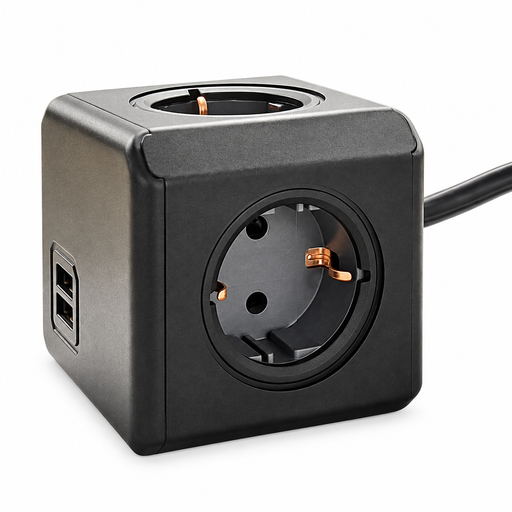
Suitable if you want to connect mains plugs and USB devices in one place; check that the cable and available ports suit your set-up.
Three sockets, three USB-A ports, one USB-C port and a 1.5 m cable.
Maximum 2500 W; don’t connect this extension lead to another extension lead, and keep it away from water and damp.
 No image available
May suit a charging area where you want to connect several devices and tuck away the cables listed after use.
The product name states a power rating of 320 W and two retractable USB-C cables. Check that the connections and charging advice suit your e-reader.
 No image available
An option if you want to combine USB connections and mains plugs in one place; check that the cable is long enough to reach from the wall socket.
Four Schuko sockets, two USB-A ports, a 1.5 m cable and an on/off switch.
 No image available
Suitable for connecting several USB devices in one place if you don’t need extra mains sockets.
Stated power rating: 65 W; two USB-C ports and one USB-A port.
According to the product description, it’s intended for indoor use; keep the charger away from damp environments. Check your e-reader’s charging advice.
 No image available
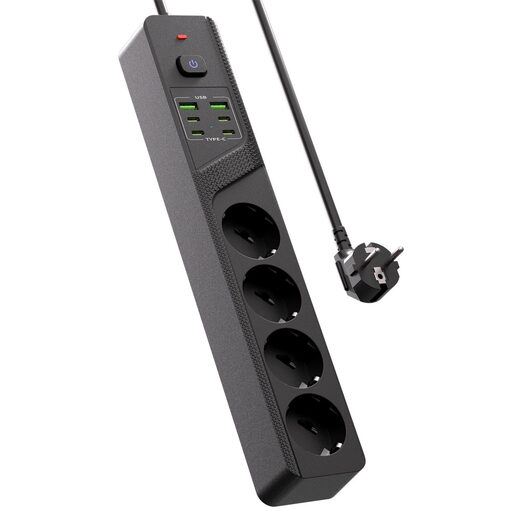
Suitable for a desk or bedside table where you want to connect both USB devices and mains plugs; check that you have enough space.
Four Schuko sockets, four USB-C ports, two USB-A ports and an on/off switch.
Don’t choose based only on the maximum wattage. Kobo advises against high-wattage fast chargers for its e-readers and, if you have charging problems, recommends a 10 W, 5 V adapter and a different USB cable. Also check the instructions for your exact model.
Place the charger in an open spot where heat can escape, not under a pillow or duvet. The Fire Service also advises students not to connect extension leads to each other, and to charge devices during the day when they’re awake and at home.
If you buy as a consumer in the Netherlands, you’re entitled to a product that works properly, and you can contact the seller if there’s a problem. According to the Dutch government, there isn’t a fixed statutory two-year guarantee for all products; what you can expect from a product depends partly on the product itself.
Yes. The Netherlands Food and Consumer Product Safety Authority states that CE marking is required for electrical products covered by the relevant product requirements. According to the European Commission, no central EU body issues CE approvals or certificates in advance; a CE mark is therefore not an independent test report for an individual charger.