
Reader with one e-reader
You mainly want a cable and adapter that are compatible with your e-reader, without having to carry a larger charging station. Rakuten Kobo recommends a 10 W adapter for Kobo models with USB-C.


If you’re only charging an e-reader, a suitable cable and a charger that meets your model’s guidance will usually be enough. A multi-port charger won’t necessarily offer any extra benefit. If you also want to charge a phone or another device from the same socket, check the number and type of ports, as well as how much power is available to each port when they’re all in use. For Kobo devices, the manufacturer recommends a 10 W, 5 V adapter if you have charging problems, and advises against high-power fast chargers.
You mainly want a cable and adapter that are compatible with your e-reader, without having to carry a larger charging station. Rakuten Kobo recommends a 10 W adapter for Kobo models with USB-C.
You want to charge a phone as well as your e-reader, for example. Check how many USB-A and USB-C ports are available, and how the power is shared when charging several devices at once.
You’re considering a charging stand instead of a cable. First, check whether your exact e-reader model supports wireless charging.
Start by checking your e-reader’s connection and charging guidance. Then consider whether you need extra ports and, if you want to charge wirelessly, whether that charging method is suitable for your exact model.
Choose this if: you only want to charge your e-reader and have a suitable cable.
Bear in mind: a simple adapter won’t necessarily have extra ports for other devices.
Choose this if: you want to charge other devices from the same socket and the ports suit your cables.
Bear in mind: the charger’s maximum power won’t automatically be available to every port at the same time.
Choose this only if: the documentation for your exact e-reader model confirms that it supports wireless charging.
Bear in mind: the brand name alone doesn’t confirm that an e-reader will work with a wireless stand.
| What to consider | What should you check? | Who is this important for? |
|---|---|---|
| Connection and charging guidance | Check the connection on your exact e-reader model and the manufacturer’s charging guidance. For Kobo devices, the manufacturer recommends a 10 W, 5 V adapter if you have charging problems, and advises against high-power fast chargers. | If I only want to charge my e-reader, I want to be sure the cable and charger are suitable for my model. Around 38% of consumers prioritise compatibility. |
| Ports and shared power | Count the USB-A and USB-C connections you need, and check the power available to each port when several devices are charging at once. | If I also want to charge my phone or other devices from the same socket, I look for suitable ports and check how the power is shared. Around 31% of consumers prioritise charging several devices at once. |
| A practical place to charge | Check that the charger and cable fit the space available. Charge on a hard surface and check which plug you’ll need at your destination. | When I take my charger with me, I want to be able to use it somewhere suitable in my hotel room, without awkward cables. Around 23% of consumers prioritise a practical travel set-up. |
| Wireless compatibility | Check whether your exact model supports wireless charging and whether the charging stand you’ve chosen is suitable. | If I don’t want to connect a cable to my e-reader, my model needs to support wireless charging. Around 8% of consumers prioritise wireless charging. |
A charger’s maximum power doesn’t tell you how much power each port supplies when several devices are connected. Belkin states that the BoostCharge WCC002vfWH delivers up to 67 W when one port is in use. When three ports are in use, Belkin states that one port delivers up to 25 W and each of the other two up to 20 W. For Kobo models, follow Rakuten Kobo’s specific guidance: if you have charging problems, the manufacturer recommends 10 W and 5 V.
Check how the power is shared when several ports are in use, and follow the manufacturer’s guidance for your e-reader.
Not every e-reader supports wireless charging. A charging stand may therefore be unsuitable for your device.
Before choosing, compare the full model name with the compatibility information for both the e-reader and the charging stand.
A different model code or power rating can make it difficult to identify which version you’re looking at.
Before buying, check that the model number, port layout and power specifications all refer to the same version.
Worth considering if you want to charge a Kobo e-reader with a suitable adapter, following the manufacturer’s guidance.
The BoostCharge WCC002vfWH we reviewed is a multi-port wall charger with several USB-C ports.
The Nexode 65 W 10335 we reviewed combines USB-C and USB-A connections.
The Anker 543 Charger (65W II), model A2046, is designed as a four-port desktop charger for several devices.
These product picks are designed for wired charging with several connections, so you can also plug in other devices alongside an e-reader if you need to. Always check that the ports and charging guidance suit your e-reader model.
 No image available
The USB connections may be suitable if you want to charge other devices as well as your e-reader. Check that your cables match the ports.
4 AC sockets, 3 USB-A ports and 2 USB-C ports; stated maximum power 2500 W; 3 m cable. The power rating is not a USB output specification.
 No image available
An option if you want to connect an e-reader and other devices to a single adapter. Choose a charging port that follows your e-reader’s guidance.
Stated power: 65 W. When charging several devices at once, the power available to each port needs to suit the connected devices.
 No image available
The two ports let you connect an e-reader and another device. Check that the charging method is suitable for your e-reader.
Stated total power: 20 W. The title lists one USB-A port and one USB-C port.
 No image available
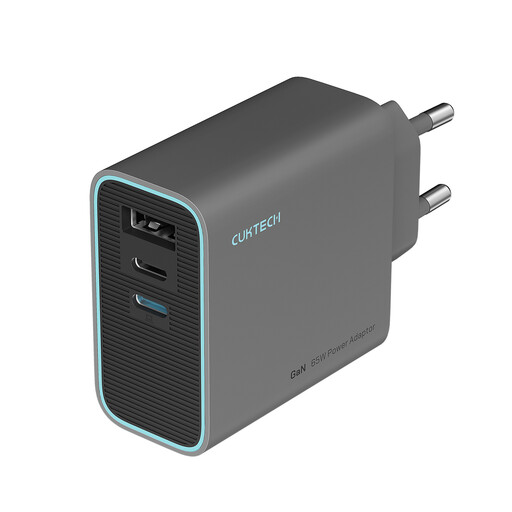
The three ports can be handy if you want to connect several devices to one charger. Check the port layout and how power is shared when charging several devices at once.
Stated maximum power: 65 W. The product name lists a foldable plug.
 No image available
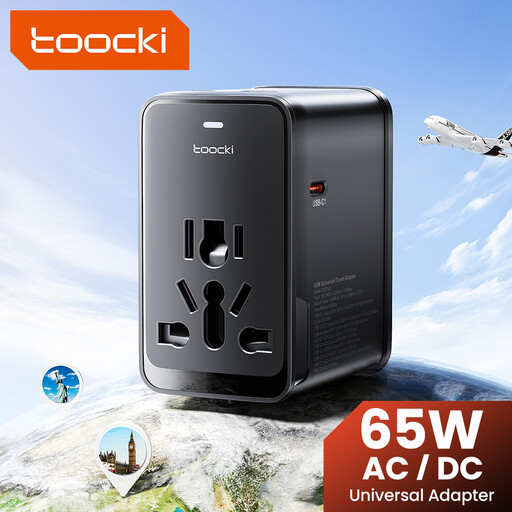
This travel adapter may be suitable if you want to connect several USB devices and need a plug type that’s compatible with your destination.
Stated maximum power: 65 W; 3 USB-C ports, 1 USB-A port and four interchangeable plugs for the EU, UK, US and Australia. Check the connection and electrical compatibility for your destination.
No, check the connection on your e-reader. According to the Rijksoverheid, the USB-C rules apply to new devices placed on the Dutch market from 28 December 2024; they don’t change the connection on an older model.
Place the e-reader on a hard surface and unplug the charger once the battery is full. Brandweer Nederland also warns against charging devices while you’re asleep.
Contact the seller. In the Netherlands, a product must do what you could reasonably expect it to do. ACM ConsuWijzer explains that if a product is faulty, the seller must provide a solution free of charge, depending on the circumstances. This could include a repair, replacement or refund.
According to Ondernemersplein, the manufacturer must apply a CE mark when the electrical device meets the applicable requirements. The CE mark is the manufacturer’s declaration of conformity; it doesn’t prove that every individual product has been independently tested.