
Outdoor reader of long books
You mainly read continuous text in daylight and don’t want to keep looking for a plug socket at the campsite. A compact e-reader may suit you, provided it can open your books.


If you mainly read full-length books outdoors and want to avoid frequent charging, a compact e-reader may suit you best. For philosophical PDFs, scans and detailed note-taking, a larger screen with suitable pen support matters more. Check that your files are compatible, and that the device can cope with the light, sand and rain at your campsite.
You mainly read continuous text in daylight and don’t want to keep looking for a plug socket at the campsite. A compact e-reader may suit you, provided it can open your books.
You use articles, scans or editions with a fixed page layout. Check whether the screen displays the full page and footnotes clearly enough to use.
You write down arguments or questions while reading. So check pen and file compatibility, not just the screen size.
Choose this option: if you mainly read standard e-books and want to charge less often when you’re outdoors.
Bear in mind: smaller screens are less suitable for A4 PDFs. Also check that your files are compatible with the device and its book ecosystem.
Choose this option: if you read longer PDFs and want to take notes as you read.
Bear in mind: a larger device takes up more space. BOOX says the Go 10.3 has no front light.
Choose this option: if faithful PDF page layouts, multiple apps or switching between reading and research are important to you.
Bear in mind: the Consumers’ Association highlights reflections and faster battery drain as points to consider when reading outdoors.
| Point to consider | What should you look for? | Who is this important for? |
|---|---|---|
| Light and power | Check the screen outdoors and consider whether you’ll need a light in the evening. Assess battery use in relation to your own reading habits. | If I read outdoors for long periods and don’t want to charge often, visibility and power consumption are my main considerations. Around 33% of consumers put light and power at the top of their list of buying concerns. |
| PDFs and scans | Open a sample of your own and check the full page, scans, footnotes and zoom. | If I want to follow the original page layout and footnotes, a screen that displays my PDFs clearly is essential. Around 27% of consumers prioritise page layout. |
| Note-taking | Check that writing works with your EPUB or PDF on the exact model, and find out how notes are saved. | If I want to note down arguments while reading and keep my notes, I check the pen and note-management features. Around 20% of consumers say this is their main buying concern. |
| Campsite conditions | Check the protection offered by the exact model, keep the charging port dry and load your books onto the device in advance. | If I want to be prepared for rain, sand or limited internet access, I look at protection and offline access. Around 20% of consumers consider these conditions the most important factor. |
File-format support doesn’t tell you whether a fixed page with footnotes will be comfortable to read.
Before you buy or set off, open a representative PDF on the screen size you’re considering and check the pages, footnotes and zoom.
Kobo warns that its waterproof e-readers are not dustproof or sandproof. A wet USB port must be dry before you charge the device.
Protect the device from sand and dry the port before connecting the charger.
Pen support varies by model. A touchscreen alone doesn’t confirm that you can write with the stylus you want to use.
Check compatibility between the exact device and pen, and find out whether the pen is included with your purchase.
Kobo warns that notes may be lost after signing out or resetting the device.
Set up suitable syncing or a backup in advance if you want to keep your notes.
Kobo’s range spans compact e-readers and larger devices with stylus support, such as the Elipsa 2E and Libra Colour.
The Go 10.3 is a larger black-and-white e-ink device for anyone who wants to annotate PDFs and use Android apps.
The Galaxy Tab S10 FE is an LCD tablet option for larger PDFs, apps and writing with the included S Pen.
The 11-inch iPad (A16) is a tablet option if reading apps and working with documents matter more to you than an e-ink screen.
These Joybuy products include e-ink devices for reading and note-taking, compact e-readers and an LCD tablet option. In particular, compare screen size, lighting and pen support with the files you plan to use at the campsite.
 No image available
For reading and taking notes on e-books and PDFs; the product information lists an included stylus.
Screen: 8.2-inch E Ink.
 No image available
For reading and writing on one device; the product information lists an included stylus.
Screen: 10.65-inch E Ink.
 No image available
A compact option for continuous text; try one of your own PDFs to check whether the screen size also works for your pages.
Screen: 7-inch colour E Ink, 300 ppi; front light with 36 levels. Storage: 4+64GB.
 No image available
A compact option for reading; try one of your own philosophical PDFs if you want to follow fixed page layouts or footnotes.
Screen: 6.13-inch E Ink. Operating system: Android 14. Storage: 8GB+256GB.
 No image available
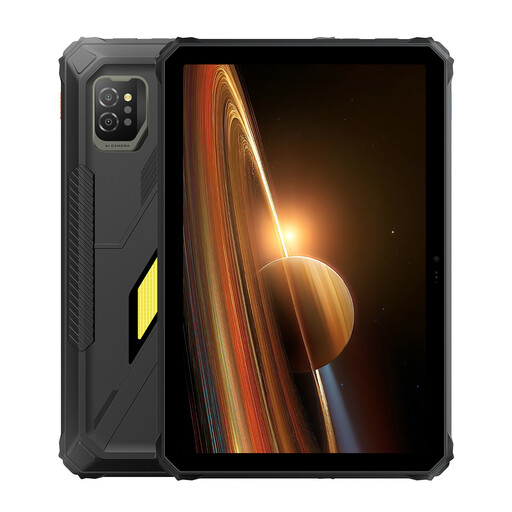
An LCD tablet option with a larger reading area; the Consumers’ Association highlights reflections as something to consider when reading outdoors.
Screen: 11-inch IPS. Memory: 24 GB (8+16 GB) + 128 GB. Battery: 10,000 mAh, 45 W. Android 15.
No. The Consumers’ Association says A4 PDFs are often difficult to read on small e-readers and that a tablet is generally more suitable. A larger e-ink device may also be an option if you want an e-ink screen; test your own pages and footnotes.
Download and open your books before you set off. Kobo explains how to add unprotected EPUB and PDF files from a computer; the same transfer method doesn’t necessarily apply to files with DRM.
No. Kobo recommends drying the USB port first and not charging the device in or near water. The brand also warns that its waterproof e-readers are not sandproof.
According to ACM ConsuWijzer, the retailer is responsible for the Dutch statutory guarantee if a product is faulty. Depending on the situation, the retailer must put the problem right free of charge; this is separate from any commercial guarantee.
No. The Dutch government says that a private copy for personal use must not be distributed or made publicly available. Check the rights for the specific edition or translation before sharing it.