What should you consider when choosing?
For reading science fiction in bright daylight, your choice mainly depends on the type of book, where your e-books come from and whether you’ll use the device for other media too.
Compact black-and-white e-ink e-reader
Ideal for: mainly reading continuous text and wanting a small device that’s easy to hold.
Consider: the smaller screen gives you less room for pages with a fixed layout or images.
Colour e-ink e-reader
Ideal for: reading outdoors and seeing colour in covers, illustrations or notes.
Consider: colour e-ink is no substitute for watching video or smoothly zooming in on PDFs on a standard tablet.
E-ink with Android apps
Ideal for: trying several reading services on one e-ink device.
Consider: check separately whether the book or library app you want works and what account requirements apply.
Kindle e-reader
Ideal for: mainly reading science fiction from the Kindle Store and wanting a glare-free screen.
Consider: the Online Library does not support its Adobe DRM-protected e-books on Kindle e-readers.
Standard LCD tablet
Ideal for: prioritising colour, other apps or zooming in on illustrated PDFs.
Consider: don’t expect it to be as easy to read in direct sunlight as e-ink; try the screen in the lighting conditions you plan to use it in.
| What to consider |
What should you check? |
Who should prioritise this? |
| Readability in bright daylight |
Compare the screen type, anti-glare finish and size where you plan to read. |
If I mainly read long novels outdoors, I want to follow the text comfortably without constantly losing my place. Around 36% of consumers prioritise readability in daylight. |
| Access to books |
For each title, check the service, EPUB or PDF support, any Adobe DRM and whether it’s available for e-readers. |
I want to be able to read the science fiction I’ve bought or borrowed on the device. Around 29% of consumers give access to books top priority. |
| Illustrations and page layout |
Look at a sample of the type of book you read and consider colour, image detail and whether you’ll need to zoom in. |
If covers, illustrations or fixed page layouts matter to me, I want to see how they look on screen. Around 21% of consumers prioritise images and colour. |
| Apps and other media |
Check the reading apps and other tools you want; also see how the screen performs outdoors. |
I want to use apps or other media as well as read, so I’m not choosing based on the book display alone. Around 14% of consumers prioritise versatility. |
Joybuy products for reading and everyday use
This Joybuy selection includes a colour e-ink reader, an e-ink device with Android apps and standard tablets. Compare them by book type, app use and the conditions you read in.
 Image unavailable
Bigme B751C S colour e-reader
Ideal for readers who want to view colour illustrations as well as text on an e-ink screen.
7-inch colour e-ink screen, 300 ppi, 4+64 GB and front light with 36 levels.
View at Joybuy
 Image unavailable
Blackview Active 8 Pro
Ideal for anyone who wants to combine reading with apps and other tools on a standard tablet.
10,36-inch FHD+ IPS screen, Android 13, 4G dual SIM and 256 GB storage.
View at Joybuy
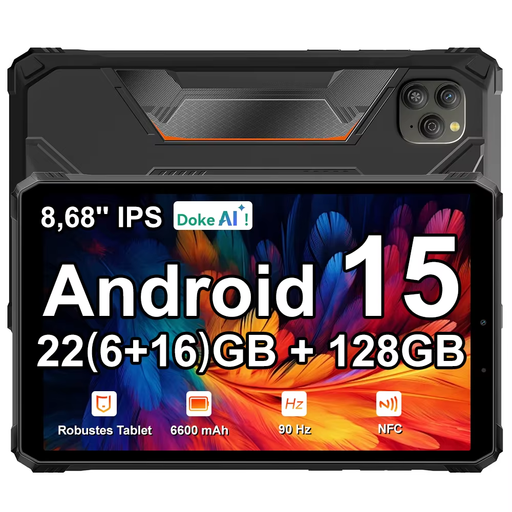 Image unavailable
Blackview Active 5
Ideal for anyone looking for a tablet that combines reading with Android apps.
8,68-inch 90Hz IPS screen, Android 15 and 128 GB storage.
View at Joybuy
 Image unavailable
Bigme HiBreak Pro Color Display
Ideal for anyone who wants to combine e-ink with Android apps and a colour screen.
6,13-inch Kaleido 3 colour screen, Android 14 and 8 GB + 256 GB.
View at Joybuy
 Image unavailable
TECLAST T65
Ideal for anyone who wants to read on a larger tablet screen and use other apps too.
13,4-inch 120Hz screen, Android 16 and 128 GB storage. The product information advises against prolonged exposure to sunlight and recommends an operating temperature of 0 to 35 °C.
View at Joybuy
Frequently asked questions
Can I put a science fiction book borrowed from the Online Library on a Kindle e-reader?
Not using the Online Library’s e-reader download: the library says its Adobe DRM is not supported on Kindle e-readers. If you use another e-reader, also check that it supports Adobe DRM and EPUB or PDF, and that the title is available.
How do I put an eligible library book on an e-reader?
The Online Library explains how to do this using Adobe Digital Editions on a computer: authorise your computer and e-reader, then transfer the book via USB. Since 23 June 2026, new users or anyone setting up a new authorisation need to sign in differently using a ByteBooks account. The library also reported a temporary issue with e-reader downloads on 21 October 2026; check its latest service update if you rely on this option.
Is a water-resistant e-reader also protected against sand and salt water?
Not necessarily. Kobo warns that its water-resistant models are not dust- or sand-proof and advises against submerging them in salt, soapy or chlorinated water. Follow the care instructions for your specific model.
What are my rights when I buy a tablet or e-reader online in the Netherlands?
According to ACM ConsuWijzer, when you buy online from a trader, you generally have a statutory 14-day cooling-off period from the date of delivery. You’re also covered by the statutory guarantee if a product used normally doesn’t meet your reasonable expectations; the seller must put a valid fault right.
Can I leave an iPad in full sun for a long time?
Apple specifies an operating temperature of 0 to 35 °C for iPads and warns that the device may behave differently outside this recommended range. This is an operating condition for iPads, not a temperature limit for every e-reader.


