
Listening back to vowels carefully
You repeatedly record the same Dutch vowel pairs and want to hear the differences without mistaking claims about calls for proof of measurement accuracy.


For repeated practice recordings, choose a headset with a connection that works with your laptop and whose microphone you can select as the recording input. An adjustable microphone boom can help you keep its position consistent, but it doesn’t prove phonetic measurement accuracy. Record the same vowel pairs calmly and with as little processing as possible: noise cancellation designed for calls, as described by Jabra, is no guarantee that vowel details will be captured accurately.
You repeatedly record the same Dutch vowel pairs and want to hear the differences without mistaking claims about calls for proof of measurement accuracy.
You want to hear your voice clearly in your recordings when fan or room noise gets picked up.
You’re looking for a suitable connection and a comfortable fit for several rounds of practice, without acoustic analysis being your main aim.
Start with the recording input and your surroundings: select the headset microphone on your laptop, and reduce distracting noise where possible before you record.
| What to consider | What to look for | Who is this important for? |
|---|---|---|
| Comparing vowels consistently | Choose an adjustable microphone boom and keep its position as consistent as possible between recordings. | I want to listen back to the same vowel pairs and hear the differences without treating claims about calls as proof of measurement accuracy. Around 33% of consumers say repeatable vowel recordings are their top priority. |
| Background noise | Make a test recording with your laptop switched on and, if needed, compare it with a recording in a quieter setting. | If fan noise gets in the way when I listen back, I want to hear what a quieter recording sounds like first. Around 27% of consumers prioritise clear speech in noisy surroundings. |
| Connection and recording input | Check the connection on the exact version, whether USB-A, USB-C or another type, and select the headset as the input device. | I want to record on my own laptop without accidentally using its built-in microphone. Around 20% of consumers say laptop compatibility is their top priority. |
| Comfort | Consider adjustability, the type of ear cushions and the position of the microphone boom. | For several rounds of practice, I want a fit that stays comfortable for me. Around 20% of consumers put comfort ahead of other buying considerations. |
A manufacturer’s claim about clear calls doesn’t show that a microphone is suitable for measuring subtle phonetic differences.
Make a test recording of your own vowel pairs and reduce distracting noise where possible before recording.
Connections can vary between versions, even within the same product range.
Check the full model variant and compare its connection with your laptop’s ports before choosing.
The Ayda USB PC Headset is a wired option with an adjustable microphone boom and on-ear controls.
The Evolve2 30 series offers wired USB versions for laptop use.
The wired Blackwire 3300 series offers versions to compare for connection type and fit.
The wired H390 is a USB computer headset for calls and listening back to recordings.
The wired Cloud III is an option if you also want to use the headset for other PC audio.
This selection includes wired and wireless headsets with microphones for vowel practice and listening back to recordings. Check each model’s connection and make sure your laptop uses the headset as the recording input.
 No image available
A wired option to compare if your laptop has a 3.5mm connection.
The headset has a detachable, flexible microphone and a 3.5mm cable. You can control the volume and mute the microphone on the earcup.
 No image available
A wireless option if freedom of movement matters; first check how recording and playback work together on your laptop.
The product description lists Bluetooth, four microphones and an included 3.5mm audio cable. Battery life is stated as up to 60 hours.
 No image available
This wireless version is worth considering if your laptop supports the listed connection options.
The description lists 2.4GHz and Bluetooth connectivity, a flip-up microphone and battery life of up to 80 hours. Compatibility with PCs and mobile devices is also mentioned.
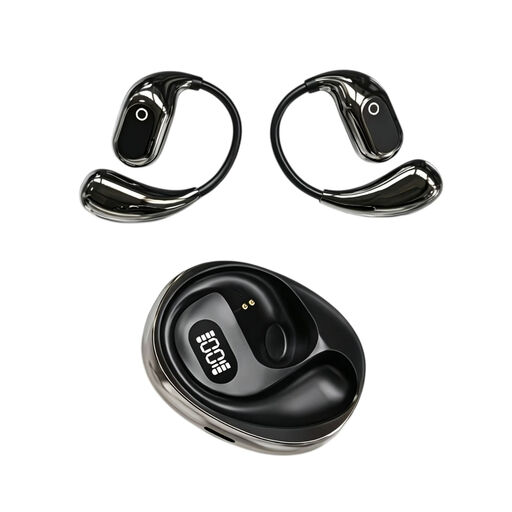 No image available
The listed recording function may be useful if you want to make recordings on the go; check whether the controls suit the way you practise.
The product information lists a built-in condenser microphone, on-the-go recording, binaural mode and a charging case with a Type-C connection.
 No image available
A wired option to consider if the connection works with your laptop and you can select the headset as the recording input.
The product specifications list two microphones, USB-A with USB-C adapter compatibility and an adjustable headband.
In Praat, explicitly select the input device under ‘Record mono Sound’ and make a short test recording. Check the selected input again if the recording sounds different from what you expected.
No. Noise cancellation designed for calls doesn’t prove phonetic accuracy. First reduce background noise, and keep a test recording with as little processing as possible for a detailed comparison.
According to Microsoft, simultaneous stereo playback and microphone use via Bluetooth LE Audio on Windows 11 have specific requirements for the Windows version, laptop, drivers and headset. Check that your setup supports this; this behaviour doesn’t automatically apply to every Bluetooth headset.
Adjust the headband and microphone boom to a position that feels comfortable, and make a short test before each session to check that you’re using the right recording input. Follow the cleaning instructions for your exact model when caring for the ear cushions.
For many distance purchases made by consumers, a 14-day cooling-off period applies; exceptions and the terms of the purchase must be assessed separately. The Dutch government also states that Dutch statutory warranty law has no fixed warranty period.