What should you look for when choosing?
Start with the recording you want to listen back to and your device’s connection. Then consider comfort and freedom of movement.
| What to consider |
What should you check? |
Who should pay particular attention? |
| Clear voice recordings |
Check the microphone position, mute setting and selected recording source. Make a short test recording using the app you plan to use. |
If I listen back to my pronunciation after each attempt, I want to be able to distinguish the sounds I’m working on in my voice. Around 33% of consumers say voice clarity is their top priority. |
| Comfort for repeated use |
Look at adjustability, ear cushions and the choice between mono and stereo. Assess the fit during a typical practice session. |
When I do several practice rounds in a row, I want a headset that stays comfortable. Around 27% of consumers put wearing comfort first. |
| Connection to your device |
Compare the headset model with your device’s ports and select the right microphone in your recording app. Audacity explains how to select a recording device. |
If my computer or tablet has a specific port, I want to know before buying whether the headset will connect to it. Around 20% of consumers name device connectivity as their top priority. |
| Freedom of movement |
Check the connection and whether your setup supports stereo playback and microphone use at the same time. According to Microsoft, this Bluetooth LE Audio feature requires compatible hardware and Windows 11 version 24H2 or later. |
When I want to stand up or move around while speaking, I don’t want to be tied to a cable. Around 20% of consumers put freedom of movement first. |
Products on Joybuy
This selection includes wired headsets with a 3.5 mm or USB connection, as well as a wireless model. Choose one that suits the ports on your recording device, then test the microphone in your own recording app.
 Image unavailable
JBL Quantum 300, wired over-ear gaming headset, Black
An option if you’re looking for a wired headset for computer recordings and want to use a 3.5 mm or USB connection.
The product description lists a 3.5 mm connection and a USB audio adapter included in the box. It says the microphone is directional and flips up to mute; this isn’t a recording test.
Joybuy
 Image unavailable
AOC wired gaming headset for PS5, Xbox Series X|S, Xbox One and PC
May suit practice on a PC if its 3.5 mm connection matches the one on your device.
The product description lists a flexible microphone described as noise-cancelling, as well as an adjustable headband. This doesn’t confirm how a recording for checking pronunciation will sound.
Joybuy
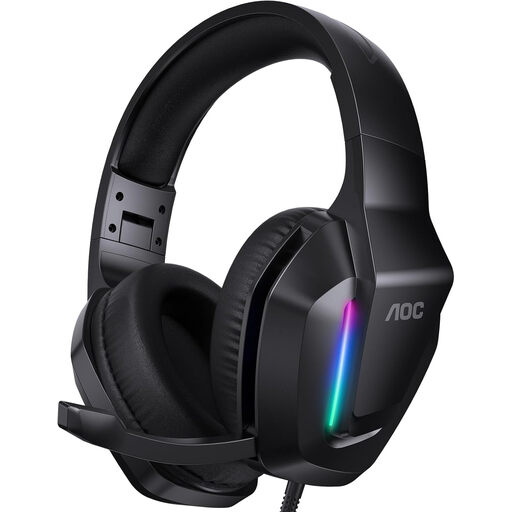 Image unavailable
AOC wired gaming headset for Xbox Series, PS5, PC and Switch
A wired option for computer use if the connection and controls described suit your setup.
The product description lists a microphone with a mute function and volume controls on the headset. It also mentions soft, breathable ear cushions; fit is a personal matter.
Joybuy
 Image unavailable
Razer Barracuda X Wireless Headset, White
A wireless option if you’d like more freedom of movement while practising speaking.
The product description lists Bluetooth and a 2.4 GHz connection via USB dongle, as well as a detachable microphone. Check which connection suits your device, then test recording and playback.
Joybuy
 Image unavailable
Logitech PC 960 wired USB headset
An option if you want to connect your headset to a computer via USB and adjust the microphone boom.
The product description lists volume and mute controls. Logitech describes the microphone as adjustable and noise-cancelling; this isn’t an independent assessment of pronunciation recordings.
Joybuy
Frequently asked questions
How can I check whether my headset microphone is recording instead of my laptop microphone?
Select the headset as the input device in your system and recording app, then make a short test recording. Check the mute button too, and listen back to the clip.
Why does Bluetooth sound different as soon as I use the microphone?
According to Microsoft, stereo playback while using the microphone via Bluetooth LE Audio requires support from both the headset and Windows computer, Windows 11 version 24H2 or later, and suitable drivers. Check that your own devices work together.
Do I need an adapter for a Logitech H151?
You do if your computer has separate headphone and microphone connections: Logitech’s manual specifies a 1-to-2 adapter for this. First check which connections your computer has.
Is the statutory guarantee in the Netherlands always exactly two years?
No. ACM ConsuWijzer explains that the Dutch statutory guarantee doesn’t have a fixed term; what you could reasonably expect from the product and normal use both matter. Discuss any fault with the seller.
Can I record my speaking exercises and share them with others?
According to the Dutch Data Protection Authority, the GDPR exemption applies when personal data is processed solely for personal or household purposes. This isn’t general permission to publish recordings in which other people can be identified, or to use them for professional purposes; assess such situations separately.


