First, choose a headset with a boom microphone you can position close to your mouth, then make a test recording with the fan running. A claim about microphone noise reduction doesn’t prove how your voice or pronunciation details will sound, so check that the connection is compatible with your recording device too. A wired headset limits your movement, while a wireless one needs pairing and charging.
Who is this for?
Practising near a fan
Your main priority is making sure your voice comes through above the constant fan noise. A boom microphone that can sit close to your mouth can help improve the balance between your voice and background noise. Shure recommends capturing the sound you want, such as your voice, more strongly than unwanted noise.
Listening back to check pronunciation
You use your recording to assess sounds and articulation. So, compare both how clearly you can be heard and how your voice sounds in a test recording. RTINGS.com treats recording quality and noise handling as separate aspects of microphones.
Practising at a fixed recording spot
You want to record easily on a computer and need to know which connection the headset version you choose has. Logitech, HP and EPOS describe different connections for specific products or versions.
What should you look for?
Wired USB headset
Choose this option if: you usually record in the same place and your computer supports the USB connection on the version you’ve chosen.
Bear in mind: the cable limits your movement. Also check whether the model uses USB-A or USB-C.
Wireless headset with microphone
Choose this option if: freedom of movement while practising is important and your recording device supports the wireless connection.
Bear in mind: pairing and charging are part of the deal. Noise cancellation for your ears isn’t the same as noise handling by the microphone.
Headset with a 3.5mm connection
Choose this option if: your device has a suitable headset socket. HP specifically lists the 3.5mm option for the Blackwire 3315 and 3325.
Bear in mind: not every version has this connection. Also check that your device’s input supports the microphone.
First, compare a recording with the fan on. Then check the connection, and only after that consider which controls and fit will suit your practice sessions.
| What to consider |
What should you check? |
Who is this important for? |
| Fan noise |
Can you position the boom microphone close to your mouth? Listen back to a test recording with the fan on. |
If I practise near a fan, I want to be able to hear my voice clearly without assuming all background noise will disappear. Around 36% of consumers prioritise being heard clearly above fan noise. |
| Pronunciation details |
Compare how your voice and pronunciation sound in the recording; a claim about call quality won’t tell you this on its own. |
If I want to listen back to Dutch sounds, I pay attention to how clearly my voice comes through and whether pronunciation details remain audible. Around 29% of consumers prioritise how pronunciation sounds. |
| Connection |
Check the exact version, its connection and whether your device accepts the microphone as an input. |
If I want to record without connection problems, I first check my device’s port and input settings. Around 21% of consumers prioritise connectivity and easy recording. |
| Comfort |
Consider the fit and, where relevant, whether you’d prefer a mono or stereo headset. |
If I practise for longer stretches, I want a comfortable headset with a microphone I can position properly. Around 14% of consumers prioritise comfort. |
Common mistakes
-
Assuming ANC for your ears means a noise-free microphone recording
Active noise cancellation for listening and noise handling by the microphone serve different purposes. A quieter listening experience doesn’t tell you what will end up in your recording.
Record a short passage with the fan on, then listen back to both your voice and the background noise.
-
Assuming every product in a range has the same connection
Versions in the same range can have different connections. For example, HP specifically lists the 3.5mm option for the Blackwire 3315 and 3325.
Before buying, check the model, the version you’ve chosen, the plug and the microphone input on your recording device.
-
Taking a call-quality claim as proof of pronunciation recording quality
Headset product descriptions may focus on calls, but for reading practice you’ll also want to assess pronunciation details.
Record the same short passage with the fan on and listen back to see whether both the background noise and your pronunciation sound acceptable for your needs.
Brands to consider
Logitech
The H390 is a wired option for use with a computer. The Dutch product page offers USB-A and USB-C versions to choose from.
- Logitech lists a positionable boom microphone, microphone noise cancellation and in-line controls for the H390.
- These are manufacturer specifications, not the results of an independent test with a fan. Check which connection the version you choose has.
Jabra
The Evolve2 30 SE is a wired headset for calls, while the Evolve2 65 Flex is a wireless option.
- Jabra describes the Evolve2 30 SE as having a two-microphone system that reduces background noise.
- For the Evolve2 65 Flex, Jabra lists both microphone noise cancellation and ANC. ANC for listening doesn’t prove that a recording will be free from fan noise.
HP Poly
The wired Blackwire 3300 series includes mono and stereo versions.
- HP describes a flexible, noise-cancelling microphone and a range of connection options.
- The connections don’t automatically apply to every model in the series; HP specifically lists 3.5mm for the Blackwire 3315 and 3325.
EPOS
The wired IMPACT 100 series is an option if you’re looking for a directional microphone and USB-C with a USB-A adapter.
- EPOS lists a unidirectional microphone, noise-processing algorithms and a movable boom microphone.
- The manufacturer links these features to call quality; assess how it records Dutch pronunciation separately.
Joybuy products
This Joybuy selection includes wired headsets with a 3.5mm connection and wireless headphones or headsets with microphones. Check that the connection and microphone input on the version you choose are compatible with your recording device. The Dutch Authority for Digital Infrastructure states that electrical and electronic equipment must have the correct CE marking; check the specific product being offered.
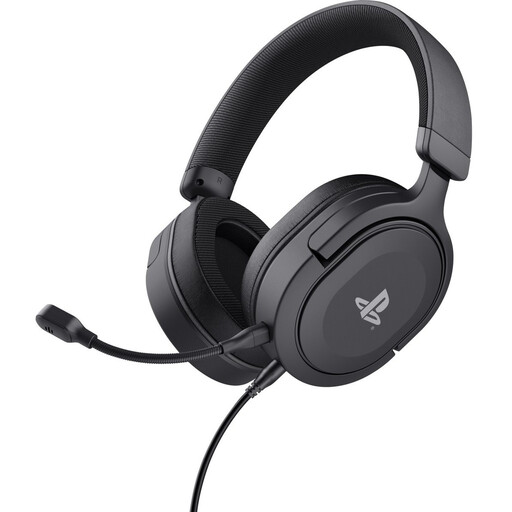 Image unavailable
Trust GXT 498 Forta, wired, black
Could suit a fixed recording spot with a compatible 3.5mm headset socket; the description mentions a flexible microphone that can be positioned close to your mouth.
The microphone is detachable and has a pop filter. The cable is 1.2 m long. These aren’t test results for recordings made with fan noise.
Joybuy
 Image unavailable
Sennheiser MOMENTUM 4 Wireless, white
Could suit you if you’re looking for wireless headphones with microphones for calls and your recording device supports the connection; the description mentions four beamforming microphones.
Bluetooth and an included 3.5mm cable are listed. The description focuses on calls and doesn’t prove how the headset records Dutch pronunciation with fan noise in the background.
Joybuy
 Image unavailable
Turtle Beach Atlas 200 PC, wired
Could suit a wired recording setup if your device has a compatible 3.5mm input; the description also mentions an included USB adapter.
The microphone can be flipped up to mute it. This doesn’t tell you how much fan noise will remain audible in a recording.
Joybuy
 Image unavailable
JBL Quantum 120, wired, black
Could suit a recording device with a compatible 3.5mm input; the description mentions a detachable microphone.
The product information lists a cardioid microphone and noise reduction for calls. This isn’t an independent assessment of a recording made with fan noise.
Joybuy
 Image unavailable
Bose QuietComfort Ultra Bluetooth headphones, black
Could suit you if you’re looking for wireless headphones with built-in microphones for hands-free calls and your device supports the connection.
Bluetooth and an included audio cable are listed. The active noise cancellation is designed for listening and doesn’t prove what the microphone will pick up.
Joybuy
Frequently asked questions
Should I choose ANC to remove the fan from my recording?
No. ANC for your ears doesn’t automatically reduce fan noise in your recording. Position the boom microphone close to your mouth and compare a recording made with the fan on.
How can I check that the right microphone is recording?
In Windows, select the connected microphone as your input and make a test recording. Microsoft explains how to test a microphone in the input settings; also listen back in the programme you use for reading practice.
Do I need a manufacturer’s warranty to have statutory protection in the Netherlands?
No. A manufacturer’s warranty is in addition to your statutory consumer rights. The Government of the Netherlands states that there is no fixed statutory warranty period in the Netherlands; if there’s a problem, you can contact the seller.
Can I return a headset bought online after making a test recording?
For online purchases from a business, you’ll often have a 14-day cooling-off period, but there are exceptions. The Government of the Netherlands explains how this period works; check the terms that apply to your purchase before testing and returning the headset.
Which marking should I check on a headset for use in the Netherlands?
Check that the specific electrical or electronic product being offered has the correct CE marking. The Dutch Authority for Digital Infrastructure states that wireless equipment must also meet radio equipment requirements; a declaration for the model doesn’t replace checking the product being offered.


