What should you look for in a headset microphone?
Wired USB headset for calls
Best suited to: practising mainly on a computer and looking for a wired connection with a positionable microphone boom.
Consider: features such as noise cancellation aren’t an independent measure of how pronunciation details will sound in your recording.
USB headset with a directional microphone
Best suited to: practising in a shared space and wanting to factor in the microphone’s direction when choosing. EPOS lists a unidirectional microphone for the IMPACT 100 UC Stereo USB-C+A.
Consider: a directional microphone doesn’t guarantee that other voices will disappear from your recording or that every sound will be retained.
Recording-focused headset with TRRS
Best suited to: recording and listening back to your voice, provided your device has a compatible microphone input. RØDE specifies that you use the supplied TRRS cable with the NTH-100M.
Consider: check that your device’s connection supports the microphone; a headphone output alone won’t necessarily do so.
Pronunciation practice can involve sounds, word stress and intonation. So make a test recording with the headset, app and space you plan to use.
| What to consider |
What should you check? |
Who is this important for? |
| Other voices |
Can you position the microphone boom close to your mouth? Record while someone talks at a normal distance. |
If I practise while others are talking, I want to be able to listen back to my own voice. Around 36% of consumers prioritise being able to distinguish their own voice. |
| Pronunciation details |
Record the same Dutch sounds and sentences, then listen back for quiet sounds, plosives and intonation. |
If I’m assessing sounds, stress and intonation, I want to be able to hear them in the recording. Around 29% of consumers put pronunciation details first. |
| Microphone connection |
Check the port, the exact headset version and whether your recording app is using the microphone as its input device. |
If I switch between devices, I want to know whether the microphone will work in my recording app too. Around 21% of consumers prioritise device compatibility. |
| Comfort |
Check that the headset and microphone boom stay comfortably in place during a practice session. |
If I practise regularly, I want a comfortable fit and a microphone that stays in position. Around 14% of consumers put comfort first. |
Headsets at Joybuy
This selection includes wired headsets with microphones for voice recordings and computer-based practice. Check each model’s connection and the input source you need.
 No image available
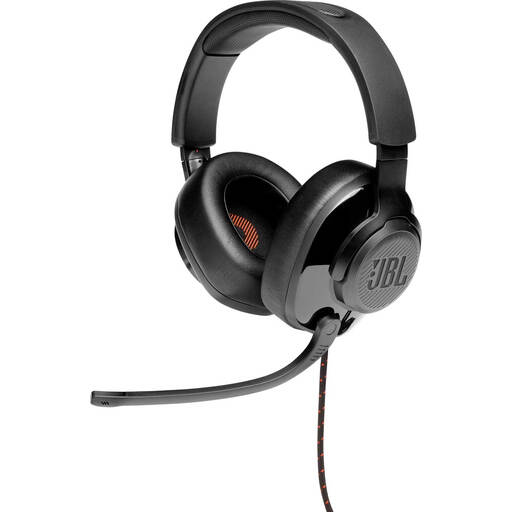
JBL Quantum 300 wired over-ear gaming headset, black
A wired headset to compare if you’re looking for an adjustable microphone boom for computer-based practice.
The product information lists a flip-up, directional microphone, a 3.5mm connection and a supplied USB audio adapter. Check that the microphone works as an input source in your recording app.
View at Joybuy
 No image available
Jabra Evolve2 30 SE
A wired headset to compare if you want to record speech on a computer and are looking for an adjustable headband.
The product information lists USB-A, two integrated microphones, memory foam ear cushions and an adjustable headband. Check that USB-A is compatible with your device and recording app.
View at Joybuy
 No image available
Logitech PC 960 USB headset
A wired USB headset to compare if you want to adjust the microphone position during practice.
The product description lists an adjustable, rotatable microphone boom, along with in-line volume and mute controls. ‘Noise-cancelling’ is a product claim, not the result of an independent recording test.
View at Joybuy
 No image available
Logitech H340 USB headset, black
A wired USB headset to compare if you’re looking for a flexible microphone for computer-based practice.
The product information lists an adjustable microphone and a USB connection. Background noise reduction is a product claim, not a measurement of pronunciation recordings.
View at Joybuy
 No image available
Edifier G2II wired USB gaming headset, black
A wired headset to compare if you want to use a detachable microphone for computer-based practice.
The product information lists a USB connection, detachable microphone and adjustable headband. The noise-cancelling feature is a product claim, not an independent test of recording quality.
View at Joybuy
Frequently asked questions
How do I set up the microphone for pronunciation practice?
Select the headset microphone as the input device in your recording app and start with a short test recording. Jabra recommends positioning the microphone boom close to your mouth; keep it out of the direct flow of your breath if you hear distracting plosives or breathing sounds. Check the position using your own voice.
Will a USB-C headset automatically work with my phone?
No, this isn’t guaranteed with the Jabra Evolve2 40 SE. Jabra says that not all USB-C devices or apps support the audio connection. Check that the headset microphone works in the app you actually use.
Can I record my voice with a TRRS headset?
Yes, if your device supports the microphone through that connection. RØDE specifies that you use the supplied TRRS cable with the RØDE NTH-100M; then make a test recording to check that the correct microphone is selected.
Could I accidentally record other people in a shared space?
That depends on who makes the recording and how it is used. If an organisation processes recordings that can identify other people, the Dutch Data Protection Authority says it must determine an appropriate legal basis under the GDPR in advance. This doesn’t mean there’s a general yes-or-no answer for every personal practice recording; agree with those present when you’ll record, and don’t share recordings of others without first checking the applicable rules.
How do I care for a headset used by several people?
Follow the cleaning instructions for the specific model. The RØDE manual describes detachable ear cushions, but that doesn’t mean the same cleaning method applies to every headset.


