What should you look for?
Start with the connection and how you want to review your recording. Then choose between a fixed wired setup and wireless practice if you need room to move.
| What to consider |
What should you check? |
Who should give this more weight? |
| Listening back to your pronunciation |
Check whether the microphone boom is adjustable. Record a short passage at your usual speaking volume and listen back to it. |
If I want to assess my pronunciation accurately, I want to be able to listen back to a recording with the microphone in a fixed position. Around 31% of consumers say listening back to recordings is their top priority. |
| A suitable connection |
Check your device’s ports and confirm the exact product version and whether any required adapter is included. |
I want to avoid buying a headset that won’t connect to my computer or device. Around 25% of consumers say compatibility is their top priority. |
| Comfort during repeated use |
Check adjustability and how easy it is to reach the mute and volume controls; try the fit if possible. |
If I record a passage repeatedly, I want to wear the headset comfortably and reach the controls easily. Around 19% of consumers put wearing comfort first. |
| Freedom to move |
Test the microphone in your own recording app while moving around and listening back. Check the battery before a session. |
I want to be able to stand or walk while rehearsing without a cable getting in the way. Around 13% of consumers say freedom to move is their top priority. |
| Purchase cost |
Compare the specific version and total checkout cost only after you’ve confirmed the connection and essential features are right. |
If I mainly practise at a computer, I don’t want to pay for features I don’t need. Around 12% of consumers put purchase cost first. |
Joybuy products for speech practice
This selection includes wired USB headsets, wireless headsets and headphones with recording features. For each model, check that the connection, microphone and way of working suit your test recording.
 No image available
Turtle Beach Stealth 600 Gen 3 Xbox headset, purple
The wireless version may suit you if you want room to move while practising; test the microphone in your own recording app first.
The product information lists 2.4 GHz and Bluetooth 5.2, as well as a microphone that flips up to mute. The built-in lithium-ion battery is not user-replaceable; according to the product information, the USB-C charging cable is not included.
View at Joybuy
 No image available
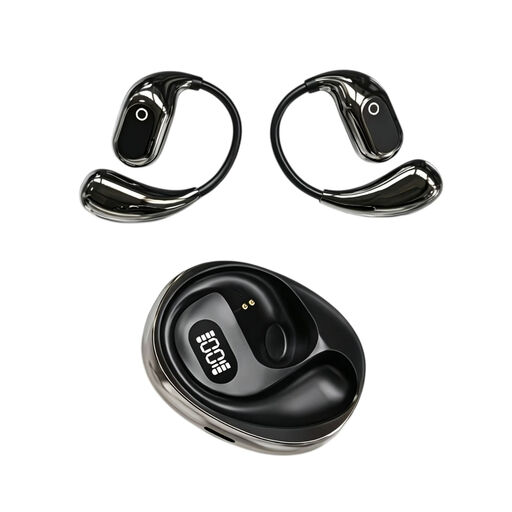
On-ear translation headphones, 144 languages, recording function
The title mentions a built-in condenser microphone and on-the-spot recording; check whether the recording function described suits the way you practise pronunciation.
The title lists binaural audio, a charging case with Type-C and a digital LED battery indicator. These features alone don’t tell you how well you’ll be able to assess your Dutch pronunciation in a recording.
View at Joybuy
 No image available
Razer Kraken V3 X headset, black
The product description mentions a microphone for voice recording and communication; make a test recording to see whether it works for your practice.
The description lists a cardioid HyperClear microphone and a weight of 285 grams.
View at Joybuy
 No image available
Logitech PC 960 USB headset
The wired USB version may suit you if you practise at a computer with a compatible USB port.
The product information lists an adjustable microphone boom, an adjustable headband and in-line volume and mute controls.
View at Joybuy
 No image available
Logitech H650e stereo headset, wired
The product description lists a wired stereo headset with a microphone for computer use; check that the connection suits your device.
The description lists USB plug-and-play and in-line volume controls.
View at Joybuy
Frequently asked questions
How can you check that your headset is recording before your performance?
In Windows, select the headset you want to use as the microphone input, start a test and play back the sample recording. Also check that the headset isn’t muted and that your recording app has access to the microphone.
Does the microphone need to be directly in front of your mouth?
Follow the positioning instructions for your chosen model. Logitech recommends placing the H390’s microphone boom level with your mouth; then listen back to decide whether the recording sounds clear enough for your needs.
What if the headset breaks sooner than expected during normal use?
In the Netherlands, if a product breaks sooner than you could reasonably expect under normal use, the seller must repair it free of charge, replace it or, in some cases, provide a refund, in accordance with the applicable terms. ACM ConsuWijzer explains that the same fixed warranty period does not automatically apply to every headset.
Can you return a headset bought online after trying it on?
For online consumer purchases, you generally have a statutory cooling-off period of 14 days after delivery. ACM ConsuWijzer lists exceptions, including certain hygiene products with a broken seal. Before opening the product, check which terms apply to that specific item.
Can you share recordings of other people at a public showcase without permission?
A sound recording in which someone can be identified may contain personal data. The Dutch Data Protection Authority explains that personal use and wider publication may be treated differently under the law; its guidance on images does not provide a definitive test for permission in every sound recording situation. Consider the specific circumstances if you record other people or publish a recording.


