If you mainly practise at a computer, start with a wired headset with a boom microphone and a connector that suits your device. Make a test recording before your presentation and listen back to it: a product claim about noise cancellation doesn’t prove how clearly your voice will come through in your practice space. If you want to leave one ear free or move around while speaking, take extra care to check that the headset you choose works with your recording device.
Who is this choice relevant to?
Student listening back to their own recording
You practise at a computer several times and mainly want to hear whether your words come across clearly. Make a test recording with the microphone you intend to use; Microsoft Support explains how to test a microphone and play back a recording in Windows 10 and 11.
Student practising for long sessions
You wear the headset for several practice sessions, so consider the fit, the ear cushions and whether you prefer one or both ears covered. HP describes different wearing styles across the Blackwire ranges, but comfort is a personal matter.
Student presenting while standing
You want to be able to move around while practising. Consider the cable length or connection type, and test the headset with the device you use to record.
What should you consider when choosing?
First, decide where you’ll be recording and how much freedom of movement you need. Then check the fit and assess the microphone by making a test recording on your own device.
| What to consider |
What to look for when buying |
Who is this important for? |
| How clearly your voice comes through |
Check the microphone position and make a test recording using the app and device you plan to use. |
If I listen back to myself after every practice session, I want to be able to follow my words clearly. Around 36% of consumers say that how clearly their own recording comes through is their main concern. |
| Comfort |
Check the adjustability, how the ear cushions sit and whether you find mono or stereo comfortable throughout a full practice session. |
When I practise for several sessions in a row, I want a fit that stays comfortable for me. Around 29% of consumers prioritise comfort. |
| Connection to your device |
Compare the port on your recording device with the exact USB-A, USB-C or 3.5mm version, and check which microphone the app uses. |
If I’m recording on my own computer, phone or tablet, the headset needs to connect to it properly. Around 21% of consumers say device compatibility is their main concern when buying. |
| Freedom of movement |
Check the cable length or connection type, and test the connection and battery charge before practising while standing. |
When I practise standing up, I want to move around without the cable getting in my way. Around 14% of consumers put freedom of movement first. |
Buying pitfalls
-
Assuming noise cancellation means your recording will be clear
A feature listed in a manufacturer’s description won’t necessarily tell you how your voice will sound in your room. The microphone position and device settings also make a difference.
Record yourself speaking at your usual presentation volume, then listen back to the recording.
-
Choosing the right product range but the wrong connector
USB-A, USB-C and 3.5 mm are different connections. Within the Poly Blackwire 3300 series, HP lists the 3.5mm option only for models 3315 and 3325.
Before buying, compare the full model name and connector with your recording device’s ports and microphone support.
-
Choosing wireless without checking the recording connection
Freedom of movement won’t help if your recording device doesn’t support the connection or the headset isn’t charged.
Check the connection type of the exact version and test it for a full practice session.
-
Assuming the legal guarantee always lasts two years
According to the Dutch government, there is no fixed statutory guarantee period in the Netherlands. However, you can expect a product to meet what you could reasonably expect of it; an additional manufacturer’s or seller’s guarantee is different.
Keep your proof of purchase and contact the seller if something is faulty.
Brands to consider
Logitech
The H390 is a wired USB headset for practising at a computer. The version mentioned uses USB-A.
- Logitech lists a positionable microphone, in-line controls, an adjustable headband and a 1.9 m cable for the H390.
- Check that USB-A is compatible with your computer. The manufacturer’s noise-cancellation claim is not an independent test of presentation recordings.
HP Poly
The Blackwire ranges include wired computer headsets in different wearing styles.
- HP describes mono and stereo versions, as well as adjustable fits across its product ranges.
- According to HP, the 3.5mm option is available only on the 3315 and 3325 within the Blackwire 3300 series. Check the exact version.
EPOS
EPOS describes the IMPACT SC 30 USB ML as a wired mono headset for computers.
- According to EPOS, this model has a USB connection, in-line controls and a noise-cancelling microphone.
- These are manufacturer details, not an independent comparison of presentation recordings. Check the full model number; features don’t automatically apply to other SC models.
JBL
The Quantum 350 is a wireless option to consider if you want to move around while practising and your recording device supports the connection.
- In a manufacturer announcement from 2021, JBL lists a detachable microphone and a 2.4GHz wireless connection for this model.
- JBL quoted a battery life of 22 hours; this is not a current, independent measurement for your use or set-up.
Joybuy products for this practice scenario
These product options include wired USB headsets for computer use, as well as wireless or mono versions for anyone who values freedom of movement or wants to keep one ear free while practising. Check that each model’s connection and microphone work with your recording device.
 No image available
Logitech PC 960 USB headset
A wired USB option for practising at a computer; check that the connector is compatible with your device.
View at Joybuy
 No image available
Logitech H340 USB headset, black
A wired USB headset for computer use; check that your computer supports the connection before buying.
View at Joybuy
 No image available
Jabra Evolve2 55 wireless stereo headset, black
A wireless stereo version for anyone who wants to move around while practising; check that it connects to your recording device.
View at Joybuy
 No image available
Jabra Evolve2 65 USB-A black MS mono
The mono version suits anyone who wants to keep one ear free while practising; check that USB-A is compatible with your recording device.
View at Joybuy
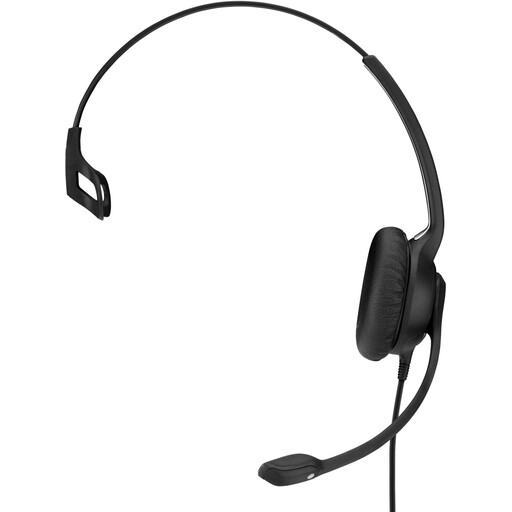 No image available
EPOS IMPACT SC 230 USB MS II wired headset, black
A wired USB headset for anyone with a compatible computer connection; test the recording on your own device.
View at Joybuy
Frequently asked questions
How can I check that the right microphone is recording before my presentation?
Test the connected microphone with the app you use for practising, then listen back to the recording. According to Microsoft Support, in Windows 10 and 11 you can start a test in the input settings, play it back and adjust the input volume if needed.
Can every USB headset also be used with your phone?
No. Don’t rely on the word USB alone. Check your phone’s port and microphone support, as well as the connection on the exact version of the headset. Support can also vary between devices for wired headsets with a 3.5mm connection.
If you buy a headset online in the Netherlands, are you always entitled to exactly two years of legal guarantee?
No. According to the Dutch government, there is no fixed statutory guarantee period in the Netherlands; you are entitled to a product that meets what you could reasonably expect of it. If something is faulty, you can contact the seller.
Can you return a headset bought online?
According to the Dutch government, when you buy from a business at a distance, you can usually change your mind within 14 days. Before buying, check the seller’s information about the cancellation period and applicable terms; this doesn’t apply if you buy from a private individual.
Can you record and share a practice session with classmates?
Don’t share a recording of other people without first checking the relevant rules. The Dutch Data Protection Authority says that educational institutions must have rules for making, storing and securing recordings, and for informing pupils or students. For a specific recording, also follow your school’s rules.


