For an online practice interview, each speaker can use their own headset, as long as the software actually records both voices. If you’re in the same room, don’t rely on a single headset microphone: make sure there’s a microphone for each speaker and check a test recording with both voices beforehand.
Who is this for?
Practice interviewer who wants to hear both voices
Wants to listen back to both questions and answers before giving a presentation to the local community. So first decide whether the interview will take place remotely or in the same room. RØDE discusses how to make both participants clear in an interview recording.
Online practice duo
Practises using two devices and wants to check that the recording includes both participants. Zoom describes computer recordings with separate audio tracks for each participant as an available option.
Individual pronunciation practice
Records their own Dutch speaking practice and wants to be able to connect, set up and test a headset. Audacity Support recommends making a test recording and listening back to it.
What should you look for when choosing?
Online: one headset per speaker
Suitable if: you’re each joining from your own device and the call software records both voices.
Bear in mind: check the recording settings. A headset worn by one participant won’t automatically record the other person’s voice.
In the same room: a microphone for each speaker
Suitable if: you want both the questions and answers to be clear in the recording.
Bear in mind: this setup requires more equipment or connections. Check that the recorder and software can capture both audio signals.
Recording only your own speaking practice
Suitable if: you only want to listen back to your own Dutch pronunciation or questions.
Bear in mind: the recording won’t automatically include your conversation partner’s answers.
| What to consider |
What should you check? |
Who is this important for? |
| Recording both voices |
Decide whether you’ll be speaking remotely or in the same room. Make a short recording of an exchange using the setup you intend to use. |
If I want to listen back to both my questions and the answers, the setup needs to capture both voices. Around 36% of consumers prioritise recording both voices. |
| Connection |
Compare the exact connection on the headset version with the one on your computer or recording device. Check whether any required adapter is included. |
If I want to get started without connection issues, I check my device’s connection and the version I’ve chosen. Around 29% of consumers prioritise connection compatibility. |
| Clarity in the room |
Test the microphone position, the level of both voices and any background noise in the room where you’ll be practising. |
When I practise in a noisy room, I want to listen back and check that both voices are clear. Around 21% of consumers prioritise clarity in the room. |
| Controls during practice |
Check that the fit is comfortable and note where the mute control is. Before recording, make sure the microphone isn’t muted. |
If I record several takes, a comfortable fit and easy-to-reach controls are important in practice. Around 14% of consumers prioritise these features. |
Common buying mistakes
-
Assuming one headset will record the whole interview
A headset microphone is designed to pick up the wearer’s voice. If two people are in the same room, the other person’s voice may not be picked up clearly enough.
Choose a setup that suits where you’ll be speaking and test both voices before your presentation.
-
Confusing a product range name with an exact version
The Trust Ayda is available as a USB version and as a version with a 3.5 mm connection. They aren’t the same product. The range name alone doesn’t tell you which connection you’ll get.
Check the full model name and connection for the version you’ve chosen on the product page and with the manufacturer.
-
Assuming noise cancellation guarantees a clear recording of two people
Headset call specifications alone don’t tell you how clearly both participants will be recorded in a practice room.
Make a test recording in the actual room and listen back to both voices and the background noise.
Brands to consider
Logitech
The H390 is a wired computer headset for recording your own speaking voice. Choose the version that suits the USB port available.
- For the USB-A version reviewed, Logitech lists in-line controls, an adjustable headband and a microphone boom.
- These features don’t prove that a conversation partner in the same room will also be recorded clearly.
Trust
The Ayda USB 25088 is designed for calls on a computer or laptop. Check the exact version and connection before choosing.
- For the USB 25088, Trust lists a microphone that mutes when flipped up and a USB-C-to-A adapter included in the box.
- An Ayda version with a 3.5 mm connection is not the same version as the USB 25088.
HP Poly
The Blackwire 3220 is available with different connection options. The documentation reviewed covers the stereo USB-C version with a USB-C/A adapter.
- For this version, HP specifies mute and volume controls and a noise-cancelling boom microphone.
- Call specifications aren’t an independent test of recording two interview participants. Check the full version details too.
Jabra
The Evolve2 30 SE is an office headset for remote calls. Check the UC and Teams versions separately.
- According to Jabra, its two-microphone system analyses background noise and picks up the wearer’s voice.
- This manufacturer description relates to calls and doesn’t establish how two interview participants are recorded separately.
EPOS
The PC 8 USB is a wired stereo headset for calls on PC and Mac, and is suitable for recording your own voice.
- EPOS lists in-line volume and mute controls, as well as a microphone for calls.
- This doesn’t establish whether it’s suitable for recording the other person’s voice in an interview.
Products for these setups
These products are suited to recording your own voice or taking part in an online practice interview. The DJI set is an alternative with two transmitters for two speakers in the same room, but it isn’t a headset.
 No image available
Logitech PC 960 USB
Designed for your own speaking practice or joining an online call from a computer. A headset worn by one person won’t automatically pick up the other person’s voice in the same room.
USB connection, adjustable microphone and in-line volume and mute controls.
View at Joybuy
 No image available
Logitech H650e Stereo
A wired headset microphone for recording your own voice on a computer or during an online practice call. If two people are in the same room, the other speaker also needs a microphone.
USB connection, in-line volume and mute controls, and a microphone that the product description says isolates background noise.
View at Joybuy
 No image available
Logitech H340 USB
A USB headset for recording your own voice on a computer. A single headset microphone won’t reliably pick up a conversation partner in the same room.
Adjustable microphone, mute and volume controls, and a mute indicator, according to the product description.
View at Joybuy
 No image available
Trust Ayda USB Type-A
Suitable for practising on a computer with a compatible USB Type-A connection. This headset is designed to pick up the wearer’s voice.
The product description mentions volume controls and a microphone that flips up to mute. Check the connection and version before buying.
View at Joybuy
 No image available
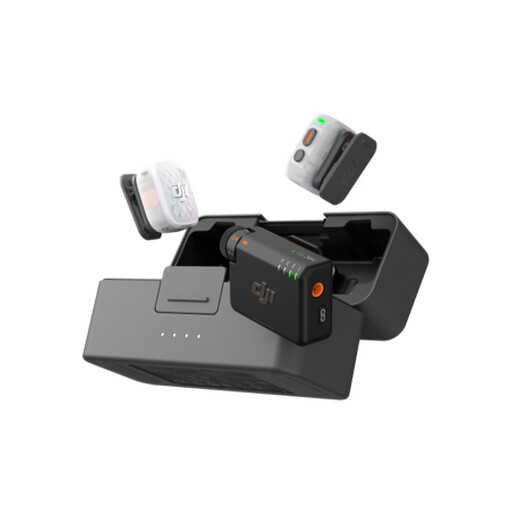
DJI Mic Mini 2S (2 TX + 1 RX + Charging Case)
An alternative to a headset when practising with two speakers in the same room: the product description lists two transmitters and one receiver. Before using it, check how to connect the recording device and listen back to your recording.
The description lists internal 32-bit float recording, 24-bit storage and two levels of AI noise cancellation. This is a system with clip-on microphones, not a headset.
View at Joybuy
Frequently asked questions
How can you check that your recording is usable before your presentation?
Make a test recording and listen back to it before using the recording. Select the intended microphone, record a few questions and answers, then check that you can hear both voices. Audacity Support warns that setting the recording level too high can cause distortion.
Can you record separate audio tracks for each participant during an online practice interview?
That depends on the software and settings you choose. Zoom documents separate audio tracks for each participant as an option for computer recordings. Check the settings and make a test recording first.
Can you play a recognisable interview recording at a presentation to the local community or share it online?
That depends on who will have access to it and how the recording will be used. The Dutch Data Protection Authority distinguishes between limited personal or household use and publication to a wider audience. If the GDPR applies, processing must have a valid legal basis. Discuss the intended use with the participants in advance and assess the specific circumstances before showing or publishing the recording.
What cooling-off period applies to an online purchase?
According to the Dutch government, consumers generally have a 14-day cooling-off period for distance purchases, although exceptions apply. Check the seller’s information and the terms and conditions for your specific purchase.


