
Practising alone at a computer
You mainly record your own answers in Dutch and listen back to different versions. A suitable microphone input and clear audio matter more to you than extra calling features.


If you mainly practise on your own at a computer, start with a wired headset that has the right connection for your device, then listen to a short test recording of your voice. If you want to move around while practising or hear your conversation partner too, check the wireless connection and make separate recordings of both voices respectively: having a microphone boom by your mouth does not guarantee that someone else’s voice will be picked up clearly.
You mainly record your own answers in Dutch and listen back to different versions. A suitable microphone input and clear audio matter more to you than extra calling features.
You wear the headset for several practice rounds and want a comfortable fit, with controls that are easy to reach. HP Poly and EPOS describe models with an adjustable headband.
You also want to hear the other person’s questions. So assess how well both voices are recorded, rather than just how close the microphone is to your mouth.
Start by checking the connection and recording of your own voice, then consider comfort and freedom of movement. If you also want to listen back to a conversation partner, treat that as a separate recording requirement.
| What to consider | What should you look for? | Who is this important for? |
|---|---|---|
| Clarity of your own voice | Check the position of the microphone boom and listen back to a test recording at a normal speaking volume. | If I want to assess my answers in Dutch, hearing my own voice clearly comes first. Around 29% of consumers share this priority. |
| Connection and microphone input | Check the port on your device and the exact headset model; then select the microphone in your recording settings and test it. | I want to make sure my recording app uses the headset microphone, rather than just playing sound through the headset. For around 23% of consumers, the right connection for their device is the top priority. |
| Comfort when practising repeatedly | Compare the mono and stereo versions, and check the adjustability and ear cushions on the specific model. | If I wear the headset for several rounds, I want a fit that works for me. Comfort is the top priority for around 18% of consumers. |
| Recording both voices | Record a short exchange and check that you can hear both your answers and the questions. | I want to listen back to the questions and my answers, not just my own voice. Around 18% of consumers prioritise recording both sides. |
| Freedom of movement | Check that the Bluetooth connection or included adapter works with your device, then test the recording while moving around. | If I want to practise while walking, a wireless connection is a practical factor to consider. Around 12% of consumers say freedom of movement is their top priority. |
A microphone boom positioned by the wearer is not necessarily suitable for clearly recording someone further away in the same room.
Record a short question and answer, then listen back to both voices. If your conversation partner’s voice is not clear enough, consider a different recording setup.
You may need a separate recording setup to capture both voices.
A headset may play audio while the recording app uses a different microphone. USB and 3.5mm models also have different port or input requirements.
Check the exact model and device input, select the headset as the input device, then make and play back a test recording. Microsoft Support explains how to test a microphone in Windows.
You may need a suitable adapter if the headset connection does not match your device.
A model name may cover several versions; connections, adapters and generation-specific specifications are not necessarily the same.
Compare the full model name and version before you buy. Jabra and JLab document different versions and generations within their headset ranges.
Logitech offers wired headsets with USB or 3.5mm connections; check which option suits your recording device for each model.
The wired Blackwire 3200 series includes a range of fits and connection options.
The IMPACT 100 series includes lightweight USB models worth comparing for repeated practice.
The Evolve ranges include wired and wireless headsets for calls; the Evolve2 65 is a wireless option to consider if you want to move around.
The GO Work is an on-ear headset to compare if you want to move around wirelessly while practising.
These headsets suit practice where you mainly record your own voice. The selection includes wired USB and 3.5mm models, as well as a wireless option. Check that each model’s connection is compatible with your device; a test recording is still important, especially if you also want to hear a conversation partner.
 Image unavailable
A wired USB option for practising at a computer and recording your own voice.
The description lists an adjustable microphone boom and in-line volume and mute controls.
The cable limits your freedom of movement.
 Image unavailable
A wireless mono model to consider if you want to move around while practising.
The description lists Bluetooth, a USB-A adapter for connecting to a computer and memory foam ear cushions.
Wireless use requires charging; the stated battery life is a product claim.
 Image unavailable
A wired USB Type-A headset for practising at a computer; check that your recording app uses its microphone.
The description lists an adjustable headband, ear cushions and a flip-up microphone with a mute function.
The cable limits your freedom of movement.
 Image unavailable
A wired 3.5mm option if your recording device has a suitable audio and microphone input.
The description lists an adjustable microphone and in-line volume and mute controls.
Check that your device’s connection also supports microphone recording.
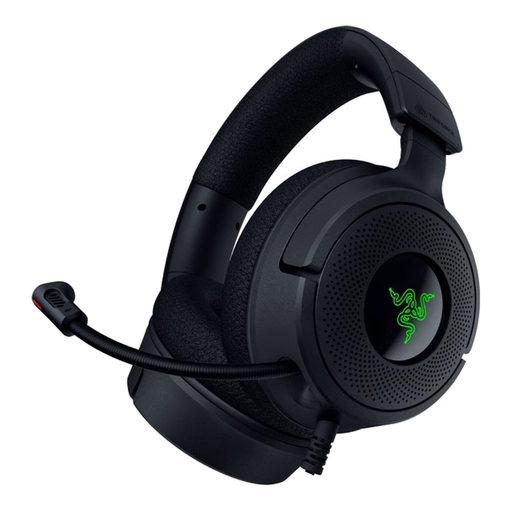 Image unavailable
A wired headset with a microphone to compare for practising at a computer.
The description lists USB-A and USB-C connections, on-earcup controls and a foldable microphone that you can position.
The cable limits your freedom of movement.
On a Windows computer, select the microphone you want to use in the input settings, start the microphone test and play back the sample recording. Microsoft Support also recommends testing the microphone in the recording app you actually use.
Do not assume so without making a test recording. The microphone boom is by the wearer; record a short exchange and check that you can hear both voices.
Contact the seller to discuss a suitable solution. ACM ConsuWijzer explains that if a product is faulty, the seller is responsible for providing a solution free of charge, such as a repair or replacement. A manufacturer’s warranty does not replace your statutory rights in the Netherlands.
Discuss recording and sharing with your conversation partner beforehand; this guide does not determine whether every recording or publication is permitted. The Dutch Data Protection Authority (Autoriteit Persoonsgegevens) describes an exemption from the GDPR for personal or household use, but not for professional or commercial use. Processing personal data outside this exemption requires an applicable legal basis; consent is one possible legal basis.