
Presenter who uses notes
You want to see your main display and notes at the same time, so you choose a stand mainly based on the screen positions you need.


A crossbar is a good fit if you usually keep your presentation and notes side by side; choose independently adjustable arms if you want to position each screen separately. Check the weight and VESA pattern of each screen, and measure your desk thickness and the distance to the wall, as limits vary by model.
You want to see your main display and notes at the same time, so you choose a stand mainly based on the screen positions you need.
You have limited space near the back of your desk and are particularly mindful of the stand’s depth and mounting method.
You switch between presenting and reading, so you need to be able to adjust each screen independently.
Suitable if: you usually keep your presentation and notes side by side and want a compact set-up. ACT states that the AC8322 sits 14 cm from the wall.
Bear in mind: both screens share the crossbar, so you have less freedom to position them independently than with separate arms. For the AC8322, ACT specifies a maximum screen size of 27 inches and weight of 7 kg per screen, VESA 75 × 75 or 100 × 100 mm, and a maximum desk thickness of 88 mm.
Suitable if: you often turn your notes screen separately or want to position your main screen differently. Neomounts specifies a 180° stop for the DS70-250BL2, allowing it to be positioned close to a wall.
Bear in mind: you’ll need room to swivel the screens, and should check the weight limit for each one. Neomounts specifies a weight range of 1–9 kg per flat screen for this model, and a maximum of 8 kg per curved or ultrawide screen. The VESA sizes are 75 × 75 and 100 × 100 mm.
Suitable if: you want to position each screen horizontally on its own, but don’t need to adjust the height of each one separately with a gas spring. StarTech.com describes the ARMDUAL3 as having two articulating arms with height adjustment along a pole.
Bear in mind: adjusting the height along the pole works differently from moving a screen directly with a gas spring. For the ARMDUAL3, StarTech.com specifies a maximum of 8 kg per arm and a desk clamp for surfaces measuring 40–85 mm thick.
| What to consider | What should you check? | Who is this important for? |
|---|---|---|
| Positioning your presentation and notes | Decide where you want each screen and check that the stand allows you to move them into those positions. | I want to see both my presentation and notes clearly at the same time, so the screen positions are crucial. Around 36% of consumers prioritise being able to position both screens usefully. |
| Mounting the screens and attaching the stand to your desk | Check the weight and VESA pattern of each screen. Also measure the desk thickness and see whether clamp or grommet mounting will work. | I want to make sure that both the mounting method and the load are within the limits for my existing screens. Around 29% of consumers prioritise this compatibility. |
| Space near the back of your desk | Measure your desk depth, the distance to the wall and the space occupied by the screens in your chosen position. | If my desk is close to the wall, I want to know in advance how much space the stand and screens will take up. Around 21% of consumers prioritise the space available. |
| Frequent adjustment | Compare how the model adjusts height, depth and swivel angle, and whether the screens can be adjusted independently. | If I often switch between presenting and reading, I want to be able to reposition the screens easily. Around 14% of consumers focus mainly on being able to adjust the screens regularly. |
A screen size that fits doesn’t necessarily mean the screen’s weight and VESA pattern are within the stand’s limits. For the model in question, Neomounts also specifies a different maximum load for curved or ultrawide screens.
Check the specifications for the exact model for each screen separately, including the weight without its stand and the VESA pattern.
If the mount isn’t compatible, you may need a different mounting solution or a suitable adapter.
A crossbar and two separate arms offer different ways to position your presentation and notes in relation to each other.
Sketch out your preferred screen positions before choosing a design, and check whether you need to adjust each screen separately.
The thickness of the desk surface, the mounting position and the space between the screens and the wall can all affect whether a stand will fit.
Measure the desk edge, surface thickness and distance to the wall, and check the mounting limits for the model you’ve chosen.
If the mount isn’t suitable for your desk, you may need a different mounting solution.
The ACT AC8322 is worth considering if you usually keep both screens side by side and have limited space behind your desk.
The DS70-250BL2 NEXT Slim suits a set-up where you need to position your presentation and notes independently, even close to a wall.
The ARMDUAL3 is an option if you want to position each screen horizontally on its own and height adjustment along a pole is sufficient.
The MX400 is a dual gas-spring arm option to compare if independent adjustment is important to you.
This selection includes a fixed dual monitor stand and adjustable arms for positioning your presentation and notes.
 No image available
This fixed stand is designed for two monitors, and its adjustable width can help you fit the set-up on your desk.
The width adjusts from 80 to 108 cm and the height is fixed at 10,4 cm. The side platforms swivel.
 No image available
This dual monitor arm is designed for a set-up with your presentation and notes on two screens.
Height and depth are adjustable; check that the movement and mounting method suit your screens and desk.
 No image available
The independently adjustable arms are designed to position two screens for presentations and notes.
The description specifies a maximum of 8 kg per screen and VESA 75 × 75 or 100 × 100 mm. Check each screen separately against these limits.
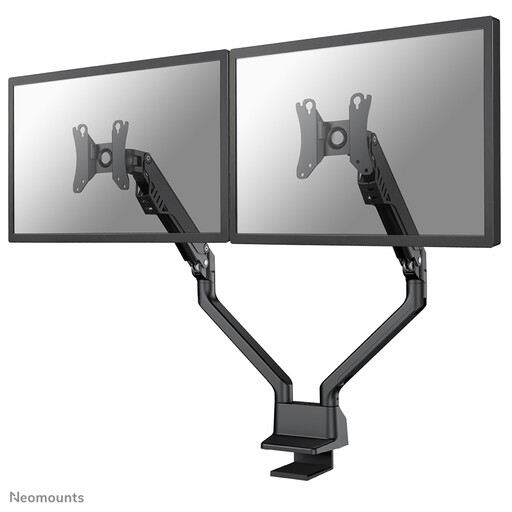 No image available
This arm is designed to position two screens at different viewing angles.
The description specifies manual height and depth adjustment, a maximum of 8 kg per screen and VESA 75 × 75 or 100 × 100 mm.
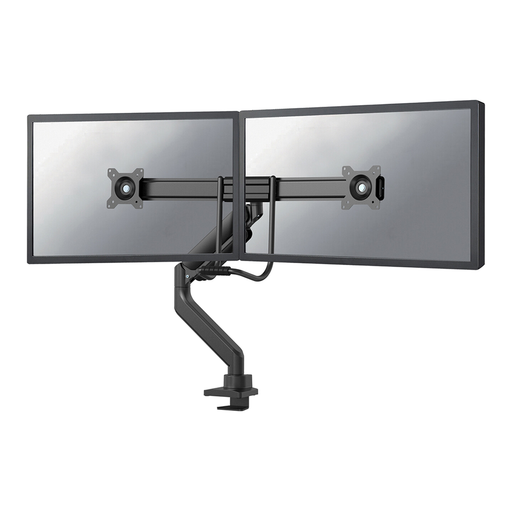 No image available
This arm is designed for two screens that you want to position independently for presentations and notes.
The description specifies a maximum of 8 kg per monitor, VESA 75 × 75 or 100 × 100 mm, and clamp or grommet mounting.
Not necessarily. Check each screen separately to make sure its weight and VESA pattern are within the limits of your chosen model. Neomounts, for example, specifies the load capacity per screen for the DS70-250BL2.
That depends on the model and where you’re mounting it on your desk. ACT lists both desk clamp and grommet mounting for the AC8322. Measure the desk thickness and check the instructions for your chosen model before installation.
First, check that the screen is within the arm’s specified weight range, then follow the adjustment instructions for the exact model. Don’t exceed the manufacturer’s maximum load.
The Dutch government describes an employer’s duty of care to provide a good and safe home-working environment. Arboportaal sets out rules for screen-based work and states that, if you work at a screen for more than two hours a day, the screen and keyboard must not be attached to each other. This doesn’t mean that every private buyer is legally required to have a dual monitor arm.
For a standard online purchase, you’ll generally have a statutory cooling-off period of up to 14 days after delivery, with some exceptions. ACM ConsuWijzer also notes that Dutch law doesn’t set a fixed statutory warranty period of two years; what you can reasonably expect from a product is also taken into account.