
Document comparer
You want to keep two versions legible side by side and avoid unnecessary changes in viewing direction. ACT and Neomounts describe setups for two screens.


If you often compare two document versions side by side, a dual monitor stand is a good choice as long as you can align both screens properly. At a shared desk, being able to readjust the setup easily can make all the difference: a crossbar moves both screens together, while separate arms give you more flexibility to position each screen individually. Check the VESA pattern, weight and dimensions of each monitor, and choose a mounting option that suits the desk.
You want to keep two versions legible side by side and avoid unnecessary changes in viewing direction. ACT and Neomounts describe setups for two screens.
You share a desk and want to be able to readjust the screen height or position when you switch users. ACT says the AC8322 has tool-free height adjustment using a wing nut, while StarTech.com describes arms that can be adjusted independently.
You need to consider how much desk space will remain and whether a desk clamp, grommet mount or freestanding base will work. ACT describes both a mounted and a freestanding version.
A good fit if: you usually keep two similar screens side by side and mainly want to adjust their height together. ACT says the AC8322’s height can be adjusted without tools using a wing nut.
Bear in mind: the stated limit for this model is 27 inches and 7 kg per screen; the desk can be up to 88 mm thick.
A good fit if: you want to position the screens at different depths or in different places. Neomounts describes the DS60-600BL2 as offering manual height and depth adjustment, while StarTech.com specifies independently adjustable arms.
Bear in mind: allow for the space behind the desk and check the limits for each screen on your chosen model. These features apply to the versions mentioned, not necessarily to every arm from those brands.
A good fit if: you don’t want to use a clamp or grommet mount and have enough room for a base. ACT describes the AC8320 as a freestanding version.
Bear in mind: the base takes up desk space, so also check that both screens are within the model’s specifications.
| What to consider | What should you check? | Who should pay particular attention? |
|---|---|---|
| Aligning documents | Check that the screens fit side by side and that the model offers the height, depth and angle adjustments you need. | If I’m comparing two versions at once, I want to position both screens comfortably; around 31% of consumers prioritise alignment. |
| Readjusting the setup | Check whether the screens move together or independently, and whether the height can be adjusted without tools. | When several people use the desk, I want to be able to adjust the screen position easily for each person; around 25% of consumers prioritise readjustment. |
| Screen compatibility | Check each screen’s VESA pattern, weight and dimensions against the specifications for the exact version. | If I want to mount two existing monitors, both must fall within the stated limits; around 25% of consumers make compatibility their top priority. |
| Mounting and space | Check the desk thickness, whether a clamp or grommet mount is possible, and how much room a freestanding base will take up. | At a shared desk, I want a mounting option that fits without unnecessarily reducing the available workspace; around 19% of consumers prioritise desk fit. |
For the models discussed, the stated weight limit applies to each screen individually. Looking only at the combined weight could therefore hide the fact that one monitor exceeds the limit.
Check each screen’s weight against the specifications for the exact version.
A freestanding model doesn’t need to be attached to the edge of the desk, but its base still sits on the desktop.
Measure the available desk space and compare it with a clamp or grommet-mounted setup.
A base leaves less desk space for other items.
Versions can differ in their VESA patterns and weight limits. For non-standard VESA patterns, Neomounts lists optional adapter plates.
Check the full model number and the VESA pattern of both monitors before choosing a version.
Some combinations may require a separate adapter plate; check this for the monitors and stand in question.
ACT describes both a dual crossbar and a freestanding dual monitor stand.
The DS60-600BL2 is a desk-mounted dual arm for positioning screens independently.
The ARMDUALPIVOT has independently adjustable arms for a side-by-side or stacked setup.
The LX Dual Side-by-Side range is designed for an adjustable setup with two screens next to each other.
These Joybuy products are dual monitor stands for mounting and adjusting two screens at a desk. Check the adjustment options, dimensions and mounting requirements for each version.
 Image unavailable
This stand is designed for two monitors, with adjustable width and viewing angle.
The product name specifies MDF and a width of 80–108 cm for the white version.
 Image unavailable
This arm is designed for two screens and offers height and depth adjustment.
The description specifies support for screens up to 27 inches. Tool-free Dell Quick Release is available for compatible Dell UltraSharp and P Series monitors.
 Image unavailable
This desk-mounted arm is designed for two monitors and offers several ways to adjust their position.
The description specifies height adjustment from 200–400 mm, tilt, swivel and rotation. The stated limit is 30 inches and 10 kg per screen, with VESA 75 × 75 or 100 × 100 mm.
 Image unavailable
The description specifies manual height and depth adjustment for two screens.
The stated limit is 27 inches and 8 kg per screen, with VESA 75 × 75 or 100 × 100 mm.
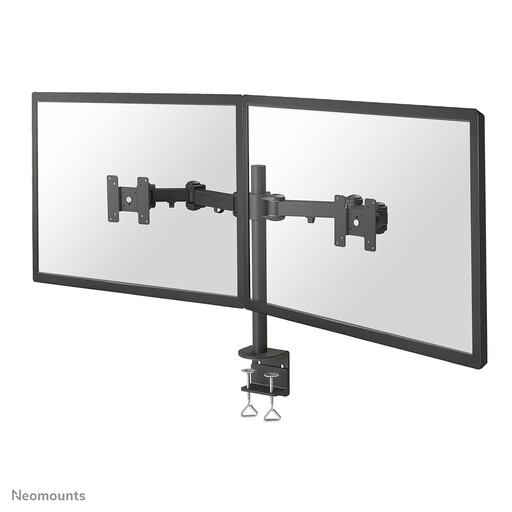 Image unavailable
This desk-mounted arm is designed for two screens and lets you adjust their position manually.
According to the description, the height can be adjusted manually from 0 to 45 cm. The stated limit is 27 inches and 8 kg per screen, with VESA 75 × 75 or 100 × 100 mm.
Yes, as long as each screen is within the VESA, weight and size limits for the exact model. Don’t rely on the stated screen diagonal alone.
Start by adjusting the setup for the user’s seated or standing position, then adjust the screen placement. ACT says the AC8322 uses a wing nut for tool-free height adjustment of both screens together; if you want to move them independently, choose a model that explicitly offers this feature.
Check whether a grommet mount is an option, or choose a freestanding stand if there’s enough room on the desktop. ACT describes the AC8320 as a freestanding model and the AC8322 as suitable for clamp and grommet mounting.
According to the Dutch government, in many cases you have 14 days to change your mind when buying online from a business. Check the seller’s terms and information; an online purchase from a private individual is not covered by the same definition of distance selling.
The government’s guidance on working with display screens describes an employer’s general responsibility to make work safe and healthy, but it does not specify a particular dual monitor arm. The right setup depends on the workplace and the screens being used.