
Presenter with a notes screen
You want your presentation in front of you, with your notes easy to read on the second screen. Being able to position the screens independently is especially useful if you regularly change your setup.


Start by choosing a mount that suits the weight and VESA pattern of each screen, as well as the mounting point on your desk. A manually adjustable crossbar could work if your screens usually stay side by side; independently adjustable arms are more useful if you regularly want to reposition your notes screen. Also consider the space behind your desk, and position the screen you look at most directly in front of you, as advised by Arboportaal.
You want your presentation in front of you, with your notes easy to read on the second screen. Being able to position the screens independently is especially useful if you regularly change your setup.
You want to check in advance that both screens are compatible with the same mount in terms of weight and VESA fittings.
You want to free up desk space by removing the monitor stands, while also considering where the clamp will go and how much room the arms need to move.
Best for: a fixed setup where two screens usually stay side by side.
Keep in mind: the screens are less independently adjustable than they would be with two separate arms.
Best for: a setup where you regularly want to adjust the height or depth of the screens.
Keep in mind: a gas spring does not make a crossbar equivalent to two independently adjustable arms. Also check the permitted weight per screen.
Best for: a presentation screen and notes screen that you regularly want to position at different distances or angles.
Keep in mind: check the space behind your desk and the weight limit for each screen. Neomounts specifies a maximum of 8 kg per curved screen and 9 kg for the other stated application for the DS70-250BL2.
For a setup with a presentation screen and a notes screen, the key considerations are compatibility, the level of adjustability you need and the space around your desk.
| What to consider | What to look for | Who should pay particular attention? |
|---|---|---|
| Screen and desk compatibility | Compare the weight and VESA pattern of each screen with the mount’s limits. Also check that the clamp or grommet fitting is suitable for your desk. | Want to mount two existing screens without running into fitting problems later? Around 33% of consumers with this setup put compatibility first. |
| Positioning screens separately | Check whether the arms move independently and whether the height, depth and tilt offer the viewing position you want. | Want to keep the presentation screen directly in front of you while still being able to read the notes screen beside it? Around 27% of consumers prioritise independent positioning. |
| Workspace and positioning | Measure the space on, behind and beside your desk, and check where the clamp will sit and how far the arms can move. | Want to clear the monitor stands from your desk without the arms hitting a wall or partition? Around 20% of consumers prioritise having clear workspace. |
| Adjustments and aftercare | Check which mounting method is included and read the terms of any manufacturer’s warranty. The Dutch government distinguishes between manufacturer’s warranties and statutory rights. | Want to adjust the screens easily and know in advance what to expect in terms of installation and aftercare? Around 20% of consumers make this a priority. |
Manufacturers specify the load capacity per screen for the models mentioned. Comparing the combined weight of the screens with the limit for a single arm can therefore give you the wrong impression.
Check the weight of each screen separately and compare it with the per-arm limit for the exact model. Also make sure the VESA measurements match.
Gas-spring height adjustment does not automatically mean you can position the notes screen independently of the presentation screen.
Compare the arm design and the range of movement for both screens with the positions you need.
The Dutch manufacturer’s page for the iiyama DS1002C-B1 lists a maximum of 32 inches, while the Dutch Joybuy product page states 30 inches. This discrepancy makes support for screens over 30 inches unclear.
Confirm the maximum screen size before choosing this model for a larger screen, and check the weight and VESA fitting too.
The models mentioned include manually adjustable crossbars, a gas-spring crossbar and a mount with independently positionable screens.
The AC8302 is a dual desk mount with clamp and grommet fittings; the AC8312 is a gas-spring alternative for anyone who adjusts the height more often.
The DS1002C-B1 is a dual desk-clamp mount with cable management and manual positioning options.
These Joybuy products are options to compare for a two-screen desk setup with a presentation screen and a notes screen.
 No image available
An option to consider if you’re looking for a dual arm. Before buying, check that the VESA measurements and weight of both screens are within this model’s limits.
 No image available
For anyone looking for a single stand for two screens with adjustable width and angle. Check that the specified version and dimensions suit your desk.
MDF; white finish; width 80–108 cm.
 No image available
An option to compare if you’re looking for a dual monitor arm with a gas spring. Check that its range of movement suits the space behind your desk.
Screen size stated in the product name: 10–32 inch. With gas spring, Topfix and 180°-Stop.
 No image available
An option to consider if you need to keep the space behind your desk clear. Measure the area and check that the mounting point is suitable.
Screen size stated in the product name: 17–27 inch.
 No image available
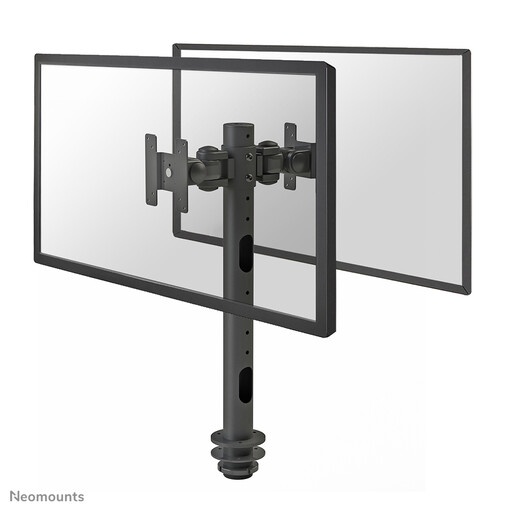
Compare this mount with your preferred screen setup if you want to attach two screens to a single desk fitting.
The product description specifies one swivel and tilt point. If you want to move the screens independently often, check that the range of movement is sufficient.
No. The Dutch workplace guidance referenced does not specify a set distance between the two screens. Arboportaal advises positioning the screen you look at most directly in front of you. Place the other screen where you can read your notes without sitting with your body turned for long periods.
Not without checking the installation instructions for the exact model and the construction of your desk. Make sure the clamp fits before mounting the screens; some of the models mentioned also offer grommet mounting.
When you buy as a consumer in the Netherlands, you’re entitled to a product that works as it should. According to the Dutch government, the Netherlands has no fixed statutory warranty period. Contact the seller if there’s a problem. Any manufacturer’s warranty is in addition to your statutory rights.
According to the Dutch government, online distance purchases generally come with a 14-day cooling-off period. Check the applicable terms and exceptions with the seller.