Who is a dual monitor arm suitable for?

Comparing documents on a small desk

If you want to read two complete versions side by side while still having room for a keyboard and papers, consider both the space behind your desk and the mounting options. Manufacturers such as Neomounts, ACT and iiyama offer different solutions for this setup.

Users with mismatched monitors

If your two monitors don’t naturally sit at the same viewing height, independent adjustment is worth considering. Check how the arms let you position each monitor, and place the one you use most directly in front of you. Arboportaal recommends this as a practical workstation tip.

Users with a changing workstation

If you regularly readjust your monitors, consider the adjustment mechanism when choosing an arm. A gas spring arm works differently from a simpler arm without a gas spring; ACT, for example, offers both a gas spring option and a simpler model.

What should you look for when choosing one?

Independently adjustable arms

Best if: you want to position each monitor separately or set them at different heights. Neomounts says the DS70-250BL2 has separate gas spring arms and a 180° stop.

Keep in mind: greater freedom of movement doesn’t automatically mean you need less space behind your desk. Measure how far the arms extend.

An arm with a crossbar

Best if: you usually move both monitors together. ACT says the AC8344 has a crossbar, gas spring and adjustable 180° rotation lock.

Keep in mind: adjusting both monitors to the same height is less suitable if each needs to sit at a different height. Also check the total width of your monitors.

A basic dual arm

Best if: you don’t move your monitors often and want to clear their stands from your desktop. The iiyama DS1002C-B1 has a desk clamp and height adjustment.

Keep in mind: the maximum monitor size isn’t stated consistently: iiyama says 32 inches, while the Joybuy product description says 30 inches. Check before buying if either monitor is larger than 30 inches.

What to consider What should you check? Who should pay particular attention?
Space on and behind your desk Measure the available space, monitor width and the arms’ full range of movement. I want to fit my documents and keyboard on a small desktop without the arms hitting the wall; around 33% of consumers prioritise freeing up workspace.
Reading two versions at once Check the total width of both monitors and whether you want to adjust each one’s height and angle independently. I want to read both document versions clearly and position the monitors so I can compare them side by side; around 27% of consumers prioritise readability.
Mounting and monitor dimensions Check the VESA size and weight of each monitor; compare the desk thickness and clamp clearance with the manual for the exact model. I want to know before installation whether the monitors and desk edge will fit the same mount; around 20% of consumers prioritise finding a compatible mount.
Frequent readjustment Compare the adjustment mechanism and check the permitted monitor weights for the model you’re considering. I share my workstation or often change my viewing position, so I want to be able to readjust the monitors; around 20% of consumers prioritise adjustability.

Common pitfalls

  • Measuring only where the clamp will go

    The monitors and arms also need room to move. A wall stop limits rotation, but doesn’t tell you how much space you’ll need behind your desk.

    Measure the full range of movement with both monitors in place, and allow for the position of the wall or partition.

  • Looking only at the monitor’s diagonal measurement

    A suitable screen size in inches isn’t enough to determine whether an arm will fit. The weight of each monitor and its VESA mounting pattern must also be compatible with the exact model.

    Check the dimensions and weight of each monitor individually. For curved or ultrawide monitors, also check whether the manufacturer sets a different weight limit.

  • Assuming a basic arm adjusts just like a gas spring arm

    How often you move your monitors affects which mechanism will work best for you. Having two monitor positions doesn’t, by itself, tell you how easy they are to adjust.

    Choose a mechanism based on how often your workstation changes and how independently you want to position the monitors.

Brands and models to consider

Neomounts

The DS70-250BL2 NEXT Slim is a dual gas spring arm with a 180° stop, designed for setups where a wall is close by.

  • Neomounts says it suits two monitors with VESA 75 × 75 or 100 × 100 mm and a weight of 1–9 kg per monitor. For curved or ultrawide monitors, the manufacturer specifies a maximum of 8 kg per monitor.
  • Check how much clearance you need from the wall and whether there’s enough room for the clamp on your desk.

ACT

The AC8344 Office Premium has a gas spring and crossbar, while the AC8302 is a simpler dual desk mount without a gas spring.

  • ACT lists a 180° rotation lock and top-side mounting for the AC8344. For the AC8302, the manufacturer specifies a maximum of 8 kg per monitor.
  • The models have different adjustment mechanisms, so consider whether you want to move the monitors together or independently.

iiyama

The DS1002C-B1 is a dual arm with a desk clamp, suited to a setup that you won’t need to readjust constantly.

  • iiyama specifies 200–400 mm of height adjustment, VESA 75 × 75 and 100 × 100 mm, and a maximum of 10 kg per monitor.
  • The maximum monitor size differs between product listings: iiyama says 32 inches, while Joybuy says 30 inches. Check this if you want to mount a monitor larger than 30 inches.

StarTech.com

The ARMDUAL3 has two articulated arms, with basic adjustment along a post.

  • StarTech.com says the arm supports two monitors weighing up to 8 kg per arm, with VESA 75 × 75 or 100 × 100 mm.
  • The clamp is specified for desktops 40–85 mm thick. Check your desktop thickness before choosing this model.

Ergotron

The LX Desk Dual Direct Arm is an example of a compact crossbar design that moves two monitors together.

  • The product sheet specifies a load capacity of 1–5 kg and an independent tilt adjustment for each monitor.
  • The product sheet dates from 2016, so check the version and product information before making a purchase decision.

Joybuy products for two monitors

This selection focuses on placing two monitors side by side and freeing up or organising your desktop. It includes both desk mounts and a freestanding monitor stand, so check how much space your chosen setup will take up on and behind your desk.

DELL MDA20 dual monitor arm

DELL Dual Monitor Arm MDA20

An option to consider if you want to mount two monitors on your desk and clear their stands from the desktop.

View at Joybuy

iiyama DS1002C-B1 dual monitor arm

iiyama DS1002C-B1 dual monitor arm

Suited to a largely fixed setup where you want to mount two monitors using a desk clamp.

iiyama specifies 200–400 mm of height adjustment, VESA 75 × 75 or 100 × 100 mm, and a maximum of 10 kg per monitor. The maximum monitor size is listed differently: iiyama says 32 inches and Joybuy says 30 inches. Check this if either monitor is larger than 30 inches.

View at Joybuy

Neomounts DS60-425BL2 monitor arm for 17–27-inch monitors

Neomounts DS60-425BL2 monitor arm, 17–27 inches

An option to consider if you want to position two monitors close to a wall. Measure the available space behind your desk first.

The product name specifies a monitor size of 17–27 inches. Before installation, check the VESA size and weight of each monitor against the specifications for the exact model.

View at Joybuy
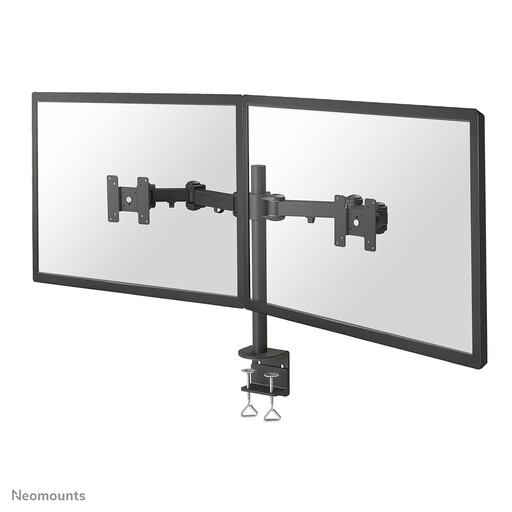
Neomounts FPMA-D960D monitor arm for 10–27-inch monitors

Neomounts FPMA-D960D monitor arm, 10–27 inches

An option for two monitors if you want to be able to adjust their position on your desk.

The product name specifies a monitor size of 10–27 inches. Check the VESA size and weight of both monitors against the specifications for each exact model.

View at Joybuy

Floordirekt stand for two monitors, MDF, white, 80–108 cm

Floordirekt stand for 2 monitors, MDF, 80–108 cm, white

A stand for anyone who wants to place two monitors side by side without using a desk mount.

The product name specifies an adjustable width of 80–108 cm and an MDF construction. Measure the available width on your desktop before choosing this option.

View at Joybuy

Frequently asked questions

Where should I position my monitors if I mainly work on one document and compare it with another?

Place the monitor you use most directly in front of you and adjust the height so you’re looking slightly downwards. Then check that the second monitor remains easy to read and reach. This is practical positioning advice from Arboportaal, not a fixed setup for every user.

Will a desk clamp fit every small desk?

No. It depends on the desktop thickness and the space available at and beneath the edge. The manual for the Neomounts DS70-250BL2 specifies a desktop thickness of 10–50 mm for the clamp; this measurement doesn’t automatically apply to other models.

How do I maintain a dual monitor arm mount?

Follow the manual for the exact model and check that the monitors are securely mounted. Leave enough slack in the cables when moving them. There’s no universal maintenance schedule for every arm, so follow the instructions for your specific model.

What guarantee and cooling-off period apply to an online purchase in the Netherlands?

Consumer purchases in the Netherlands are covered by a legal guarantee: the product must meet what you could reasonably expect from it. For a typical online consumer purchase, you usually have 14 days to change your mind, starting the day after delivery. Check for any applicable exceptions and information about return costs. Business.gov.nl makes clear that a commercial guarantee doesn’t replace the legal guarantee.

Is a dual monitor arm a legal requirement for working with a screen?

No. The Dutch regulations cited don’t require a dual monitor arm as a product. Arboportaal does outline requirements for a safe workstation with display screen equipment. If you work with a screen for more than two hours a day, these include provisions for a monitor that can be positioned separately from the keyboard and for height adjustment. Employers must assess which workstation requirements apply.
