Independently adjustable arms are a good choice if you want to keep your presentation screen centred and move your notes screen separately. If both screens usually stay side by side, a crossbar or pole-mounted option is also worth comparing. Check the VESA pattern and weight without the stand for each screen, and measure the desk edge, desktop thickness and available space behind the screens. Manufacturer specifications explain the differences between models, but they don’t guarantee ergonomic or productivity results.
Who is this for?
Presenter with a separate screen for notes
Wants to keep the presentation directly in front of them and read notes on a second screen that’s easy to see. Independent screen positioning is important here. Neomounts and StarTech.com describe models with arms that move separately.
Shared-desk user
Needs to readjust the screens regularly and should first check whether a clamp or grommet mount will fit the available desk. Mounting options and desktop thickness limits vary by model.
User with limited space behind the desk
Needs to know how much room the arms require to move near a wall or partition. A more compact pole or crossbar setup may be worth comparing if the screens usually stay in a fixed position.
What should you look for when buying?
First decide whether the presentation and notes need to move independently. Then check that both screens and the shared desk are within the limits of the model you’re considering.
Two independently adjustable arms
A good fit if: you want to keep the presentation screen centred and move the notes screen separately for each user or meeting.
Bear in mind: the arms need room to move, so check the weight and VESA limits for each screen. Neomounts specifies two gas-spring arms and a 180° stop for the DS70-810BL2.
Crossbar with two screen positions
A good fit if: both screens usually stay side by side and you want to line them up along a single bar.
Bear in mind: the screens are less independently adjustable than on separate arms. For the Monitor Mount PRO 5085, DURABLE specifies screens measuring 21–27 inches and weighing 3–8 kg each, with a desk clamp for desktops measuring 14–44 mm thick.
Articulating arms on a pole
A good fit if: you want to position two screens side by side without needing to adjust the gas-spring height each time.
Bear in mind: with the StarTech.com ARMDUAL2, you adjust the height manually along the pole. Check the VESA pattern for each arm and the maximum load of 8 kg.
| What to consider |
What should you check? |
Who should pay particular attention? |
| Positioning the presentation and notes separately |
Check whether both screens can be adjusted independently for height, depth and viewing angle, and whether the arms have enough room to move. |
If I want to keep the presentation centred and read notes separately, independent adjustment is my top priority. Around 29% of consumers prioritise this positioning. |
| Weight and VESA pattern |
Note the weight of each monitor without its stand and its VESA mounting pattern, then compare both with the limits of the exact model. |
If you want to keep using two existing screens, you’ll want to avoid finding that one doesn’t fit because of its weight or VESA pattern. Around 29% of consumers prioritise screen compatibility. |
| Mounting on a shared desk |
Measure the desktop thickness and clear desk edge, check whether a clamp or grommet mount is possible, and discuss any changes with the workplace manager. |
If the desk edge or desktop thickness determines how you can mount the arm, you’ll want to know in advance whether your chosen fitting will work. Around 24% of consumers prioritise desk mounting. |
| Readjusting the screens for colleagues |
Compare the height and depth adjustment and how the arms are set up. Also allow for enough cable slack as the screens move. |
If colleagues take turns using the desk, I want to be able to readjust the screen height and angle easily. Around 18% of consumers prioritise ease of readjustment. |
Common buying mistakes
-
Choosing based on screen size alone
A screen with the right diagonal measurement won’t necessarily be compatible with the arm in terms of weight and VESA mounting holes. The Neomounts DS70-810BL2 has separate limits for each.
Check the weight without the stand and the VESA pattern for each screen against the specifications of the arm you’ve chosen.
-
Assuming all dual monitor arms work in the same way
A crossbar, a pole with manual height adjustment and two gas-spring arms offer different ways to move and readjust screens independently.
Choose based on how often colleagues adjust the screens and whether the presentation and notes need to move independently.
-
Not measuring the space by the partition or the desktop thickness
A partition can restrict an arm’s movement, and clamps have a model-specific desktop thickness range. Neomounts says the 180° stop on the DS70-810BL2 limits movement towards a wall or partition.
Measure the space behind the screen and the desk edge, and check the mounting instructions before ordering.
-
Confusing the manufacturer’s warranty with your statutory rights
A stated manufacturer’s warranty is separate from your right to receive a product that conforms to the contract. The Dutch government states that the Netherlands does not have a fixed statutory warranty period.
Check any manufacturer’s warranty terms separately. If a product is faulty, contact the seller about your statutory rights.
Brands to compare
These brands offer different types of dual monitor arms. Always compare the specifications of the exact model, and don’t take brand claims as a guarantee of a particular working posture or outcome.
Neomounts
The DS70-810BL2 has separate gas-spring arms, while the DS70-250BL2 uses Topfix mounting. These are different models with their own specifications.
- Neomounts says the DS70-810BL2 has two gas-spring arms, clamp and grommet mounting, and supports 1–9 kg per screen.
- For the DS70-250BL2, Neomounts specifies a separate limit of 8 kg per curved or ultrawide screen. Don’t mix up the specifications for these two models.
StarTech.com
The ARMDUAL2 is a dual pole-mounted arm with articulating arms and manual height adjustment.
- StarTech.com specifies VESA 75×75 and 100×100 mm, and a maximum of 8 kg per arm.
- Height adjustment along the pole works differently from a gas spring. The stated specifications alone don’t tell you which method will be more comfortable.
DURABLE
The Monitor Mount PRO 5085 uses a crossbar for two screens that usually stay side by side.
- DURABLE specifies sliding screen mounts, cable clips and a 10-year manufacturer’s warranty.
- The stated limits are 21–27 inches, 3–8 kg per screen and a desktop thickness of 14–44 mm. A crossbar doesn’t offer the same independent positioning as separate arms.
Kensington
The SmartFit One-Touch K59601WW is a dual gas-spring arm designed to make it easy to reposition screens.
- Kensington says this model supports screens measuring 13–34 inches and weighing up to 9 kg, with VESA 75 or 100 mm and clamp or grommet mounting.
- Check that the size, weight and VESA pattern of each screen are within the model’s specifications.
Dual monitor arms at Joybuy
These models are designed for using two screens side by side and repositioning them in a shared workspace. Check that the mounting options and screen specifications for each model are right for your desk and monitors.
 No image available
DELL Dual Monitor Arm MDA20
The swivel arms and height and depth adjustment make it easy to readjust screen positions in a shared workspace.
For screens up to 27 inches. Quick Release is designed for compatible Dell UltraSharp and P Series monitors.
View at Joybuy
 No image available
Neomounts NM-D775DXSILVER
The adjustable arm is an option if you want to move two screens up and down and forwards and backwards on a shared desk.
For screens measuring 10–32 inches and weighing up to 8 kg each; VESA 75×75 or 100×100 mm. The product information specifies a desk clamp and a 180° stop.
View at Joybuy
 No image available
Neomounts DS60-425BL2
The short upper arm is designed for setups close to a wall or partition. Height and depth are adjusted manually.
For up to 8 kg per screen and VESA 75×75 or 100×100 mm. Check how much space is available around the desk.
View at Joybuy
 No image available
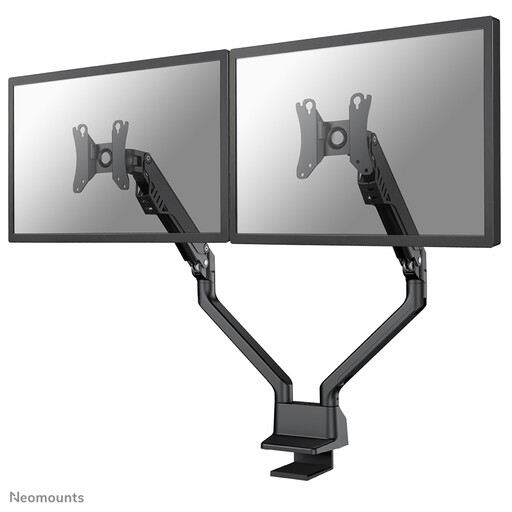
Neomounts FPMA-D750DBLACK2
The gas-spring arm is a good choice if you want to reposition two screens and adjust their height and depth.
For screens measuring 10–32 inches and weighing 2–8 kg each, with VESA 75×75 or 100×100 mm. Height adjustment: 20–51 cm; depth adjustment: up to 53 cm. Mounts using a Topfix clamp or grommet.
View at Joybuy
 No image available
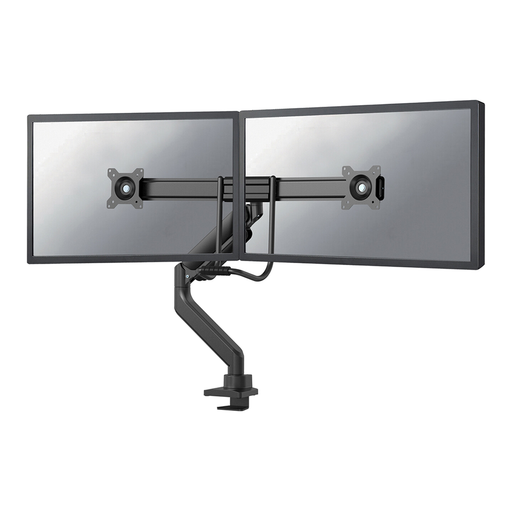
Neomounts DS75-450BL2
The pneumatic height and depth adjustment can be useful when the screen setup changes in a shared workspace.
Up to 8 kg per monitor and VESA 75×75 or 100×100 mm. Mounting options include a top-mount desk clamp and grommet fitting.
View at Joybuy
Frequently asked questions
Are dual monitor arms compulsory in Dutch offices?
No. Arboportaal does not specify that you must use a dual monitor arm. Employers do have to follow rules on healthy screen-based work and workplace setup; what applies depends on the working environment. Arboportaal separately outlines requirements for employees who work at a screen for more than 2 hours a day.
How do you set up two screens for colleagues sharing the same desk?
Readjust the workstation for each user, taking readability, reflections and lighting into account. Keep the presentation screen in a practical central position and put the notes screen somewhere easy to read. This is a practical layout, not a legally required dual-screen setup. Arboportaal advises varying screen-based work and taking short visual breaks or microbreaks.
Can you mount a dual monitor arm without drilling?
Yes, if the model you choose has a desk clamp and the desk edge and desktop thickness are within its specifications. The DURABLE Monitor Mount PRO 5085 is specified for desktops measuring 14–44 mm thick; Neomounts lists both clamp and grommet mounting for the DS70-810BL2. Check the instructions and shared-desk arrangements before fitting the arm.
What are your rights when buying online in the Netherlands?
For eligible distance purchases from a business, you’ll usually have a 14-day cooling-off period, according to the Dutch government. You’re also entitled to a product that conforms to the contract; the Netherlands does not have a fixed two-year statutory warranty period. Check any additional manufacturer’s warranty separately.


