Who is a dual monitor arm relevant for?

Translator comparing two texts

You want to see the source text and translation at the same time, with both screens at a similar height. The Health and Safety Catalogue from Sectorinstituut Transport en Logistiek describes a setup with two screens side by side and the user sitting between them.

Shared desk user

You’ll benefit from a setup that can be readjusted after a changeover and suits the available desk space and any partition. Arboportaal covers the arrangement of display screen equipment.

Buyer with existing screens

You’ll need to check each screen separately to make sure its weight, VESA mounting pattern and dimensions fall within the specifications of the same arm. Manufacturers such as Neomounts and Fellowes list these details for each model.

What should you consider when choosing?

Two adjustable arms with a desk clamp

A good fit if: you want to keep the desktop clear and reposition the screens after a change of user.

Keep in mind: the desk edge and mounting point must be suitable; also check that the arms can move freely near a wall or partition.

Freestanding dual stand

A good fit if: you can’t or aren’t allowed to attach anything to the desk, and there’s room for a base on the desktop.

Keep in mind: the base takes up desk space; the Neomounts FPMA-D550DDBLACK has manual height adjustment.

What to consider What should you check? Who is this important for?
Source text and translation side by side Check that both screens fit side by side and can be positioned at a similar height. A stacked setup changes your viewing direction. If you want to read both texts at once while checking your work, pay attention to the position and height of both screens. Around 36% of consumers prioritise comparing them side by side.
Readjusting the setup Compare the adjustment range and controls; check that the arms can move freely without hitting a wall or partition. At a shared desk, you’ll want to adjust the screen positions when users change over. Around 29% of consumers put adjustability first.
Compatibility with both screens Note the weight and VESA pattern of each screen and compare them with the limits for the exact model. Check for different weight limits for curved or ultra-wide screens. If you want to keep using your existing screens, check that each one individually falls within the stated specifications. Around 21% of consumers make compatibility their main purchase concern.
Mounting at a shared desk Check whether a clamp or grommet mount is permitted and possible, or whether a freestanding base will fit without getting in the way of your workspace. If the desk has a fixed layout or limited mounting space, you’ll want a mount that suits it. Around 14% of consumers focus mainly on this.

Common mistakes when choosing a dual monitor arm

  • Looking only at the maximum screen size

    A screen may be within the stated size limit but still exceed the arm’s weight limit or have an incompatible VESA pattern. Curved or ultra-wide screens may also have a different weight limit.

    Compare the weight and mounting pattern of each screen separately with the specifications for the exact model.

    Choosing an unsuitable arm could mean you need to buy a different one or use another mounting method.

  • Choosing a clamp without checking the shared desk

    A clamp needs to attach to the edge of the desk. A freestanding stand avoids this type of mounting, but takes up space on the desktop.

    Check the mounting edge, any partition and the rules on attaching equipment. Also measure how much room a freestanding base will take up.

    You may need a different mounting method if your chosen option isn’t suitable for the desk.

  • Assuming the manufacturer’s warranty covers all your statutory rights

    For a consumer purchase in the Netherlands, statutory rights apply alongside any manufacturer’s or seller’s warranty. The Netherlands Authority for Consumers and Markets explains the difference.

    Keep your proof of purchase and contact the seller if there’s a fault. Also check the terms of any manufacturer’s warranty.

Brands to consider

Neomounts

Worth considering for both dual arms with a desk clamp and freestanding dual stands.

  • According to Neomounts, the DS70-250BL2 has gas-spring adjustment and a 180° stop. The manufacturer lists a weight range of 1–9 kg per screen, with a maximum of 8 kg for curved or ultra-wide screens.
  • The freestanding FPMA-D550DDBLACK avoids attaching anything to the desk, but has manual height adjustment and needs room for its base.

Ergotron

The LX Dual Side-by-Side Arm 45-245-224 is worth considering for two screens positioned side by side.

  • Ergotron lists a maximum screen size of 27 inches for this model.
  • Check the full specifications for the model and both of your existing screens. This limit alone doesn’t tell you anything about other models from the brand.

StarTech.com

The ARMDUAL30 may be worth considering if you want a side-by-side setup, with the option of stacking the screens sometimes.

  • For this model, StarTech.com lists screens up to 30 inches side by side, up to 24 inches stacked, and a maximum of 9 kg per arm.
  • The stated screen size varies depending on the arrangement. Stacking isn’t necessarily the best setup for comparing two texts at once.

Fellowes

The Platinum Series dual monitor arm is worth considering if you’re comparing gas-spring adjustment and clamp or grommet mounting.

  • For models 8042501, 8056301 and 8056501, Fellowes lists 1.5–8 kg per arm and VESA 75×75 or 100×100 mm.
  • Fellowes specifies a desk thickness of 10–85 mm for clamp and grommet mounting. Check that these figures suit the model you’ve chosen and the shared desk.

Joybuy product picks

This selection includes adjustable dual arms for clamp or grommet mounting, plus a freestanding dual stand if you’d rather not use a clamp.

DELL Dual Monitor Arm MDA20

DELL Dual Monitor Arm MDA20

A dual desk arm for positioning two screens in a shared workspace.

The product details list height and depth adjustment, swivel arms and cable management.

Joybuy

Neomounts DS60-425BL2 Monitor Arm 17-27 inch

Neomounts DS60-425BL2 Monitor Arm 17-27"

A dual desk arm for a side-by-side setup, with a short upper arm that lets you position the screens close to a wall or partition.

The product details list a maximum of 8 kg per screen, VESA 75×75 and 100×100 mm, and manual height and depth adjustment.

Joybuy
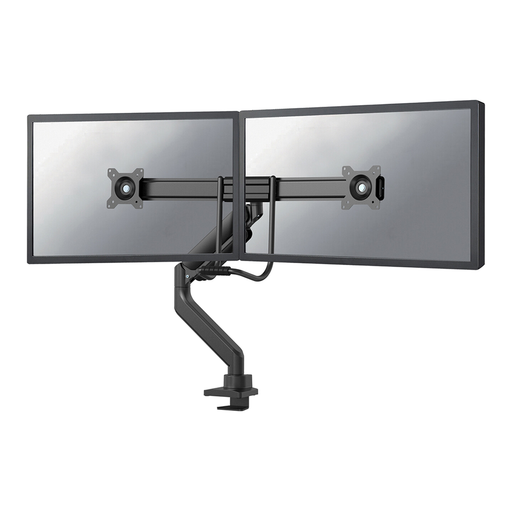
Neomounts DS75-450BL2 Monitor Arm 17-32 inch with gas spring

Neomounts DS75-450BL2 Monitor Arm 17-32" - Gas Spring - Topfix - 180°-Stop

A dual desk arm with gas-spring height and depth adjustment, so you can reposition your screens.

Neomounts lists screens from 17–32 inches and a maximum of 8 kg per monitor. The stated mounting patterns are VESA 75×75 and 100×100 mm; you can mount it with a desk clamp or grommet fitting.

Joybuy
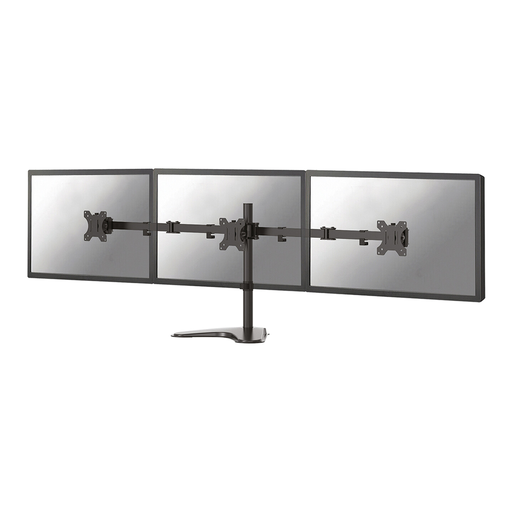
Neomounts FPMA-D550DDBLACK Monitor Stand 10-32 inch

Neomounts FPMA-D550DDBLACK Monitor Stand 10-32"

A freestanding dual stand for anyone who doesn’t want to use a desk clamp and has room for a base on the desktop.

Neomounts lists a maximum load of 8 kg per screen, VESA 75×75 and 100×100 mm, and manual height adjustment from 0 to 46 cm.

The freestanding base takes up space on the desktop.

Joybuy

Floordirekt Monitor Stand for 2 Monitors, 80-108 cm, white

Floordirekt Monitor Stand for 2 Monitors, Adjustable Width, MDF, 80–108 cm, white

A freestanding stand for two screens side by side, with adjustable width.

The product details list rotating side platforms and a fixed height of 10.4 cm; the screen height isn’t adjustable.

Joybuy

Frequently asked questions

How do I set up the source text and translation on two screens?

Place the screens side by side and, if possible, set them at a similar height. In Windows, you can identify the screens and change their left-to-right order in the display settings; the monitor arm itself doesn’t provide a video signal.

What should I check before mounting the arm?

For each screen, check its weight and VESA pattern against the specifications for the exact arm. If you’re using a clamp or grommet mount, also check that the desk is suitable; for a freestanding model, make sure its base will fit on the desktop. Don’t exceed the manufacturer’s maximum load.

Does my employer have to provide an adjustable workstation?

Arboportaal describes the rules for display screen work, including requirements for workstation setup when someone works with display screen equipment for more than two hours a day. According to its guidance, there can be exceptions as long as health and safety are protected. This doesn’t mean there’s a general requirement to buy a particular type of dual monitor arm. Talk to your employer about setting up a shared workspace.

What warranty or cooling-off period applies to a purchase?

For a consumer purchase in the Netherlands, statutory rights apply alongside any manufacturer’s warranty. According to ACM ConsuWijzer, online consumer purchases usually come with a cooling-off period of up to 14 days after delivery, subject to legal exceptions. For a business purchase, check which terms apply; these consumer rules don’t necessarily apply to a business order.
